
CPU Widget
Thomas Timm
No ratings yetUtilitiesAges 4+
Screenshots



About this app
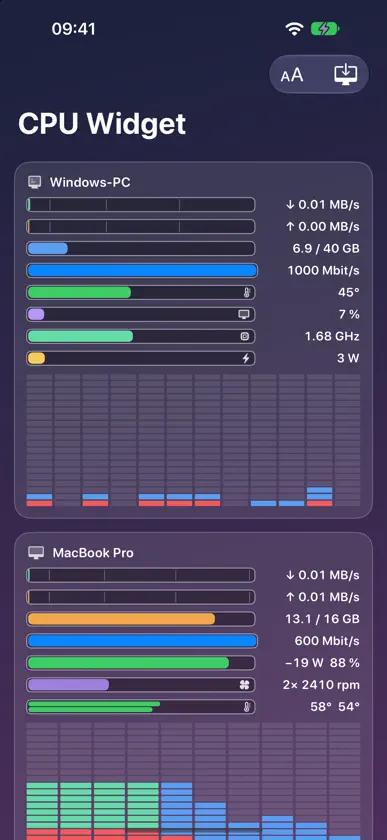
CPU Widget for iPhone and iPad shows live what your computers are doing – the Mac or Windows PC running CPU Widget. Handy while the computer is busy in full screen: gaming, rendering, compiling. HOW IT WORKS 1. On the Mac: open CPU Widget from the Mac App Store (version 1.5 or later) and turn on “Show on Wi-Fi (remote display)” in its menu. For Windows, CPU Widget is free at printyet.de – with the same menu item. 2. On iPhone or iPad: the computer appears automatically on the same Wi-Fi. Tap it, enter the 6-digit pairing code from the menu – done. AT A GLANCE • Every processor core as an LED column, split into apps and system • Network down- and upload, memory, link speed, battery • GPU, temperatures, fans and clock speed, as far as the computer provides them • Several computers stacked (iPhone) or side by side (iPad) MAKE IT YOURS • Show, hide or reorder rows (long press) • 1, 2 or 3 bars per line, adjustable text size and core grid • Pairings sync between your devices via iCloud NO DATA COLLECTION The values come straight from your own computers on your own network. The app collects nothing and sends nothing to us. Requires a Mac with CPU Widget 1.5 or later, or a Windows PC with CPU Widget for Windows.
In-app purchases
The most popular purchases on the App Store.
- Full versionConsumableUSD 3.99
More from Thomas Timm

You might also like
All apps like CPU Widget → Stats Panel - System MonitorAndrew Moloney
 SpectroscopeLEONARDO TAZZINI
 BigInt CalculatorViktor Pobedria
 Vavideo - TV Mediatheken SucheN. Bekaan
 ASMOKEASMOKE USA INC
 PingKit: Network ScannerPAUL SNYMAN
 AI CleanGuru: Photo Cleaner天星 李
 V-Like贤东 官
 next.calc: a modern calculatorJosh Angelsberg
 Amplify Sounds - Sound BoosterRafael Mirza