
DeviceAI
Evan Yeoh
No ratings yetProductivityAges 4+
Screenshots



About this app
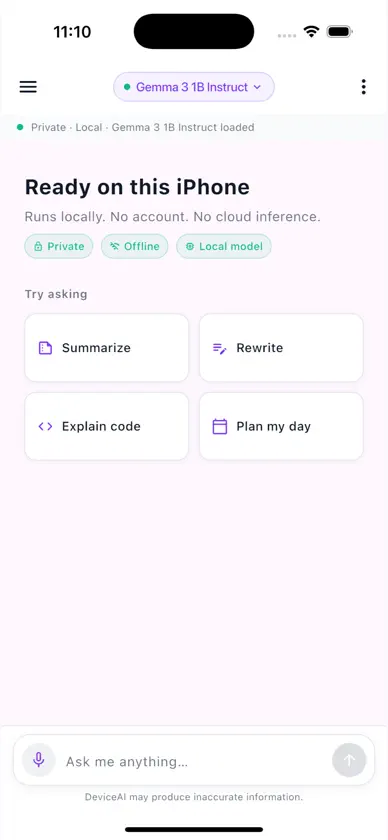
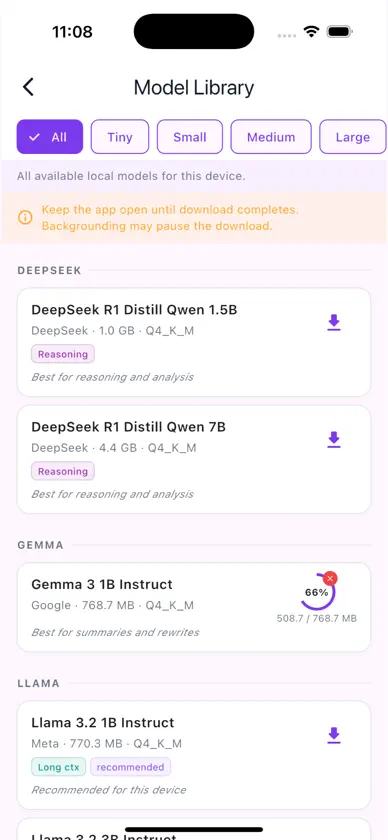
Run powerful AI models entirely on your iPhone — no internet, no subscriptions, no data sharing. DeviceAI is a privacy-first chat app that runs large language models (LLMs) completely on your device using Apple's Metal GPU acceleration. Your conversations never leave your phone. KEY FEATURES • 100% On-Device Processing — All AI inference happens locally. Zero cloud dependency. • 60+ Open-Source Models — Choose from Llama, Qwen, Phi, Mistral, DeepSeek and more • Full Privacy — No data collection, no analytics, no telemetry. Your chats stay on your device. • Offline-First — Works perfectly without internet after model download • Streaming Responses — See AI responses appear in real-time • Reasoning Models — Support for advanced thinking models like DeepSeek R1 • Markdown & Code — Beautiful formatting with syntax highlighting • Customizable — Adjust system prompts, temperature, and generation parameters • Conversation History — All chats saved locally with Isar database PERFECT FOR • Privacy advocates who want AI without cloud exposure • Travelers and remote workers who need offline AI assistance • Developers testing open-source models • Students wanting unlimited, free AI tutoring • Anyone who values data sovereignty TECHNICAL DETAILS • Powered by llamadart (llama.cpp for Flutter) • Supports GGUF format models from HuggingFace • Metal GPU acceleration for fast inference (15-40 tokens/second) • Models range from 0.5B to 8B parameters • Requires iOS 16.0 or later Download models once, use forever. No subscriptions, no API keys, no compromises. Your data stays on your device. Always.
What's new
Version 1.3.0 · Jul 10, 2026
Document Q&A — Import PDFs, text, and Markdown files and ask questions about them. All processing stays on your device. Voice Input — Speak your messages using on-device speech recognition. Your voice never leaves your iPhone. Custom Model Import — Import your own GGUF models from the Files app or a direct download URL. Search Your Chats — Find past messages by content, not just conversation titles. Export Conversations — Save and share chats as Markdown files. Prompt Templates — 25 ready-to-use prompts for writing, coding, learning, productivity, and more. Storage Management — View and delete downloaded models and indexed documents. Vision Models — Download vision-capable models to analyze images in chat. Bug fixes and performance improvements.
More from Evan Yeoh


You might also like
 OnDevice AIFlorin Valentin Micu
 CosmicChat by Mistyoz AIMISTYOZ AI PRIVATE LIMITED
 BotsChat - Chat with AgentAi Notes, LLC
 Flowline: AI Day PlannerViktoriia Kovalenko
 Just Drop AppJuice Box Monkey Designs Inc.
 Fenk Aiabbas yavuz
 MeshNotesBonnet AI Solutions LLC
 YapRunRunAnywhere
 Stealth: Private AICosmin Gabriel Ciocirlan
 MethodicaGiacomo Cavallini