
GhostKeys
Roeland Verhaeren
No ratings yetMusicAges 4+
Screenshots

About this app
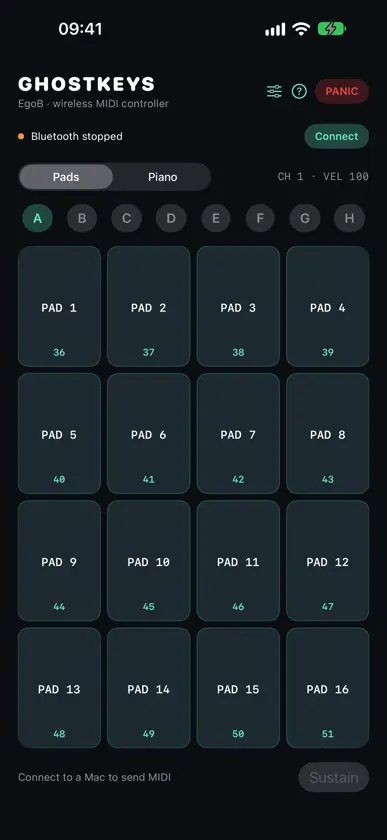
Play pads and piano from your iPhone or iPad with GhostKeys, a Bluetooth MIDI controller by EgoB. Send MIDI notes to instruments on your Mac. Connect through macOS Audio MIDI Setup, enable GhostKeys in your music app, and start playing. Your Mac produces the audio; GhostKeys is a controller and does not include its own sound engine. PADS • 16 multitouch pads in a 4 × 4 grid • Banks A–H for 128 assignments • Editable labels, notes and MIDI channels • Momentary playing or toggle/hold pads • Eight pad colors PIANO • Multitouch keyboard with glissando • One or two visible octaves and octave shifts • Selectable MIDI channel and fixed velocity • Sustain control YOUR SETUP Save and recall up to 16 named complete controller setups locally on your device. Keep Panic close at hand to release tracked notes and sustain while connected. Requires iOS 17 or later and a receiving Bluetooth MIDI host, such as a compatible Mac with a MIDI instrument or music app. Enable the input and check your instrument's note and channel mappings. Keep GhostKeys open while playing. If the connection drops, stop stuck sound in the host before reconnecting. No GhostKeys account, advertising or subscriptions. iPAD Use the full screen with native portrait and landscape layouts, large pads and a wide piano. Sustain and toggle pads stay enabled when rotating. Optional musical assistance: choose a root and scale, then play single notes or three- and four-note chords. Use pitch bend and modulation controls for expression. Your existing saved setups remain available.
What's new
Version 1.2.7 · Nov 8, 2026
Save and select personal settings and reset settings to defaults while keeping saved setups. Improved recovery and task feedback. Restoring settings leaves playback, held notes and connection tests stopped until explicitly started.
You might also like
 Stage Deck: Setlist ManagerGribblet Factory, LLC
 Memory MIDIDmitrii Bondarchuk
 Reach: Control SurfaceMoriah Point LLC
 BloopKeysJoel Stephen Birchler
 ChordicalKyle Pointer
 Syntien 2Modulii
 Andy Mini PianoJoon Hyuk Yoon
 Harmonizer - AUv3Peter Hafner
 Synth Box: Music SynthesizerAlper Kahriman
 4 bars MetronomeHitoshi Yamaguchi