
Mathify: Math Editor
Hakob Grigoryan
No ratings yetProductivityAges 4+
Screenshots



About this app
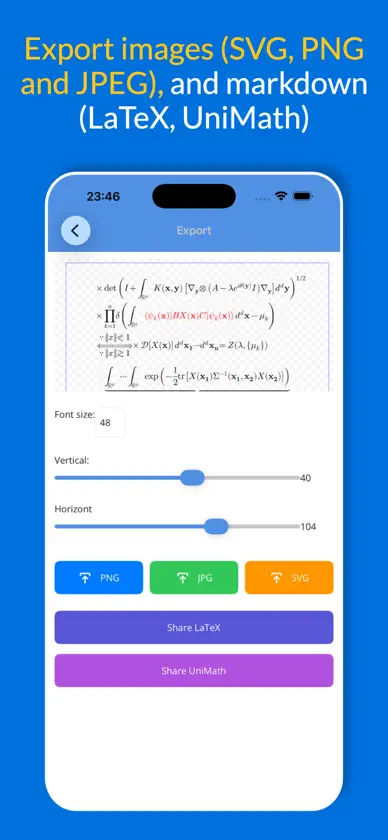
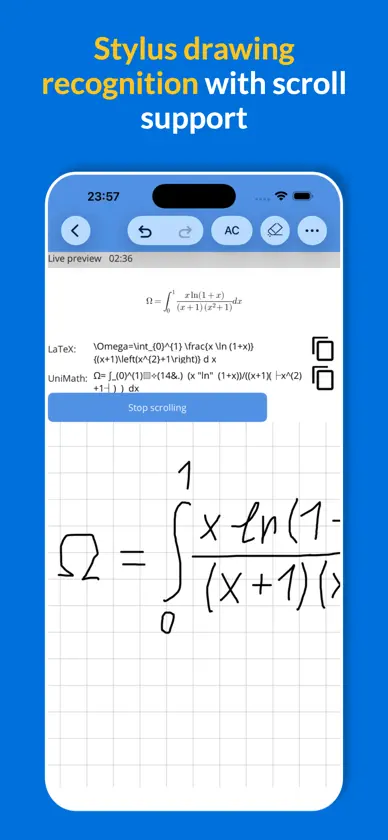
AI powered document style math/equation editor and solver allowing you to - Create STEM documents and export to PDF and other formats - PDF processor (upload PDF, select pages to modify, then export new PDF) * - AI chat to generate documents or step by step solutions * - Capture advanced math formulas with high precision using image upload, direct sharing from your photo library, or real-time camera capture powered by OCR (Optical Character Recognition) * - AI powered handwriting recognition with live previews (stylus drawing) * - Creating advanced math formulas fast and intuitively - Sharing images as SVG, PNG, JPEG formats * - Calculate results in WolframAlpha - Step by step solutions using LLM * * Free plan includes limited usage of these features. Higher limits and unlimited exports require a paid subscription (Standard, Professional or Expert), available as an auto-renewable in-app purchase. For current prices and the exact limits of each plan, open the Subscriptions/Paywall screen in the app by tapping "Upgrade" button at homepage. SUBSCRIPTIONS - Free: limited daily exports and AI usage, limited monthly OCR/handwriting and PDF processing - Standard, Professional, Expert: unlimited exports and higher monthly OCR, handwriting, PDF and daily AI limits Payment is charged to your Apple ID at confirmation of purchase. Subscriptions renew automatically unless cancelled at least 24 hours before the end of the current period. Manage or cancel in your App Store account settings. For more information check paywall TIPS -For multi-language use text input -For greek symbols include greek in your native keyboard. -To select formula longpress on a formula or text. -To activate zoom using pinch gestures tap with two fingers then start to zoom. To deactivate zoom mode tap with single finger. -For power or index (superscript, subscript) use '_' (underscore) for sub and '^' for super scripts. -For Big Operators (integrals, sum, product ....) choose type of limits and to add limits press '_' (underscore) for lower limit and '^' for upper limit.
What's new
Version 7.8 · Nov 2, 2026
- Images as PDF converter - Masive bug fixes - 100 more Latex commands - UI improvements
In-app purchases
The most popular purchases on the App Store.
- ExpertSubscriptionUSD 9.99 / month
- ProfessionalSubscriptionUSD 3.99 / month
- StandardSubscriptionUSD 1.99 / month
You might also like
 SymEditor - Formula editorBeijing Xingxinghai Technology Co., Ltd
 MathTech minKelly Technology Inc.
 WriteTex - Math OCR & LaTeX星宇 黄
 Texlet: LaTeX EditorJulian Lau
 MathNotes: AI Notes for STEMMark Miller
 Pic2LaTeX - Image to LaTeX AIResch GmbH
 MXTNoteTao Ma
 BabelKeepPROBABILITY LLC
 AI Voice Note Taker: QuillPadHakan Kumdakci
 Math Notes - Math SolverKairoos Solutions SL