
Screenshots


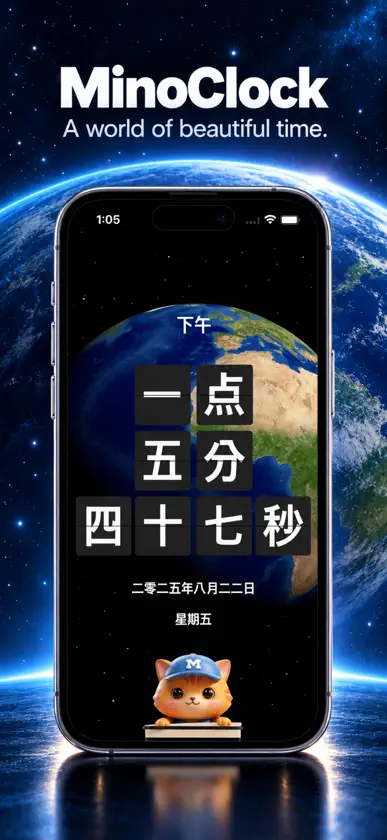


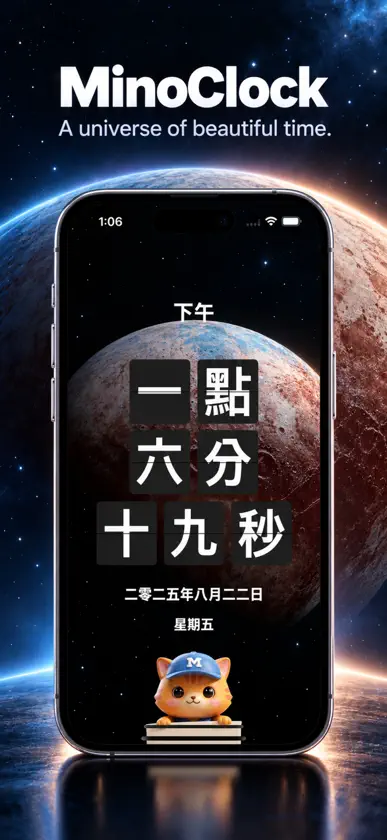

About this app
Introducing a clock that expresses time with words, not numbers. Instead of "1:02:03", it says "One hour two minutes three seconds." Instead of "2025.12.25", it says "Two thousand twenty-five, December twenty-fifth." Instead of "AM/PM", it says "Ante Meridiem/Post Meridiem ." Key features include expressing time in English or many other languages around the world, as well as the option to display numbers. By combining 10+ language clock types and backgrounds, you can enjoy dozens of unique clock styles. [ Key Features ] Time in Words • Expresses time in natural sentences instead of numbers. • Supported languages: English, Korean, Japanese, Chinese, French, Spanish, Arabic, Hindi, Russian, Italian, Bengali, Portuguese, German, and more. • Various combinations allow dozens of unique time expressions. • Switch between 12-hour / 24-hour modes. • Screen always-on option available. Animated Backgrounds • Supports 30+ dynamic backgrounds such as the Solar System (Mercury, Venus, Jupiter, Sun, Moon, Earth, etc.), nature, and weather themes. • Combine with blur options to make clock fonts stand out more clearly. Theme • Provides more than 30 themes in various colors. • Select a theme to easily change the clock color. Voice Announcements • Announces the current time by voice while the app is running. • Get voice alerts every hour or every 5 minutes. • Adjustable voice volume options. • Natural TTS voices for each supported language. • Tap the Minocat character to hear the current time. Push Notifications • Receive hourly or 5-minute interval push notifications. • Works even when the app is closed. • Customizable push notification tones. Second Hand Sounds • Tick sounds like "punk heart" or "click" available while using the clock. Menu Bar Mini Clock • Check the time anytime with a small, handy menu bar clock. Gesture Controls • Easily change settings with touch gestures. • Change clock types: swipe up/down. • Change backgrounds: swipe left/right. • Adjust clock font size: pinch zoom. • Switch between vertical/horizontal layouts: long press to toggle. Upcoming Features - Custom alarms - D-Day counter - Countdown timer - World clock - Pomodoro timer - Analog clock combination - Workout set-based timer - Alarm sync across all devices - 100+ additional backgrounds - 30+ additional language clock types - 10+ second hand sounds ...and much more! Get it now at a discounted price before all features are added! Thank you~ If you have feature requests, please send us feedback. https://minoworks.net
What's new
Version 26.10.2 · Oct 31, 2026
• Added Snowfall, Clouds, and Window Raindrops to Pro backgrounds. • Snowfall gently transitions between four snow patterns. Clouds drift, thin out, and rise as the background slowly shifts between blue-gray and black. • Window Raindrops features flowing droplets on glass and one of six scenes chosen at random, including a Christmas village. • Improved the startup display of your saved clock and presentation of the Pro purchase screen.
In-app purchases
The most popular purchases on the App Store.
- MinoClock ProConsumableUSD 5.99
More from MINOWORKS


You might also like
 KanjiClock - 漢字時計Bazooka Corp.
 TimeInWordsStefan Arnhold
 time4wordsBuddhaCat Publishing
 FaceFrame: Face Shape DetectorImran Khan
 24ClockAox.design Co., Ltd.
 Niva: Habit & Mood TrackerEnes Oz
 Clock Plus - Photo Flip Timersekleung chang
 ColorTimer - Fullscreen Timer仲辉 黄
 Talking Clock: Time AnnouncerAkash Sinha
 WordClockGerhard Lentschik