
Pairlet: Coding Agents
大鹏 李
No ratings yetUtilitiesAges 4+
Screenshots


About this app
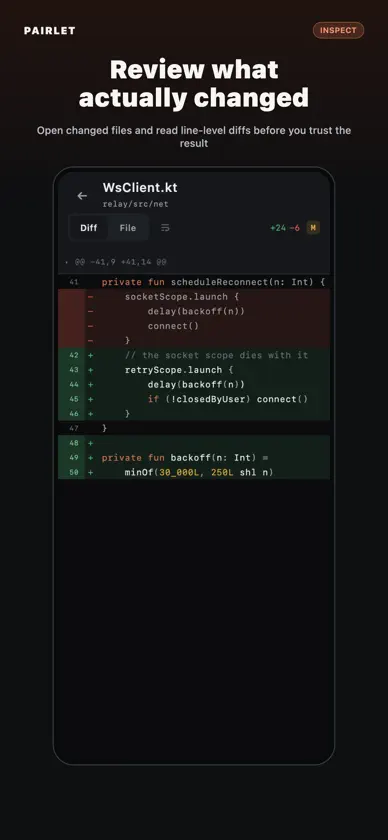
Keep coding work moving when you are away from the keyboard. Pairlet (formerly CC Pocket) is an open-source, local-first companion for command-line AI coding agents. Your agent keeps running on your own Mac, Windows, or Linux computer, against your own checkout. From your iPhone or iPad, you can watch it work, answer permission requests, continue the same session, and review what changed. SUPPORTED AGENTS • Claude Code • Codex • OpenCode • Kimi Code (Preview) • ZCode • DeepSeek Harness (narrow support) WHAT YOU CAN DO • See projects, sessions, live output, tool calls, and background work • Allow or deny supported permission requests; unanswered requests fail closed • Send prompts, images, and voice input • Continue the same task without starting over • Review changed files and line-level diffs where the selected agent exposes them • Pair multiple computers and switch between them LOCAL-FIRST BY DESIGN The daemon runs on your computer and drives the agent CLI there. It makes an outbound connection, so you do not need to expose an inbound port. App-to-daemon traffic is end-to-end encrypted; the hosted relay only forwards ciphertext and does not hold your message content or private keys. No Pairlet account is required. You can also self-host the relay. HONEST CAPABILITY BOUNDARIES Agent backends are not equivalent. Approval, changed-files, usage, model controls, and other features depend on what each agent exposes. OpenCode has no enforceable interactive approval and runs with Full access. DeepSeek support is deliberately narrow: remote approvals fail closed, and changed-files, usage, and model switching are not available. Pairlet is MIT-licensed and built in Kotlin. Website and user guide: https://pairlet.org/en/ Source and security model: https://github.com/heypandax/pairlet
What's new
Version 2.6.4 · Nov 15, 2026
What's new in 2.6.4 - Fixed the numeric keyboard covering Save when editing a model's context window. The editor now scrolls to keep Save and Cancel accessible. - Added a button to hide the numeric keyboard without losing your draft. - Improved saving, cancelling edits, and restoring the default context window.


