
pmosh
Robert Gruber
No ratings yetDeveloper ToolsAges 4+
Screenshots


About this app
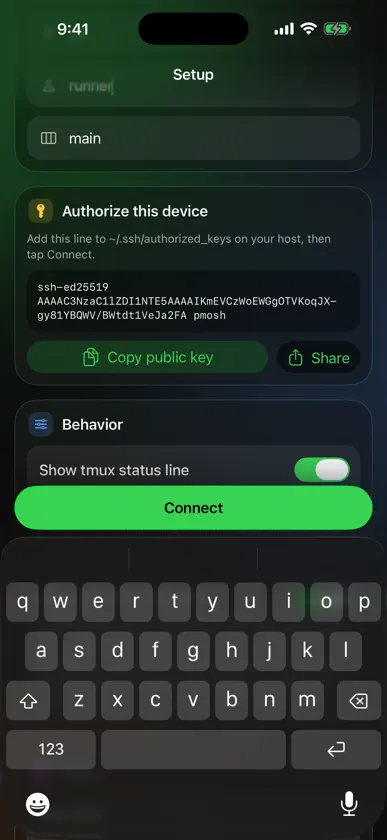
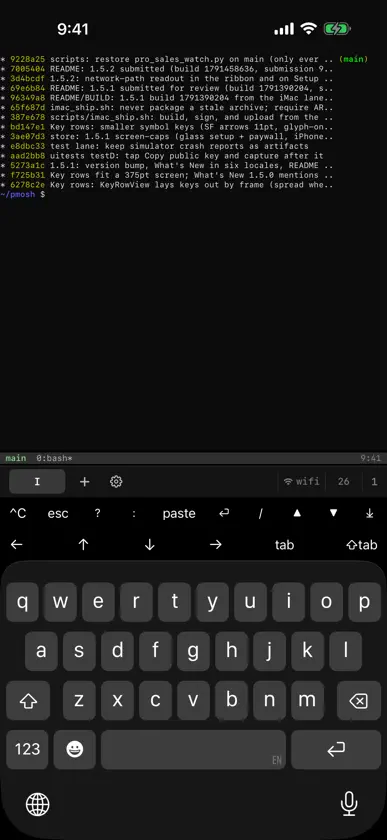
pmosh is an SSH terminal for iPhone and iPad that attaches to a tmux session on your own server using tmux's control mode, so the terminal you see on your phone is the same session running on your machine. It's built for developers who run tmux, shells, and command-line tools — including agentic coding tools like Claude Code — on servers or machines they already own and administer. pmosh doesn't provide any of that for you; it's a client that connects to infrastructure you already have. pmosh only connects to servers you configure. On first launch it generates an ed25519 SSH keypair on your device, stored in the iOS Keychain, and shows you the public key so you can add it to authorized_keys on your own server. You type in your host and username; nothing is pre-filled or bundled. There is no pmosh service in between. Features: - Attaches to a remote tmux session over SSH using tmux's control mode (tmux -CC), so output and session state stay in sync with the server - Smooth scrollback for Claude Code: new sessions start Claude Code in its classic renderer, so the conversation lands in tmux history and scrolls natively under your finger - Multiple tabs, each its own tmux session: swipe between them, or hold + to open a tab for every session on your host - Hand a tab from your iPhone to your iPad with Handoff; on iPad, pmosh uses the whole screen - On-device ed25519 key generation — a unique keypair per install, kept in the iOS Keychain - Optional pmosh account: Sign in with Apple and your host, key rows, settings and SSH key follow you to your other iPhones and iPads through your own iCloud (key-value storage for settings, iCloud Keychain for the key). Nothing requires an account - Two rows of on-screen keys above the keyboard with what terminal work needs but iOS doesn't have: Esc, Ctrl-C, Enter, arrow keys (hold to repeat), Tab / Shift-Tab, and scrollback paging — both rows customizable in Settings, including keys that type your own text and macro keys that send several in order - JetBrains Mono, with a text size setting - Works with an external hardware keyboard if you use one - No account required; free tier with one tab, pmosh Pro for unlimited tabs Privacy: pmosh does not collect analytics or usage data. It connects only to the server you enter in setup. Nothing is sent to the developer unless you choose Report a problem in Settings, which sends what you type and, if you leave the option on, pmosh's own connection log — never what is on your screen. The optional account syncs through your own iCloud, which we cannot read. Requirements: pmosh needs an SSH server you control, reachable from your device, with tmux installed on it. It is not a hosting service and does not include a server — you connect it to a server you already run.
What's new
Version 1.5.14 · Nov 6, 2026
- The buttons at the right of the tab bar (×, +, the network, the round trip and the tab count) sit closer together, the way the tabs do, and the tabs get the room: more of them fit. × and + keep their full-size touch areas, and × still never takes a tap meant for +. - Swiping fast through many tabs no longer leaves the tab bar empty: the numerals keep up with every throw, so you can see which tab you are coming to. - While mosh is reconnecting, its button counts down to the next try, and its details show the last try. - A page no longer bounces past its top or bottom, and a steep swipe at the bottom of a page switches tabs. - Programs in a pmosh session can find the guide for agents (how to put text on this iPhone's clipboard, for one) in PMOSH_AGENT_GUIDE.
In-app purchases
The most popular purchases on the App Store.
- pmosh Pro MonthlySubscription · 7 days free trialUSD 4.99 / month
- pmosh Pro YearlySubscription · 7 days free trialUSD 34.99 / year
More from Robert Gruber


You might also like
 Rafter Homelab ConsoleMAROUANE HACHEMI BOUMILA
 OrbitSSH - Mobile TerminalDaniel Dobrowolski
 GitzyMarco Janssen
 Tap Command RunnerMatt Wisniewski
 WaycarOtreva, LLC
 Gumpbox - AI SSH clientTran Dinh Khang
 SuperDuper TerminalRustam SALAVATOV
 Termite: SSH TerminalSentryline Labs Private Limited
 MuxLink: SSH Terminal & tmuxJesse Ziegler
 NodeOps: Terminal, Docker, K8sMd Shohag