
QuickLayout - Window Manager
KAZUHIRO KAKIMOTO
No ratings yetUtilitiesAges 4+
Screenshots

About this app
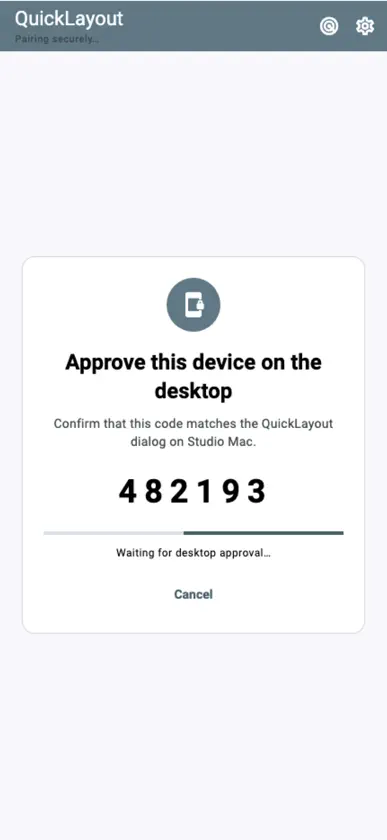
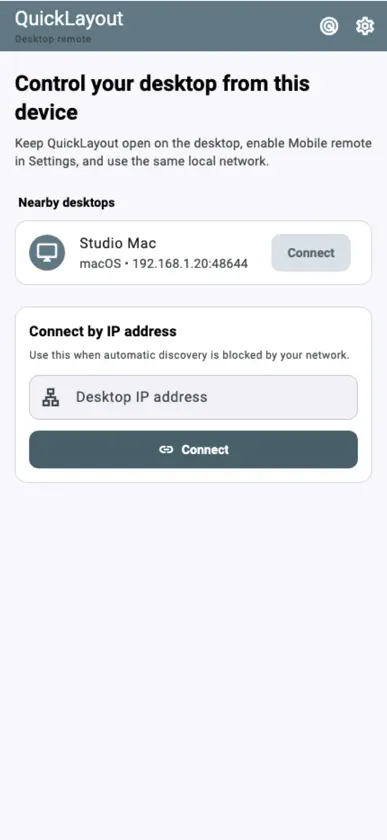
Switch your Mac's saved window workspaces from iPhone or iPad. QuickLayout gives you a touch-friendly list of Layouts on your paired Mac, with search, Apply, desktop status and Undo. A Mac running QuickLayout on the same local network is required for remote operation. Create and edit Layouts on the Mac first. This iOS app does not arrange other iPhone or iPad apps' windows. CHOOSE A WORKSPACE - Browse saved Layouts with their display profile and app/window counts. - Search by Layout name. Favorites set on the Mac appear first. - Keep a focused list on iPhone or use the wider Layout grid on iPad. APPLY AND UNDO - Tap Apply to send the selected Layout to your Mac. - See progress and the desktop's result, including partial results or errors. - Refresh the list and desktop status. - Use Undo when the Mac reports that its previous arrangement can be restored. PAIR WITH YOUR MAC - Enable Mobile remote in QuickLayout's Mac settings and keep the app open. - Find the Mac on your local network or enter its IP address manually. - Compare the six-digit code on both devices and approve pairing on the Mac. - Reconnect to saved, approved desktops. - No QuickLayout account or cloud relay is required. Paired commands use an authenticated encrypted connection. SET UP LAYOUTS ON MAC Install the bundled QuickLayout Window Bridge shortcut when prompted by the Mac app. Save the window arrangements you want to switch between. Layout capture, editing, Quick Placement and automation setup stay on the Mac; your iPhone or iPad selects and applies those saved workspaces. PREVIEW THE INTERFACE Explore demo shows sample Layouts without a Mac connection. It is a labelled interactive preview only: no desktop commands are sent. FREE AND PRO Start with a seven-day trial. Remote-control features remain available in Free after the trial, with advertising. Pro removes ads through a yearly subscription or a one-time lifetime purchase. Restore Purchases is available. Terms of Use: https://kakitiro.com/quickapps/quicklayout/terms/
In-app purchases
The most popular purchases on the App Store.
- Pro - AnnualSubscriptionUSD 1.99 / year
- Pro - LifetimeConsumableUSD 7.99
More from KAZUHIRO KAKIMOTO
 QuickVibrator - Remote SyncKAZUHIRO KAKIMOTO
 QuickEditor - Text & CodeKAZUHIRO KAKIMOTO
 QuickTrack - AI Music StudioKAZUHIRO KAKIMOTO
 QuickSheet - Grid EditorKAZUHIRO KAKIMOTO
 QuickHumming - Melody MakerKAZUHIRO KAKIMOTO
 QuickImage - Photo LayersKAZUHIRO KAKIMOTO
 QuickLLM - AI Model ManagerKAZUHIRO KAKIMOTO
 QuickClip - Copy Paste ManagerKAZUHIRO KAKIMOTO
You might also like
 PocketStack - Hypervisor MgrWeaveHub Technologies LLC
 EaseConnect RemoteJoaquin Garcia
 ONE KVMShenzhen Yeesoo Technology Co., Ltd.
 emu98Caner (Chongqing) Computer System Co., Ltd.
 TouchNow RemotePo hin Ma
 CPCemuRainer Loritz
 Cleaner Zero: Clean Up StoragePEU SX S.R.L.
 Smart Print: Printer & ScannerSon Nguyen Minh
 AirPlay TV Screen MirroringCalista Fernandes
 Home Widget for HomeKit · HWClement Marty