
Taskroot: Task Planner
SIarhei Tarasenka
No ratings yetProductivityAges 4+
Screenshots




About this app
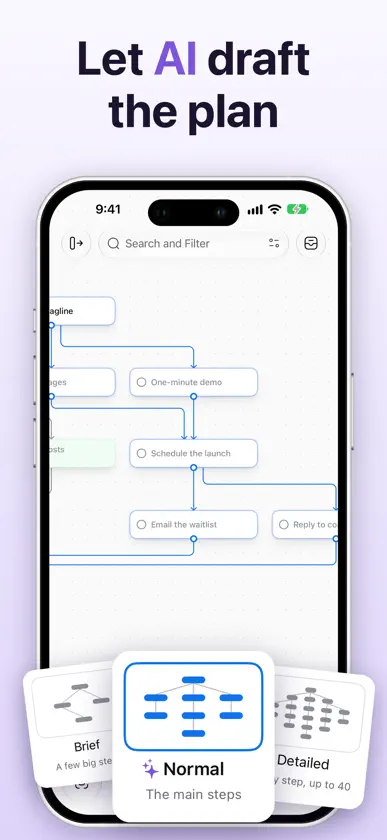
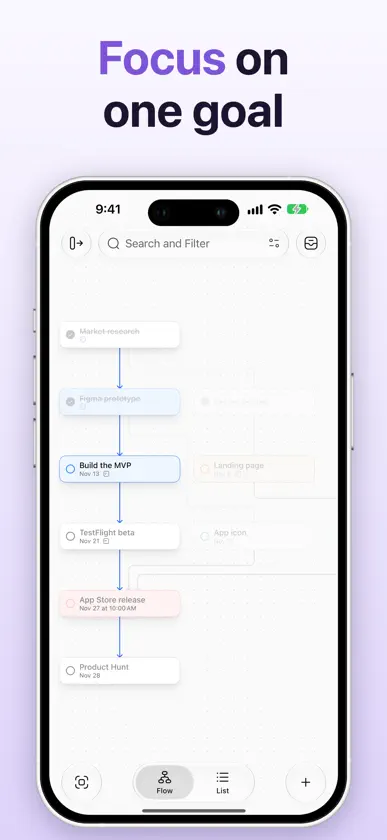
Taskroot is a task manager where tasks are linked by what depends on what. Instead of a long list, you see the path to your goal — and exactly what you can do right now. PLAN THE PATH, NOT THE LIST • Put tasks on a chart and link them with arrows: a task becomes available when everything before it is done. • Build a plan from the goal backwards or step by step, with the keyboard or by touch. • The chart arranges itself, top to bottom or left to right. EVERY DETAIL IN ITS PLACE • Notes, colour, tags, a due date and time, who it's delegated to, a place and attachments — in a card that unfolds right on the chart. • Upcoming, Anytime, Delegated and Completed lists across all your projects. LET AI DRAFT THE PLAN • Make a Plan… turns a goal into steps with the links between them — brief, normal or detailed. • Suggest the steps before or after any task, with Apple Intelligence on your device or with Claude. SEE IT YOUR WAY • Switch between the chart and a list in the order the work can be done. • Focus on one goal and everything else steps back; filter by tag, colour or what's available now. • Park ideas in the Inbox and bring them onto the chart when it's time. EVERYWHERE YOU WORK • Mac, iPhone and iPad, kept in sync through iCloud. • Quick entry from anywhere on your Mac, the share sheet, export to PNG and PDF. • Let AI assistants work with your projects over MCP. TASKROOT PRO Two projects are free. Pro adds unlimited projects, plus plans and suggestions by Claude. Pro is a monthly or annual subscription. Terms of Use: https://taskroot.app/terms Privacy Policy: https://taskroot.app/privacy
What's new
Version 1.2.0 · Nov 9, 2026
• Project folders: group projects in the sidebar, drag them in, and see a folder's projects as cards with their progress. • Templates: start a new project from a ready-made plan for apps, launches, travel, home and life. • Widgets on the Mac: what you can do now and what's due today, right on your desktop. • Folders and tags get their own boards, opened from the sidebar's section titles. • Tidier charts when you arrange them, and many small fixes.
In-app purchases
The most popular purchases on the App Store.
- Taskroot Pro · MonthlySubscription · 3 days free trial5,99 € / month
- Taskroot Pro · AnnualSubscription44,99 € / year
More from SIarhei Tarasenka


You might also like
All apps like Taskroot: Task Planner → Marc.Julian Hobmeier
 MTimrJoshua Sherwood
 MotivAction: Goal PlannerAdam Smaka
 Kickstart:AI Action PlannerSai Ho Mak
 Your Daily OrganizerMckbui Solutions
 Goals - AI Action PlannerPrincipal LA LLC
 Welcome RenovationGST Holdings LLC
 Task Manager: Daily To-DoRodrigo Belloso
 Notepen: Notes & PlannerHamdi Tug
 Save for Later:Links OrganiserAnurag Chutani