
PythonIDE Python 3 Code Editor
文禄 张
No ratings yetDeveloper ToolsAges 4+
Screenshots



About this app
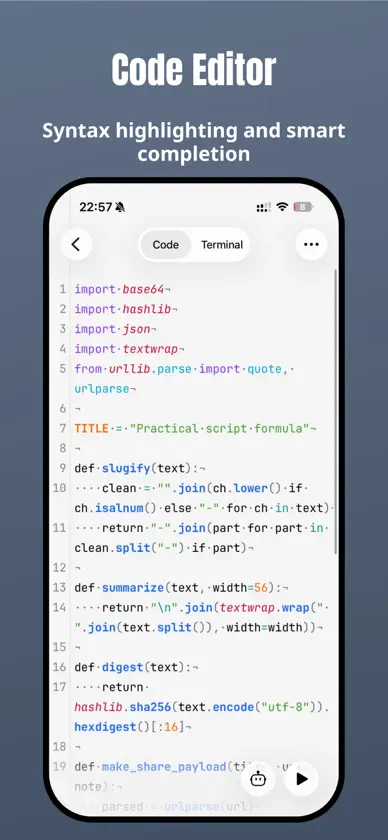
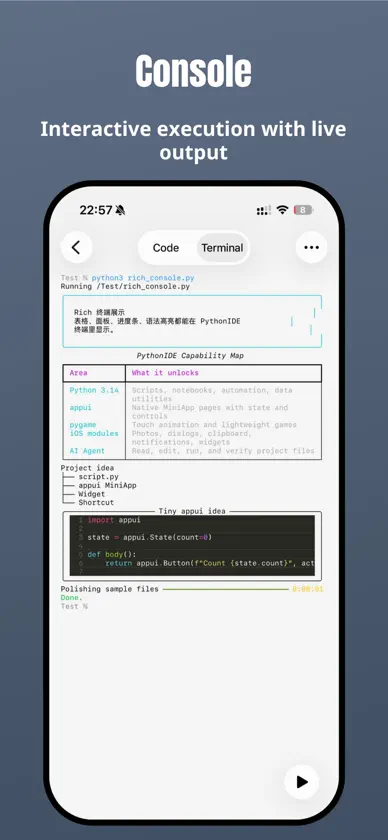
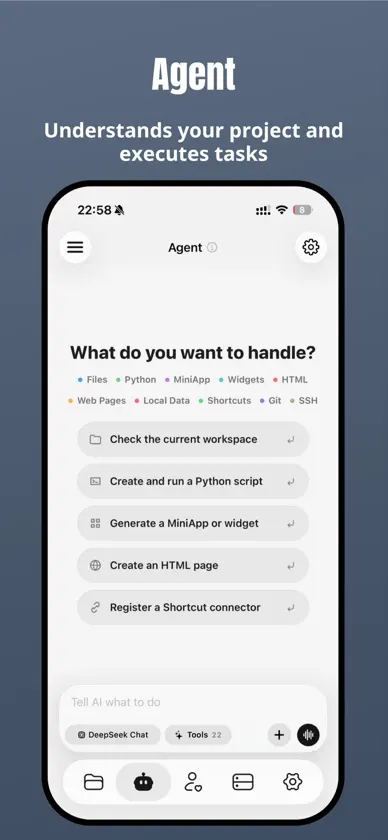
Your ideas. Your code. Your iPhone and iPad. PythonIDE brings local Python, notebooks, web projects, native MiniApps and remote development into one workspace. Learn a language, explore data, build a useful tool or work on an existing project wherever you are. PYTHON, FROM EDITING TO DEBUGGING • Run Python 3.14.10 locally without a remote server. • Work with syntax highlighting, completion, multiple files and project folders. • Use interactive input, script arguments, ANSI/Rich terminal output, images and charts. • Investigate problems with breakpoints, stepping, call stacks and a variable viewer. NOTEBOOKS THAT KEEP YOUR THINKING WITH YOUR CODE Open and edit .ipynb files, run Python cells, and combine Markdown notes with results. View rich output including HTML, images and plots. HTML / CSS / JAVASCRIPT Build multi-file web projects with live page and style previews. HTML/CSS includes offline completion, formatting and relative resource path suggestions. Load local images and scripts, then use the built-in console to inspect console messages, resource loading, Promise and fetch errors. 50 BUNDLED NATIVE EXTENSION PACKAGES Start with 50 third-party distributions containing C/C++/Rust native extensions for scientific computing, data analysis, imaging, machine learning, media and cryptography. Libraries include NumPy, pandas, Matplotlib, SciPy, scikit-learn, OpenCV, Pillow, pygame, h5py, PyAV, MLX, tokenizers, safetensors, SentencePiece, cryptography and lxml. Install compatible pure Python packages through the package manager. EXPLORE ON-DEVICE COMPUTING WITH MLX Use MLX for arrays, automatic differentiation and training. With compatible higher-level packages and model weights obtained separately, explore local model inference from Python scripts. MLX.md in the examples folder includes array, training, tokenisation and model-file examples. MLX requires iOS 17 or later; model weights are not preinstalled. BUILD NATIVE MINIAPPS WITH PYTHON Use AppUI to combine native lists, forms, charts and navigation with Python logic. Organise projects with file tools, import/export and native capability interfaces, subject to system permissions. AN AI AGENT THAT WORKS WITH YOUR PROJECT Get help writing and editing files, running code, analysing errors and working through multi-step tasks with project context. Extend workflows with Skills and MCP. Tool access follows the app's permission and confirmation settings. SSH / SFTP / GIT AND YOUR FILES Connect to SSH with passwords or keys and host fingerprint verification. Browse, edit and transfer SFTP files. Work with Git status, diffs, staging, commits, branches, remote synchronisation and conflicts. Access WebDAV, Files and iCloud Drive. WIDGETS, AUTOMATION AND DEVELOPER TOOLS Create Python widgets and connect scripts to Shortcuts and automation. Discover and share community scripts, publish web projects, and use JSON, regex, encoding, HTTP, QR and download tools, plus SQLite/CSV previews. Some features require Pro. AI, community, remote connections and online publishing need internet access. AI services may require separate credits or your own API key. Packages, models and system capabilities depend on compatibility, device support and permissions. Terms of Use: https://www.apple.com/legal/internet-services/itunes/dev/stdeula/ Privacy Policy: https://pythonide.xin/privacy/
What's new
Version 1.7.9 · Nov 11, 2026
• Editor and console improvements: Faster editor entry, clear hints, guides, tabs, completion, brackets and libraries, lighter consoles and reading recovery, background options and protection, Live Activities and keep-awake fixes. • Updated Python libraries: Updated selected bundled libraries and coroutine support, clarified model download progress and errors in the bundled MLX example, and preserved installed packages, scripts and settings. • Refreshed Pro page: A unified Pro page with a flowing background, native close, adaptive light/dark layouts and membership status, with cards for available offers after returning and inline offer countdowns in Settings. • Smoother startup: Removed the brand launch screen and setting, improved in-app Shortcuts and external-folder opening/deletion, and fixed external-folder ZIP creation/extraction and crashes when leaving previews.
In-app purchases
The most popular purchases on the App Store.
- PythonIDE Pro Lifetime OfferConsumable$15.99
- PythonIDE Pro YearlySubscription$8.99 / year
- PythonIDE Pro MonthlySubscription$0.99 / month
- PythonIDE Pro LegacyConsumable$8.99
- PythonIDE Pro LifetimeConsumable$19.99
- Feed Dev PoopConsumable$0.99
- Donate · Bubble TeaConsumable$0.99
- Donate · LollipopConsumable$0.99
- Donate · Chicken LegConsumable$0.99
- 200次调用包Consumable$2.99
More from 文禄 张


You might also like
All apps like PythonIDE Python 3 Code Editor → Pythona - Python 3 IDE志远 刘
 pythoni-run code,autocomplete小文 黄
 Python3 IDE Fresh Edition小文 黄
 Python3IDE辉 马
 Scripting: AI Agent & ToolsShenzhen Yin Shi Technology Co., Ltd.
 PyroidTERMUX LIMITED LIABILITY COMPANY
 PyPie for Python雷 戴
 Python3 Charm - AI LeaningPhoenix Lab Technology Co., Ltd.
 Stream HTTP SnifferXiamen Yidong Network Technology Company Limited
 Python编程狮-零基础学cursor,windsunf课Xiamen Yidong Network Technology Company Limited