
+1 Timer - Multiple timers
nanawork
No ratings yetProductivityAges 4+
Screenshots




About this app
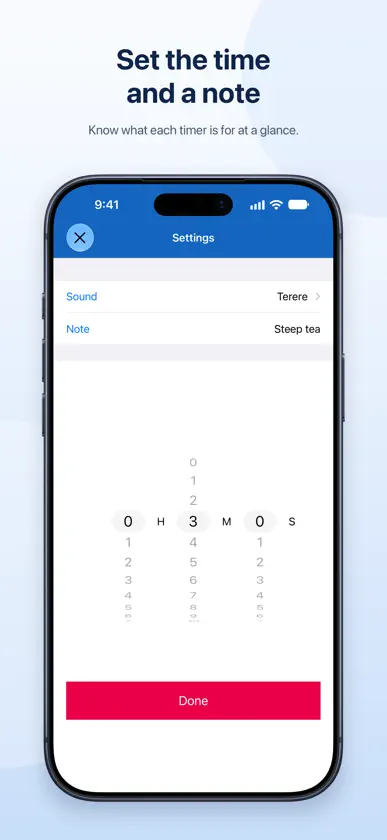
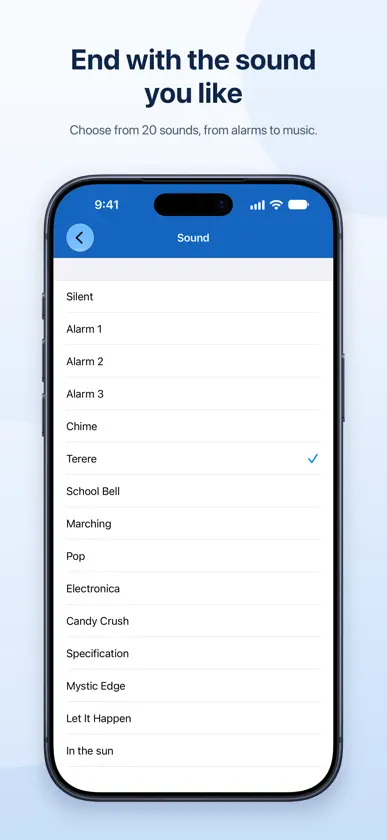
As many timers as you need. "+1 Timer" is a simple timer app that lets you manage multiple countdowns on a single screen. It's perfect whenever you need to time several things at once: cooking, studying, workouts, work, breaks, and more. Save a timer for each task, and you'll never have to set it up again. [Key Features] - Add multiple timers and start, pause, or resume each one individually - Add a memo to each timer - Choose from a variety of sounds for each timer - Set vibration on iPhone - Get a notification when a timer ends (notifications play the sound you chose for each timer) - Reorder your timers however you like - Edit, reset, or delete timers - Timers are saved on your device - Option to play the end sound in Silent Mode while the app is open - Supports Dynamic Type and VoiceOver - Works on iPhone and iPad [System Alarms (iOS 26 or later)] Get alerted with system alarms when a timer ends. They sound even in Silent Mode or Focus, so you won't miss them. While a timer is waiting on an alarm, the time remaining appears on the Lock Screen and in the Dynamic Island. Just tap a timer in the list to quickly start or pause it. Time the laundry while you cook. Keep study time and breaks separate. Set a time for each part of your workout. "+1 Timer" makes managing all the time in your day simple. * To be alerted when a timer ends, allow alarms or notifications. You'll be asked the first time you start a timer. * System alarms require iOS 26 or later. On earlier versions, you'll get a regular notification. * When system alarms are on, volume, vibration, and how long the alarm sounds follow your system settings.
What's new
Version 1.14 · Nov 2, 2026
- System Alarms (iOS 26 or later) Timers can now alert you with system alarms, even in Silent Mode or Focus. While a timer is running, the time remaining also appears on the Lock Screen and in the Dynamic Island. Turn this on or off with "Use System Alarms" in the More screen. - Per-Timer Notification Sounds When the app is closed, notifications now play the sound you chose for each timer. - Reorder Timers Use the new button at the top of the list to change the order of your timers. Your order is saved. - Open from Control Center (iOS 26 or later) Add "+1 Timer" to Control Center to open the app with a single tap. - More Screen Improvements - Timer end settings are now grouped in one section - A new "Alerts and Permissions" section at the top shows your permission status at a glance - Permission for alarms and notifications is now requested when you start a timer, not at launch - Other - Bug fixes and performance improvements
In-app purchases
The most popular purchases on the App Store.
- Remove Ads.Consumable$2.99
More from nanawork


You might also like
 Chronoplan TimerTreeness, LLC
 Stopwatch - Multiple StopwatchAssem Ahmed
 MultipleTimers+EIICHI KOMINE
 MultiTimer - Timer & StopwatchSANG HYEOK KIM
 Timers - Multiple TimerTue Nguyen Minh
 Timers - Repeat Interval TimerKoji Ito
 Multiple Stopwatches & LapsRoman Kotov
 Timer MachineMontage App, Inc.
 Focus On: Build DisciplineKhandker Tafiqul Islam
 Visual Countdown Timer LiquidOguz Kaytanci