
CursorCalc
Yohaan Ardeni
No ratings yetUtilitiesAges 4+
Screenshots



About this app
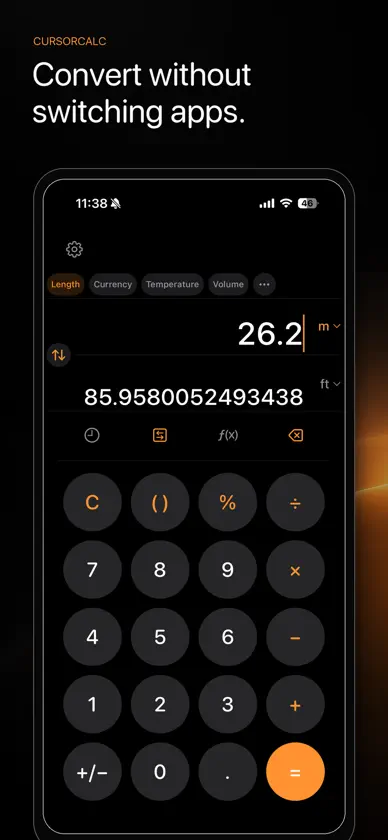
CursorCalc is a thoughtfully designed calculator that puts you in control of the entire expression. Tap exactly where a change belongs to move the cursor there, then insert numbers, operators, scientific functions, or pasted values without rebuilding your calculation from the beginning. SEE RESULTS AS YOU TYPE Live previews update whenever your expression is valid, helping you catch mistakes and understand the result before pressing equals. Smart input rules prevent malformed expressions while keeping calculations quick and natural. STANDARD AND SCIENTIFIC Handle everyday arithmetic or open scientific mode for trigonometry, logarithms, exponents, roots, factorials, constants, inverse functions, degree and radian modes, and more. HISTORY THAT WORKS WITH YOU Your history is more than a list. Tap any previous expression or answer and it is inserted directly at the current cursor position. Reuse a subtotal, revise an earlier formula, or build on a past result without copying it manually or starting over. Your history stays stored locally on your device and can be cleared whenever you choose. POWERFUL UNIT CONVERSION Convert length, area, temperature, volume, speed, time, mass, data, currency, and more. Enter complete expressions instead of individual numbers, search large unit lists, customize your favorite conversion categories, or calculate tips and split totals between multiple people. DESIGNED FOR FOCUS • Precise, keyboard-free cursor editing • Tap-to-insert calculation history • Long-press copy and paste • Automatic number grouping • Two decimal-notation styles • Portrait and landscape layouts • Multiple button shapes and accent colors • Light, dark, and system appearances • Optional haptic feedback • VoiceOver-friendly controls • Custom themes and app icons PRIVATE BY DESIGN CursorCalc has no advertising, analytics, accounts, or cross-app tracking. Calculations and history remain on your device. Currency mode downloads reference exchange rates without sending your entered amounts or expressions. All calculator and conversion functionality is free, with no ads or subscriptions. Optional tips support continued development, while the one-time Supporter purchase unlocks additional cosmetic themes and app icons. Calculate your way with CursorCalc.
What's new
Version 1.0.1 · Oct 18, 2026
Improved calculation precision and rounding, especially when reusing results in continued calculations. This update also includes interface refinements, reliability improvements, and general bug fixes.
In-app purchases
The most popular purchases on the App Store.
- Generous TipConsumable$12.99
- Medium TipConsumable$3.99
- Small TipConsumable$0.99
- CursorCalc SupporterConsumable$6.99
You might also like
 Callie - All in One CalculatorThe Clairos Group,LLC
 Audio Trim & Slice : TrimAudioCUMA ALI KESICI
 ConvCalc Calculator ConverterGilson GmbH
 iCalc - Multi-Func Calculator小生 张
 ShanKeyboardNorhsangpha Boonhse
 VRC RoboScoutWilliam Castro
 IDM - Download ManagerJennismary Nadar
 XBX Controller - Remote PlayTri Tran Thi
 HuYue VPNCAMELS IT
 Router Admin ControlPhawk Infotech LLP