
MagicPing
Frank Weigand
No ratings yetUtilitiesAges 4+
Screenshots


About this app
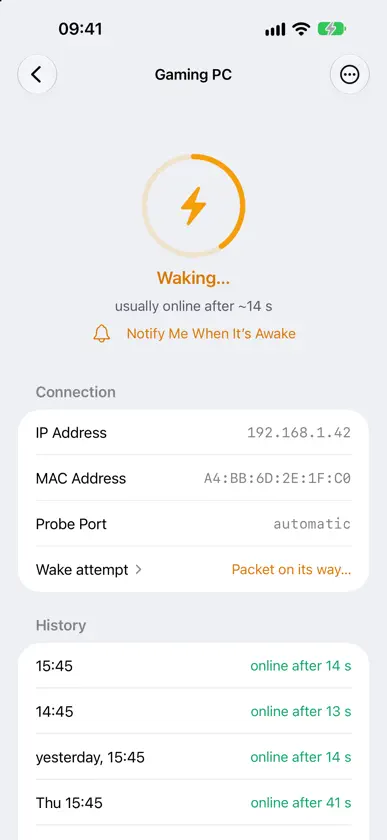
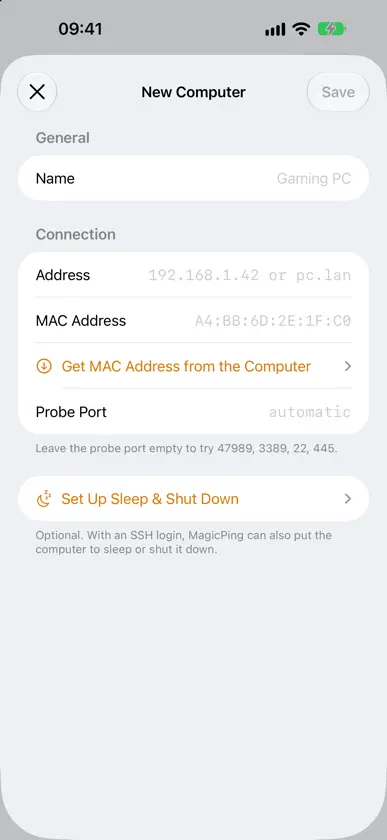
One tap, and your computer wakes up. MagicPing wakes PCs, Macs, NAS boxes, and servers on your home network via Wake-on-LAN — from your iPhone, your Mac, your Apple TV, and your Apple Watch. And when you're done, MagicPing shuts them down again over SSH. BUILT FOR THE LIVING ROOM The Apple TV launcher starts your gaming PC right from your television — before you stream via Moonlight/Sunshine or Steam Link. MagicPing even shows you when the streaming service is ready to accept connections. YOUR COMPUTERS, EVERYWHERE Enter a computer once and it appears on all your devices: the list syncs through iCloud — no account, no sign-up, no server run by us. WHAT MAGICPING DOES • Wake computers with a magic packet (Wake-on-LAN) • Live status: see who is online — and since when • Shut down over SSH (Linux, macOS, and Windows with OpenSSH) • Apple Watch: wake machines right from your wrist • Apple TV: the fastest way from couch to running gaming PC • Probe port selectable or automatic (Sunshine, RDP, SSH, SMB) • Type MAC addresses without colons — MagicPing formats as you type PRIVATE BY DESIGN MagicPing collects no data. Your computer list lives in your private iCloud; SSH passwords are stored only in the keychain. No ads, no tracking, no accounts. GOOD TO KNOW Wake-on-LAN must be enabled on the target machine (BIOS/UEFI and network adapter). Shutting down requires SSH access to the target. iCloud sync requires a signed-in iCloud account.
What's new
Version 2.5.0 · Nov 1, 2026
MagicPing now wakes your PlayStation 5, too, and makes use of the unfolded iPhone Duo. • iPhone Duo: unfolded, your device list and the selected device sit side by side, one on each side of the fold. • iPad: the sidebar now stands clearly apart from the device view, just like on the Mac. • PlayStation 5: link once (PIN from "Link Device" plus your PSN account), then wake it from rest mode and put it back to sleep from iPhone, Mac, Apple TV and Watch. MagicPing shows whether the console is running or asleep. • Siri, Shortcuts, Spotlight and the Action button: wake devices by voice or with a single press. • Wake with progress: the ring fills against the learned boot time, and a notification tells you when the device is awake. A history lists recent wake-ups. • "No response" instead of a silent offline, with a way out, even when your router has handed out a new address. • Mac: menu bar panel by keyboard (↑/↓, Return, 1–9), reworked menus and shortcuts. • New device: network scan first, clearer forms, better VoiceOver. The PlayStation doesn't offer a full shutdown from the network.
More from Frank Weigand

You might also like
 WakeyTooErnest Cho
 WakeCast: Wake-on-LAN清源 欧阳
 Wakivo: Wake on LAN & ShutdownTECNO BLOCKS FOR IT'S OWNER BAHAA EHAB ELDEN ABDULMOLLY MOHAMED
 SayBoot — turn on your PCALESSANDRO COLALONGO
 Wakey - Wake on LanChun Yu Leung
 Power Remote - Sleep Wake LockNTWIND, LLC
 PowMote: Remote Power ControlHeitz Bruno
 Simple IPTV: Loky (No Ads)santiago ortega
 ConfiCheckGerrit Grunwald
 KeyForge - Password GeneratorKNIGHT MUNANDA