
Offline Browser: Split Screen
Daniel Esteban Gonzalez
No ratings yetUtilitiesAges 17+
Screenshots




About this app
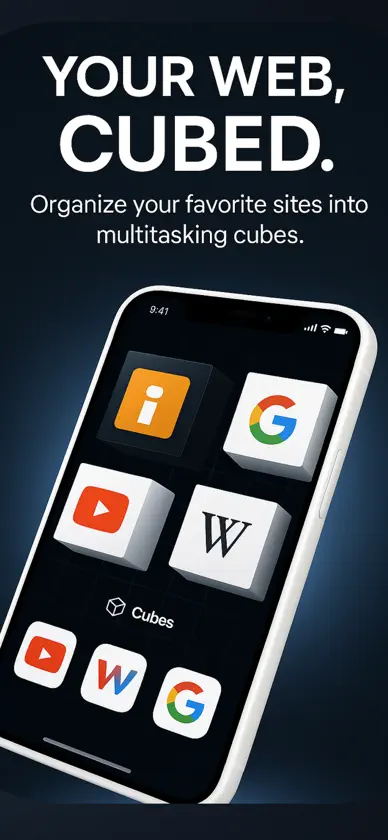
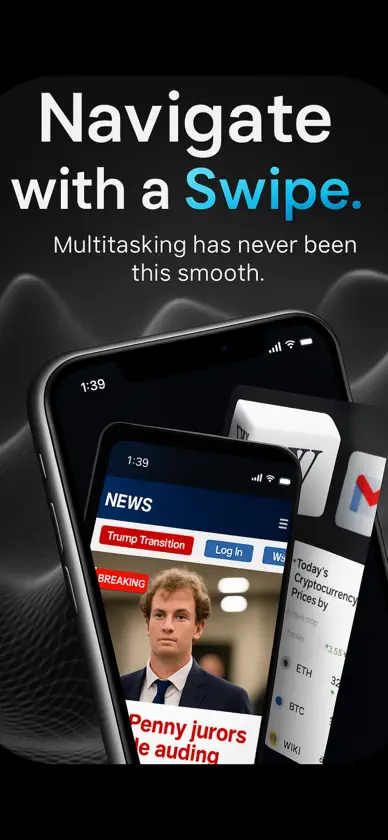
Tired of slow or unsafe browsing? Meet Offline Browser: Split Screen – a fast, secure, and private web browser that works even offline. Whether you need an incognito browser, a safe alternative to Safari and Chrome, or an adblock browser with multitasking tabs, this all-in-one solution keeps your internet experience smooth and distraction-free. Say goodbye to chaos and hello to control with Offline Browser: Split Screen – the revolutionary multitasking browser that lets you surf in a whole new dimension. Designed for those who demand power, privacy, and productivity, it’s your ultimate weapon against distraction. Offline Browser: Split Screen isn’t just another browser – it’s a reimagined browsing experience powered by a stunning 3D cube interface. With support for multitasking and incognito cubes, it transforms how you navigate your favorite sites with speed, security, and style. Key Features True 3D Cube Navigation Browse with 1 interactive cube, each holding up to 4 websites. VIP members unlock 4 interactive cubes, each with 4 websites – that’s up to 16 tabs open at once. Interactive Cubes: Rotate, swipe, and dive into a 3D browsing world that feels alive and intuitive. Split-Screen Power & Multi-Navigation Seamless navigation between open websites using natural gestures. Boost your productivity by organizing your browsing into thematic cubes. Incognito + Custom Browsing Private Cubes: Activate Incognito Mode per cube for private browsing within a shared interface. Independent History & Favorites: Each cube keeps its own bookmarks and history. Touch Chat & Accessibility Tools: Perfect for all users, including those with accessibility needs. Advanced Personalization Create & Save Custom Cubes. Explore the Public Cube Library: Use community-designed themes for news, privacy, entertainment, and more. Some features such as custom cubes, additional cubes, and access to the full 16-page browsing experience require a VIP subscription. Why Choose Offline Browser: Split Screen? Because you deserve a browser that works like you do – fast, private, and free from distractions. Use it for work. Use it for fun. Use it to stay ahead. Download now and explore – upgrade anytime from within the app. Main page and contact: https://cubifyapp.netlify.app/index.html Terms of service: https://cubifyapp.netlify.app/terms.html Privacy policy: https://cubifyapp.netlify.app/privacy.html
What's new
Version 1.2.6 · May 29, 2026
Improved cube rotation performance for a smoother browsing experience. Animations are now better cached and optimized, making transitions between web cubes faster, more fluid, and more responsive. Subscriptions have been removed. All features are now unlocked, including web cubes, custom browsing spaces, and the full multi-tab browsing experience.
In-app purchases
The most popular purchases on the App Store.
- Cubify Annual VIP AccessSubscription · year free trial$129.99 / year
- Cubify Weekly VIP AccessSubscription · year free trial$2.99 / 7 days
- Cubify Monthly VIP AccessSubscription · year free trial$3.99 / month
More from Daniel Esteban Gonzalez
 Score Keeper: Game CounterDaniel Esteban Gonzalez
 GPS Speedometer: MPH TrackerDaniel Esteban Gonzalez
 Labor Timer: Contraction LogDaniel Esteban Gonzalez
 JPG to PDF:Convert JPEG to PDFDaniel Esteban Gonzalez
 Bible Trivia: Bible Quiz GamesDaniel Esteban Gonzalez
 BP Log: Blood Pressure TrackerDaniel Esteban Gonzalez
 Blood Sugar Tracker: BS LogDaniel Esteban Gonzalez
 Work Hour Tracker Work LogDaniel Esteban Gonzalez
You might also like
 Perfect Browser - Dark ModeNoriaki Togashi
 eBrowser: Private Web & FilesEyermin Colon Sanchez
 Sundial BrowserJoseph Casey
 Emerald BrowserDario Ortiz
 NaviWave BrowserAis Business Mexico S.A. de C.V.
 Weblock BrowserApp Machine SIA
 Santa Browser: Smart RewardsSantaBrowser
 Keep Browser: Tree TabsRSA TECHNOLOGIES, LIMITED LIABILITY CO.
 TablessEric Bomgardner
 Novastart - Fastest AI BrowserMarketplace Distributors, LLC