
ShadowClip
Alexander Hepburn
No ratings yetUtilitiesAges 4+
Screenshots



About this app
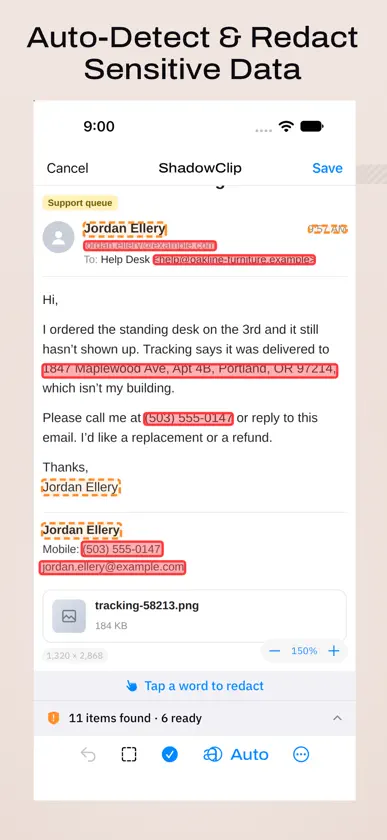
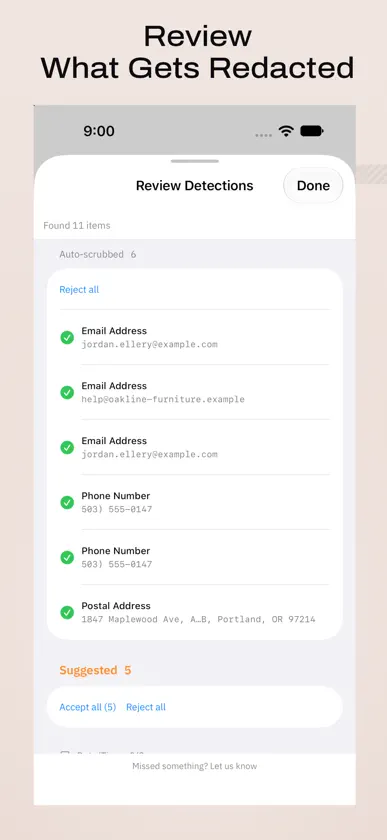
You share screenshots with colleagues and paste them into AI tools every day. ShadowClip removes the personal data before you hit send. Email addresses in a complaint. Names and faces. API keys. They end up in screenshots constantly, and then in places they shouldn't — AI assistants, emails to colleagues, or texts to friends. ShadowClip autodetects sensitive information in images, and lets you review and adjust before sharing. WHAT IT DETECTS • Credentials: API keys and tokens in more than 20 formats • Financial: credit card numbers and IBANs, each checked against its own check digit, so a number that merely looks like a card isn't flagged • Identity: national ID numbers for 29 countries, each matched to its own format • Contact: email addresses, phone numbers, postal addresses • Network: IPv4, IPv6 and MAC addresses • Visual: faces, QR codes, barcodes • Names, organisations and locations • Dates of birth and handwritten signatures BUILT INTO YOUR WORKFLOW Pick a photo from your library and give ShadowClip a few seconds. Findings appear as a review list: accept, dismiss, or add your own. Then save the redacted copy back to Photos. You can also select words by hand, or draw a region over anything else you want hidden. Share Extension: from Photos, Safari, or any app with the system Share menu, choose ShadowClip. Redact and save without leaving what you're doing. BUILT FOR EVERY LANGUAGE Most redaction tools are built for English. ShadowClip's interface is available in 17 languages, and it checks text in 30 — including Chinese, Japanese, Korean, Arabic, Russian and Thai. National ID numbers are matched country by country, not with one generic pattern. Arabic and Hebrew get a fully right-to-left interface. Apple's text recognition cannot read Hebrew, Greek or Hindi. Rather than pass over it silently, ShadowClip marks that text on the image so you can see exactly what went unchecked — and numbers, email addresses and ID numbers inside it are still found. SHADOWCLIP PRO One purchase for the Mac and iPhone apps, shared with your family. No subscription. • Batch redaction: up to 20 images reviewed side by side and saved together • Redact everywhere: redact something once and it's found in every image of the batch • Always-redact list: names, clients and codenames you add are redacted in every image • Shortcuts actions: redact images automatically from the Shortcuts app • Export options: PNG, JPEG or HEIC, with or without "-redacted" in the name Redacting one image at a time, with every detector and the review, stays free. IRREVERSIBLE BY DESIGN Redactions are opaque fills composited into a new image. The original pixels are discarded, not covered: there is nothing underneath to recover. Location data and camera metadata are stripped when you save. PRIVACY BY DESIGN ShadowClip contains no networking code and makes no network requests. Your images are processed on your device and never leave it. No accounts, no cloud, no telemetry.
What's new
Version 1.4.0 · Nov 4, 2026
ShadowClip Pro grows: Redact everywhere, an always-redact list, export options and a Shortcuts action. Hebrew pages are marked more carefully. • New in ShadowClip Pro: Redact everywhere. In a batch, redact something once and the same text is offered in the other images; one tap covers it in all of them • New in ShadowClip Pro: an always-redact list (Settings > Detection). Names, clients and codenames you add are redacted wherever they appear: in the app, the share extension and Shortcuts • New in ShadowClip Pro: export options (Settings > General). Save as PNG, JPEG or HEIC, and keep the original file name or add "-redacted" • New in ShadowClip Pro: a "Redact Images" action for the Shortcuts app. It redacts what is certain, with no review • ShadowClip Pro is one purchase for the Mac and iPhone apps, shared with your family. Redacting one image at a time stays free • Hebrew text next to a number or email address is now marked as unread rather than passed over; the number or address beside it is still found • A name is boxed as the name, not its whole line, and a form's "Token" label is no longer suggested as one • Opening new files while a batch is under review asks before the review is discarded Everything still runs on your device. Nothing is uploaded.
In-app purchases
The most popular purchases on the App Store.
- ShadowClip ProConsumable$9.99
You might also like
 Rereminder: Presentation Timerhyunho lee
 Geometry Calculator - TriangleAndrey Russkin
 TriTab Calc: Multi CalculatorHIROKI MURAI
 MiruMado Focus BrowserYusuke Teranishi
 Calcula Keyboard锦珍 黄
 ZoneClockAndrei Lupanin
 Sleep Fighters: Alarm Clockmohammad malek
 Nubox万飞 杜
 Mechanical Key Sound: KeyJoyArima Jain
 Text Scanner AI: OCR & ScanAndy Soft