
FileMaker Server Admin
David Hind-Smith
No ratings yetDeveloper ToolsAges 4+
Screenshots



About this app
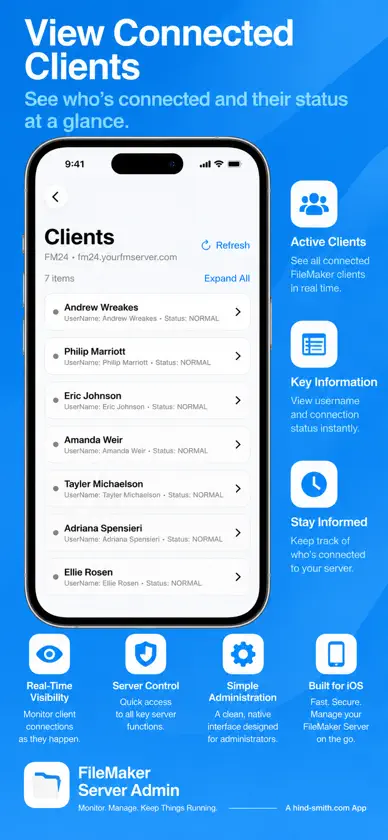
Your FileMaker Servers. One App. Anywhere. FileMaker Server Admin puts the tools you need to monitor and manage your Claris FileMaker Servers right at your fingertips. Whether you’re responsible for a single FileMaker Server or dozens of installations, FileMaker Server Admin provides a convenient, intuitive way to keep an eye on your servers and perform everyday administrative tasks. Built by FileMaker professionals for FileMaker professionals. MANAGE MULTIPLE SERVERS Add and manage multiple FileMaker Servers from one convenient interface. Quickly switch between servers to check their status, review activity, and perform administrative tasks. SERVER OVERVIEW See important server information at a glance, including: • FileMaker Server version and status • Licence information and expiration • SSL certificate expiration • Connected clients • Hosted databases • Scheduled tasks • Web publishing and connector status DATABASE MANAGEMENT View hosted databases and their current status. • Open and close individual databases • Open or close all databases • Launch hosted databases directly in FileMaker Pro or FileMaker Go • Review database information CLIENT MANAGEMENT See who’s connected to your FileMaker Servers. • View active client sessions • Review connection information • Disconnect individual clients • Disconnect all clients when necessary • Send notifications before disconnecting users SCHEDULE MANAGEMENT Monitor and manage FileMaker Server schedules. • View configured schedules • See last-run times and results • Identify failed schedules • Review available error information • Run schedules directly from the app CONNECTOR MANAGEMENT Monitor and control FileMaker Server services, including: • FileMaker WebDirect • FileMaker Data API • OData API • XML • PHP • ODBC/JDBC Enable or disable supported services without opening the FileMaker Server Admin Console. SERVER ADMINISTRATION Access additional administrative controls, including: • Block New Users • Client session timeout settings • Database visibility and filtering • Direct access to the FileMaker Server Admin Console Available controls depend on the FileMaker Server version. SERVER REPORTS Generate PDF reports containing useful information about your FileMaker Servers. Save or share reports for documentation, troubleshooting, and administrative review. DESIGNED FOR APPLE DEVICES FileMaker Server Admin is available for: • macOS • iPhone • iPad Enjoy an interface designed for each device, with consistent features and familiar controls. ONE PURCHASE. ALL THREE PLATFORMS. FileMaker Server Admin is a Universal Purchase app. Buy it once and use it on your Mac, iPhone, and iPad with the same Apple Account. No subscriptions. No recurring fees. BUILT FOR THE FILEMAKER COMMUNITY FileMaker Server Admin is independently developed by hind-smith.com inc., drawing on more than 25 years of experience developing, hosting, and supporting FileMaker solutions. The app continues to evolve through suggestions and feedback from FileMaker administrators around the world. We welcome your ideas! REQUIREMENTS • A compatible Claris FileMaker Server installation • Network access to the FileMaker Server Admin API • Valid FileMaker Server administrator credentials • FileMaker Pro or FileMaker Go for opening hosted databases directly Some features depend on the FileMaker Server version and configuration. FileMaker Server Admin is an independent application and is not affiliated with or endorsed by Claris International Inc.
What's new
Version 1.30 · Nov 6, 2026
Version 1.30 introduces new features and improvements inspired by feedback from FileMaker administrators. • Open the FileMaker Server Admin Console directly from the app. • Launch hosted databases in FileMaker Pro or FileMaker Go. • Monitor and manage OData API availability. • Open or close all hosted databases. • View schedule execution results and error information. • Improved startup performance and Dark Mode support. • Refined layouts for Mac, iPhone, and iPad. • New Contributors section recognizing community feedback. Thank you to everyone helping make FileMaker Server Admin better!


