
Calíope — SQL Client
David Villalobos Cambronero
No ratings yetDeveloper ToolsAges 4+
Screenshots



About this app
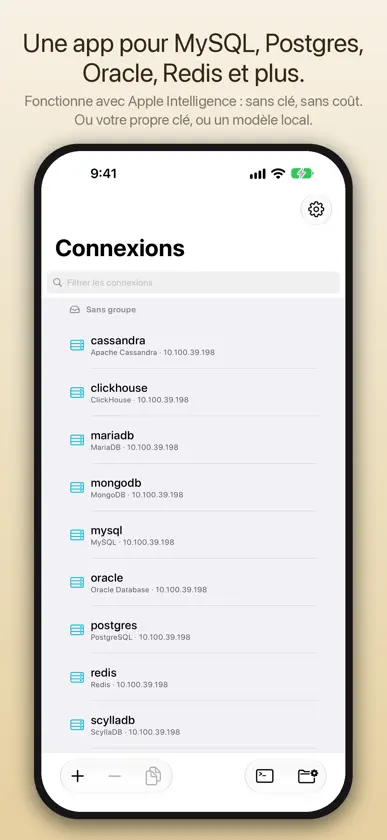
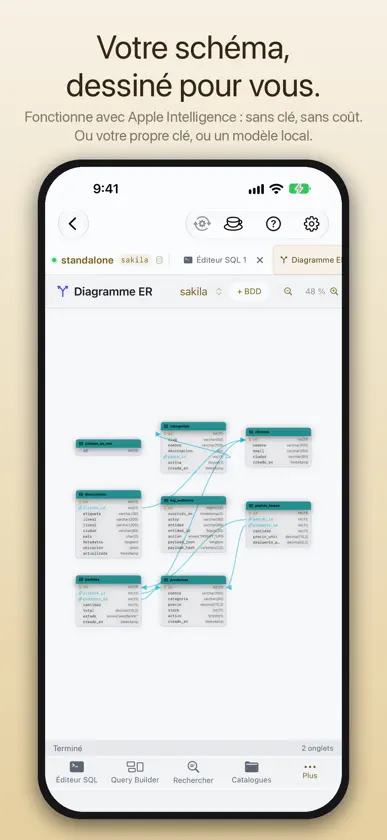
Calíope — Client de bases de données pour tous vos écrans Apple Calíope est un client natif et puissant pour MySQL, MariaDB, Amazon Aurora, TiDB, PostgreSQL, SQL Server, Oracle, ClickHouse, Redis, Valkey, Apache Cassandra, ScyllaDB, Elasticsearch, OpenSearch et MongoDB, conçu pour Mac, iPad, iPhone et Apple Vision Pro, avec un écran d'état des serveurs sur Apple Watch et Apple TV. CE QUE COMPREND CALÍOPE PRO Éditeur SQL — Écrivez et exécutez vos requêtes avec coloration syntaxique et historique intégré, en parallèle dans des onglets indépendants ayant chacun sa session active. Rapports — Une requête enregistrée avec ses paramètres déclarés et sa sortie définie : quelles colonnes, dans quel ordre, avec quels titres et formats. L'exécuter deux fois donne la même chose. Fonctionne avec les bases relationnelles, les fichiers SQLite et DuckDB, MongoDB, Redis, Cassandra et Elasticsearch, exporte en neuf formats dont un PDF paginé, et peut être planifiée. Explorateur de schéma — Parcourez tout le schéma — tables, vues, procédures stockées, déclencheurs, événements et plus — depuis un arbre intuitif, avec colonnes, index et clés étrangères d'un coup d'œil, et un diagramme ER interactif de chaque schéma. Connexions sécurisées — Serveurs distants en toute sécurité : tunnel SSH natif (clés ed25519 et ECDSA), chiffrement SSL/TLS et identifiants stockés par profil dans le Keychain de votre système. Sauvegardes planifiées — Automatisez vos sauvegardes avec une planification flexible et une rétention configurable, en choisissant les bases et les tables de chaque tâche. Topologie de réplication — Déclarez le primaire et ses répliques, et voyez le groupe entier d'un coup, avec son diagramme : chaque réplique avec son retard, ses deux threads et les transactions qui lui manquent vraiment. Une réplique peut afficher 0 seconde alors qu'elle a des heures de retard. Sans serveur — Éditeur SQLite intégré pour vos fichiers .sqlite locaux : structure, données, SQL, pragmas, Enregistrer/Annuler, import-export CSV/JSON/SQL. Un éditeur DuckDB ouvre les fichiers .duckdb et interroge Parquet, CSV ou JSON là où ils sont. Plus un aperçu en lecture seule des .md, .sql, .json, .csv, .rtf et .log. Hors ligne. Coup d'œil — Sélectionnez un fichier SQLite, DuckDB ou Parquet dans le Finder et appuyez sur la barre d'espace, ou touchez-le dans l'app Fichiers de l'iPad et de l'iPhone, pour voir ses tables, leurs colonnes avec leur type et leurs 20 premières lignes sans ouvrir Calíope. Rien n'est jamais écrit dans le fichier. Widgets et activités en direct — Les métriques du serveur sans ouvrir l'app : bureau du Mac, accueil et écran verrouillé sur iPhone et iPad. Un serveur par widget ; touchez pour ouvrir son tableau de bord. Sauvegardes, restaurations et requêtes longues se suivent en activités en direct sur l’iPhone et l’iPad. Assistant SQL IA — Un assistant optionnel qui aide à écrire des requêtes, à expliquer les résultats et à suggérer des optimisations. Il fonctionne dès le premier lancement avec Apple Intelligence : sans clé, sans coût, et rien ne quitte votre appareil. Vous pouvez aussi fournir votre clé d'un fournisseur compatible —l'usage est facturé par ce fournisseur, et Calíope ne facture ni ne revend de services d'IA— ou un modèle local. Les clés restent dans votre Keychain. ACHAT UNIQUE • Calíope Pro — achetez-la une fois et gardez-la pour toujours. Le prix est affiché dans l'App Store au moment de l'achat et peut varier selon la région. • 30 jours d'essai gratuit avec tout débloqué avant de décider. Sans carte ni prélèvement automatique. • Un seul achat débloque Calíope sur tous vos appareils avec votre identifiant Apple, avec toutes les mises à jour futures incluses. • Sans abonnement ni renouvellement. Conditions d'utilisation (EULA) : https://www.apple.com/legal/internet-services/itunes/dev/stdeula/ Politique de confidentialité : https://caliope.org/PrivacyPolicy.html
What's new
Version 1.7 · Nov 5, 2026
Calíope 1.7 What's new: • Calíope speaks TiDB — TiDB joins through the MySQL engine Calíope already speaks, and what TiDB does not have is hidden rather than greyed out: sequences in Catalogs, and AUTO_RANDOM and clustered keys in the Table Builder. The slow query log, the visual EXPLAIN with its index advisor and the Dashboard read what TiDB itself publishes. Ten TiDB chapters in the DBA Handbook. TiDB 8.5 and newer. • Calíope speaks Valkey — Valkey joins through the client written for Redis, with its seven tools: Keys, Server, Memory, Slow Log, Clients, Console and Topology, cluster included. Test connection recognizes Valkey and offers “Use Valkey”. Valkey 8.0 and newer. • Quick Look for databases and data files — Select a SQLite, DuckDB or Parquet file in the Finder and press the space bar, or tap it in the Files app on iPad and iPhone, and you see its tables, their columns with types and their first 20 rows without opening Calíope. On the Mac, TSV files too. The preview never writes to the file, and if it runs out of time after about three seconds it says so. • Calíope speaks Cassandra and ScyllaDB — Apache Cassandra and ScyllaDB join as a native engine, with a client written for Calíope from the specification of the native protocol (v4): TLS, an SSH tunnel and an alternate host. Seven tools of their own: CQL Query, Keyspaces, Cluster, Node, Clients, Traces and Roles. Twelve chapters in the DBA Handbook. Cassandra 4.1 and ScyllaDB 2025.1 or newer. • Calíope speaks Elasticsearch and OpenSearch — Elasticsearch and OpenSearch join as a fifth family, with a client for their REST API written for Calíope from the official specifications of both products. Seven tools of their own: Query (Query DSL and SQL, plus ES|QL in Elasticsearch and PPL in OpenSearch), Indices, Cluster health, Node, Running tasks, Snapshots, and Users and roles. Twelve chapters in the DBA Handbook. Elasticsearch 8.18 and OpenSearch 2.19 or newer. • Live Activities on iPhone and iPad — Follow a backup, a restore or a long query without opening Calíope: on the Lock Screen and in the Dynamic Island of the iPhone, on the Lock Screen of the iPad and in the Smart Stack of the paired Apple Watch. Tapping it takes you back to its tab, and “Stop” stops it from there. • SQL alerts tell you when they fire — When a rule turns ALERT, Calíope leaves a system message with the rule, its value and the threshold and, with Calíope not in front, a notification. It tells you when the rule changes, not on every cycle. • The ER Diagram in the space — On Apple Vision Pro, “Open in space” in the ER Diagram lays the diagram out in the room around you: each table becomes a card with its columns, each foreign key a line from its column to the other. The space only reads: nothing you do in it changes the server. • Calíope speaks Japanese — Japanese joins as the sixth interface language, translated in full: the interface, the Help and the DBA Handbook, the function reference, the widgets, the Siri shortcuts, Calíope on Apple TV and Apple Watch, and the website. You choose the language per app in the system settings; on Apple TV and Apple Watch, Calíope’s own settings also offer 日本語. Update Calíope on all your devices before creating Cassandra, ScyllaDB, Elasticsearch or OpenSearch connections: an earlier version would read them as MariaDB. Requirements: Calíope 1.7 needs macOS 26 Tahoe on the Mac, iOS 26 or iPadOS 26 on iPhone and iPad, visionOS 26 on Apple Vision Pro, tvOS 26 on Apple TV and watchOS 26 on Apple Watch. On an earlier Mac or iPad, version 1.2 stays available and keeps working.
In-app purchases
The most popular purchases on the App Store.
- 30-day TrialConsumableFree
- Calíope ProConsumable59,99 $US
- 60-day TrialConsumableFree
You might also like
 DBPort: Modern Database ClientMansur Tauken
 Master SQL Gestionnaire de BDDSECKIN SEFA DURASI
 MagicSQL - SQL Client & EditorFatih Yesilbas
 Navidog for MySQL冰冰 邓
 SQLSSH: Database Client/SSH/S3Trendcas
 UsageMaster - suivi IAMyeongJin Lee
 Anvil - Dev ToolsetAlex Javier Rivas Martinez
 LunoDBTimothy Murphy
 Tablewright: PostgreSQL EditorROBERT BARRETT LAUNIUS
 Index - SQL ClientPatrizio Pezzilli