
Eclipse Play
Brian Whittaker
No ratings yetMusicAges 4+
Screenshots





About this app
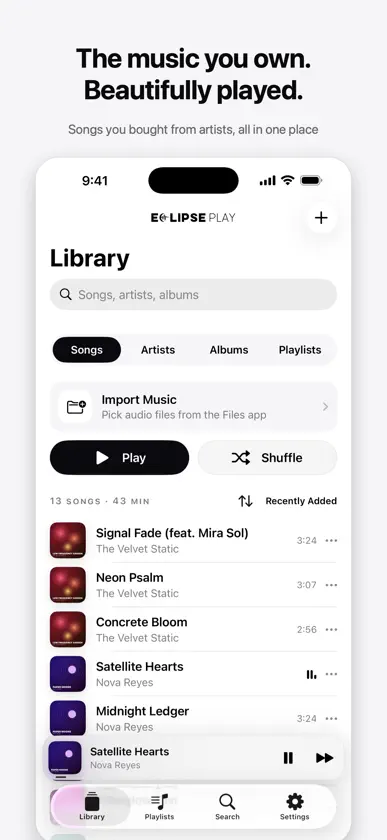
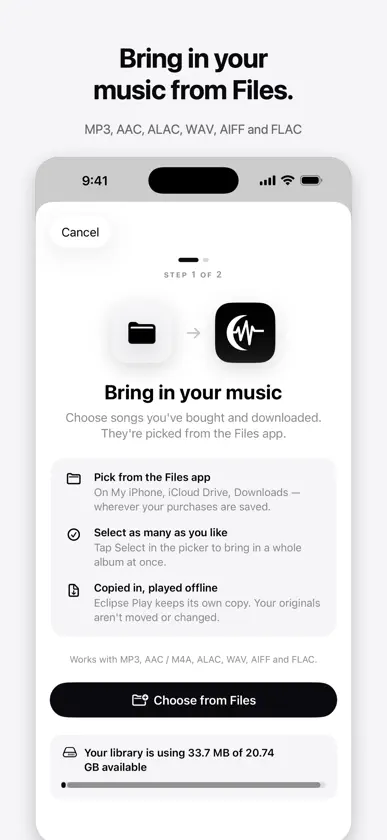
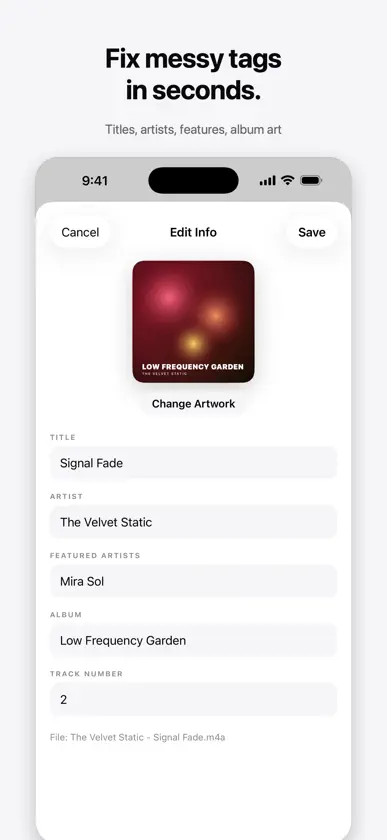
Eclipse Play is a music player for the songs you own: the albums and singles you buy straight from artists. No streaming, no ads, no tracking, and no account required. BRING IN YOUR MUSIC • Import from the Files app: On My iPhone, iCloud Drive, Downloads and more • Select a whole album at once; duplicates are skipped automatically • Works with MP3, AAC / M4A, ALAC, WAV, AIFF and FLAC • Open audio from Safari, Mail or AirDrop straight into Eclipse Play YOUR ECLIPSE DIRECT PURCHASES • Sign in with your Eclipse Direct account to see everything you've bought • Download a song, a release, or your whole collection • Optionally let new purchases download on their own, on Wi-Fi or cellular • Songs you download in the Eclipse Direct app appear here automatically A PLAYER THAT GETS OUT OF THE WAY • A monochrome design where your album art brings the color • Lock Screen and Control Center controls, background playback and AirPlay • Up Next queue with play next, reorder, shuffle and repeat • Songs, artists, albums, playlists and smart playlists CLASSIC MODE • Turn Eclipse Play into a retro music player with a scroll wheel • Circle your thumb to scroll, with a click you hear and feel on every step • Pick the body, wheel and highlight colors, or any color you like, with a light or dark screen • Hold the center button on a song to play it next, add it to Up Next or add it to a playlist • Album Scroll: flip through your covers with the wheel or a swipe, then turn one over to see its songs • Switch between Eclipse and Classic any time in Settings YOUR LIBRARY, YOUR WAY • Fix messy tags: edit titles, artists, featured artists, albums and track numbers • Add your own artwork to songs, albums, artists and playlists • Featured artists credited on every song, with a Featured On section for each artist • Search across everything, and see how much space your library uses PRIVATE BY DESIGN Your music stays on your iPhone. Eclipse Play only goes online when you sign in to download your purchases.
What's new
Version 1.2 · Nov 7, 2026
New in Classic mode: Album Scroll. Flip through your album covers with the wheel or a swipe, then turn a cover over to see its songs and press play. Find it on the main menu. Also fixes tapping rows on the Classic screen.
More from Brian Whittaker


You might also like
 SPOZZEnvision Finance Technologies AG
 MiniMoon: Offline Music PlayerMiles Egan
 Plum Music PlayerAdam Wienconek
 SoundchartsSoundcharts
 LudyAmp - Lecteur Hi-ResLudy Ankas, LLC
 HAT MusicHAT Music
 Musinova & Lecteur de MusiqueCelestine Nishimwe
 ChartmetricChartmetric
 Tune.fmTune Media Inc
 faidr: FM Radio appAuddia Inc.