
Hypergate AI
12th House Media, Inc
No ratings yetLifestyleAges 17+
Screenshots



About this app
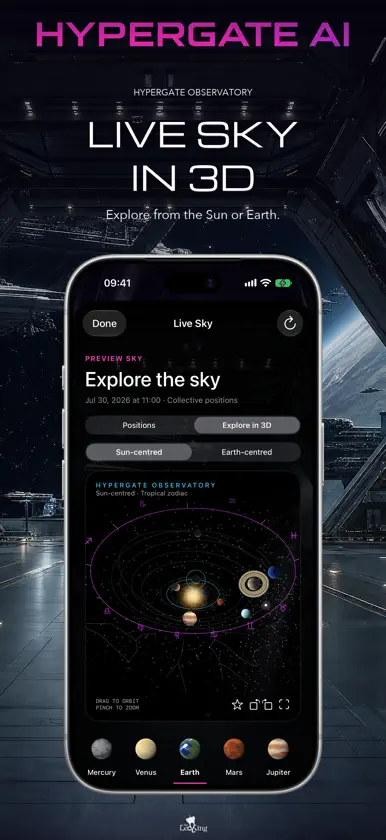
Personal astrology. In conversation. Meet AERA, your personal AI astrologer inside Hypergate AI, created by David Palmer, The Leo King. Bring your birth chart, relationships, and real questions into a conversation built around you. ASK AERA WITH SIRI Say, "Hey Siri, ask AERA where Venus is right now." Hear a current planetary sign and degree calculated with the Swiss Ephemeris. Ask about another planet, check which planets are retrograde, or use Shortcuts to ask about your birth chart. Personal readings use your signed-in account and your Siri permission. EXPLORE THE SKY IN 3D Open Live Sky directly from Home. Explore current planetary positions and retrogrades. Open the 3D observatory full screen, switch between Sun-centered and Earth-centered views, and orbit above or below the planets. Take a question about the moment into HyperChat. TALK OR TYPE WITH AERA Ask naturally in HyperChat or start a voice conversation. In a transit reading, AERA can name the planets and aspect, explain whether it is applying or separating, and tell you when a planet is retrograde. Explore love, work, personal patterns, and timing with your selected chart in context. Return to saved conversations and pick up the thread. Ask about a particular date or range of days in the past, present, or future. YOUR CHARTS, IN DEPTH Create and save charts for yourself and the people or moments you are authorized to explore. See natal placements, houses, aspects, angles, and Human Design. Enlarge your chart wheel, explore a placement, and bring your question to AERA. AT HOME ACROSS YOUR DEVICES Enjoy native layouts on iPhone, iPhone Duo, and iPad. Unfold iPhone Duo while keeping your draft in progress. Check the current sky on Apple Watch, prepare a question to continue on iPhone, and keep planetary information close with widgets. Share a compact Sun and Moon card in Messages. Choose a day and time for a weekly sky reminder in Settings. CREATE AND CONNECT Describe an image in HyperChat, choose a canvas, and create it. Save the finished image to Photos or use the system share sheet. Join astrology-centered Community conversations through profiles, posts, comments, reactions, and following. MAKE IT PERSONAL Choose reading depth, response length, appearance, chart preferences, and notifications. Control optional memory, Siri access, and AI processing. Find account, membership, chart, and technical help in Customer Service. Export or delete your data from account controls. Hypergate clearly identifies its AI experience. Astrology readings are for personal reflection and entertainment and are not medical, mental-health, financial, legal, or emergency advice. Some features require an auto-renewing Hypergate membership. Plans, billing periods, prices, and included allowances are shown before purchase. Payment is charged to your Apple Account after confirmation. Subscriptions renew automatically unless canceled at least 24 hours before the end of the current period. Manage or cancel subscriptions in your App Store account settings. If you already subscribed through Apple, use Recover Apple Membership in Portal Access. Use the same Hypergate account on the website to access your recognized Apple membership. Terms of Use (Apple Standard EULA): https://www.apple.com/legal/internet-services/itunes/dev/stdeula/ Hypergate Terms: https://legal.hypergate.ai/terms Privacy Policy: https://legal.hypergate.ai/privacy Support: https://hypergate.ai/support
What's new
Version 2.0.3 · Nov 8, 2026
Your sky is closer than ever. - Say “Hey Siri, ask AERA where Venus is right now” to hear its sign and degree. In Shortcuts, check retrogrades, ask about a planet in your birth chart, or start a personal AERA reading. - Open Live Sky at the top of Home. Go full screen in the 3D observatory, switch between Sun-centered and Earth-centered views, and turn the sky to see it from any angle. - Talk through your transits with AERA. Hear which planets form an aspect, whether it is applying or separating, and when a planet is retrograde. - Keep your HyperChat draft as you unfold iPhone Duo. The portal and chat are easier to read in light mode, with more room for charts on iPad. - Check planetary placements and retrogrades on Apple Watch, or prepare a question to continue on iPhone. In Messages, share a compact Sun and Moon card. - Add a sky widget or choose a weekly sky reminder in Settings. You choose the day and time. - Recover an Apple membership in Portal Access and use it on the website with the same Hypergate login.
In-app purchases
The most popular purchases on the App Store.
- Hypergate Pro MonthlySubscription149,00 $US / month
- Hypergate Basic YearlySubscription200,00 $US / year
- Hypergate Plus YearlySubscription400,00 $US / year
- Hypergate Plus MonthlySubscription40,00 $US / month
- Hypergate Basic MonthlySubscription19,00 $US / month
More from 12th House Media, Inc

You might also like
 Startek: Pro Astrology ChartsCameron White
 AstroYou Astrology Birth ChartAstroyou
 GlowApp: Astrology for youGlow AI, LLC
 V Element: AI Chrono CoachIgor Olnev
 Soulio : Astrologie IA & Amour金浩 肖
 True Sky PsychologyAndrea Buchan
 Galactic Planner By Joni PatryGalactic Planner
 Clarity by Nikki NovoNikki Novo Writes LLC
 AI Astrology Chat: Natal ChartKanat Magdanov
 Luna: Manifestation AstrologyJesse Linson