
Windfall - Expense Tracker
Swapnanil Dhol
No ratings yetFinanceAges 4+
Screenshots




About this app
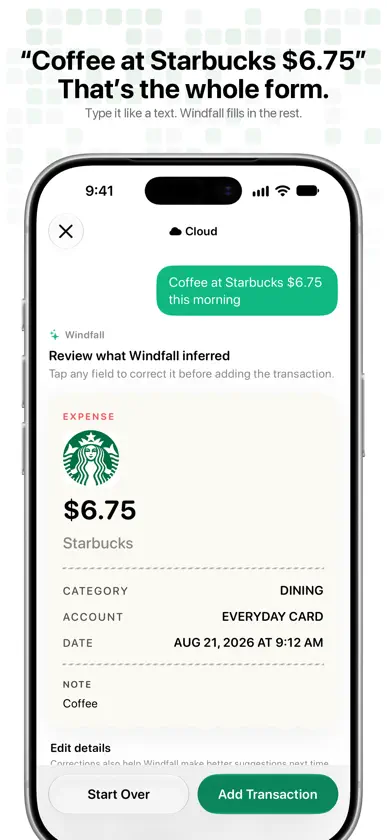
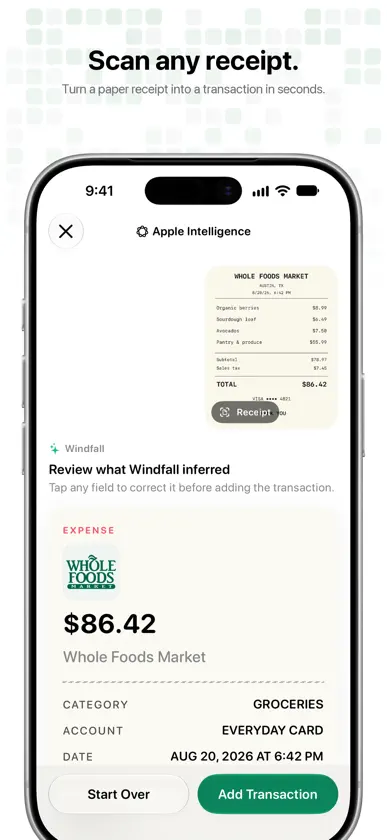
Turn a sentence into a transaction you can review. Type ‘Lunch at Starbucks $12’, ask Siri, or scan a receipt—Windfall prepares the merchant, amount, category, account, and date before you save. LOG SPENDING YOUR WAY • Describe expenses and income in natural language • Ask Siri, use Shortcuts, or run a personal automation • Review every prepared transaction before saving • Scan receipts or import multiple transactions RIGHT ON YOUR WRIST • Log an expense or income on Apple Watch in a few taps: amount, category, done • Your most recently used categories come first, and you can dictate a merchant name • Keep logging when your iPhone is out of reach; entries sync as soon as it's near • See today's spend and your latest entries on the Today page • Put Today's Spend on a watch face or in the Smart Stack, and tap it to open the keypad • Say it (Pro): dictate the whole thing, like ‘Uber to the airport $24’, and review the entry before it's saved • Watch entries count toward the same budgets and insights, and teach Windfall your merchants NEVER MISS A BILL (PRO) • See upcoming bills and income on an Upcoming screen and on Home • Log recurring payments automatically, or have Windfall ask first • Get reminders, price-change alerts, and a duplicate warning • Find recurring payments hiding in your history • Budgets set money aside for bills that are coming up • Check and log payments with Siri, Shortcuts, and Spotlight ACCOUNTS THAT LOOK LIKE CARDS • Pick a card design and a network such as Visa, Mastercard, American Express, or Discover • Tap a card to flip it, or drag to tilt it • Account pickers suggest the account you usually use at a merchant, and tell you why YOUR YEAR IN REVIEW • From December 1, relive your year as a story: totals, your biggest month, top categories, and the places you visit most • See your longest logging streak and what recurring payments cost you over a year (Pro) • Share a story or square card, with amounts hidden unless you choose to show them KEEP YOUR MONEY CLEAR • See weekly, monthly, and yearly budget progress • Follow trends, categories, forecasts, and activity heat maps • Use merchant logos, calendar browsing, search, and CSV export • Track multiple currencies with exchange-rate conversion NO BANK LOGIN REQUIRED Windfall never asks for banking credentials or connects to your bank. Saved financial records stay on your device, and entries you log on Apple Watch go straight to your iPhone. Smart Entry can run on device; when Cloud parsing, receipt scanning, or Say it on Apple Watch uses a service provider, only the text, receipt image, and relevant context needed to return the parsed result are sent. Choose your parsing mode in Settings. A focused ledger, ready for your approval, with native iPhone and Apple Watch tools that fit your routine. EULA: https://www.apple.com/legal/internet-services/itunes/dev/stdeula/ Privacy Policy: https://trywindfall.app/privacy
What's new
Version 2.7.1 · Nov 8, 2026
A simpler Windfall on Apple Watch. • A new home screen shows today's spend with clear buttons for Say it, Keypad and Recent. No more turning the Digital Crown to find your entries • A bigger keypad that fills the screen, with the Expense or Income switch right next to the amount • Say it has its own screen: tap Speak, say something like "Coffee 4.50 at Blue Bottle", and check the entry before saving • After you save, the watch takes you back home so your new total is right there • Reliability fixes across the app
In-app purchases
The most popular purchases on the App Store.
- Lifetime ProConsumable22,99 $US
- Monthly ProSubscription3,99 $US / month
- Yearly ProSubscription · 3 days free trial14,99 $US / year
- Money Buddy WeeklySubscription3,99 $US / 7 days
More from Swapnanil Dhol
 WhatsPlaying : Dynamic IslandSwapnanil Dhol
 Neon : Pipette couleurSwapnanil Dhol
 Goaley: Savings Goal TrackerSwapnanil Dhol
 URL ComponentsSwapnanil Dhol
 Padel Score: Wrist ScoreboardSwapnanil Dhol
 Moonspan: Moon Phase & LunarSwapnanil Dhol
 Almond - Book TrackerSwapnanil Dhol
 Pass Maker - Wallet PassSwapnanil Dhol
You might also like
 Expeny: Budget & ExpenseRahul Singh
 Klarr: Expense TrackerSidharth Jain
 Finma - AI Finance TrackerTanmay Sonawane
 Track It: Expense TrackerDhruv Pujara
 iLekka - Expense TrackerGagan Krishne
 Money Manager: Expense PlannerTechnozer Solution
 Expense Tracker: ExpenlySrivishnu Ramakrishnan
 PaisaFlow: Money ManagerBala Murali
 Rilio: Expense TrackerRaja Niketh Reddy Nallapareddy
 Smart Budget Budget & DépensesCarlo Di Giuseppe