
CodeIME
Ho Lam Chung
No ratings yetDeveloper ToolsAges 4+
Screenshots
About this app
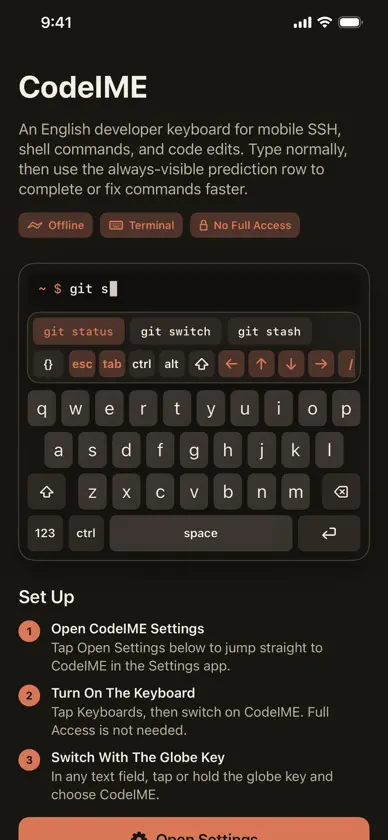
CodeIME 是一款专为在手机上工作的开发者打造的 iOS 键盘。它保留了熟悉的英文键盘布局,同时让你快速使用终端按键、代码符号、导航控制和命令预测。 无论是连接服务器、编辑文件、运行 shell 命令,还是在终端 App 中工作,CodeIME 都能派上用场。它提供常驻显示的命令预测栏、导航与符号快捷模式,以及可用于 Ctrl-C、Shift-Tab 等操作的粘滞式 Ctrl、Alt 和 Shift 修饰键。 功能亮点: 面向开发者的英文键盘,采用紧凑的深色界面 Esc、Tab、Ctrl、Alt、Shift、方向键、斜杠、管道符、波浪号等终端按键 粘滞式 Ctrl、Alt 和 Shift,支持 Ctrl-C、Ctrl-D、Shift-Tab、Ctrl + 方向键等组合键 常驻显示的命令预测栏和代码符号面板 按键弹出预览、删除键与方向键长按重复、按键音效以及修饰键高亮 注重隐私的设计,无追踪、无数据收集 CodeIME 无需开启键盘的“完全访问”权限。
What's new
Version 1.2 · Oct 31, 2026
CodeIME 1.2 learns your commands and knows what is running in your terminal. • Predictions learn the commands you run, saved only on this device. Hold a prediction to pin or forget it • The top row switches to vim, nano, less, htop, and tmux keys while those programs run • Risky commands such as rm -rf ~ or a force push turn Return red: hold it to run, or tap the safer version • Drag along the space bar to move the cursor; in terminals, drag up or down for shell history • Hold a letter for the digit or symbol in its corner, and slide to pick extras such as && or 2>&1 • Page Up and Page Down keys next to the arrows • Placeholders such as the message in git commit -m are left out, and the cursor lands where you type • Caps lock no longer turns arrow keys into Shift-arrows
More from Ho Lam Chung


You might also like
All apps like CodeIME → MCP Explorer MobileGabriel Schreiber
 Hard RefreshAlbuquerque de Matos, Unipessoal, LDA
 Java 编译器-AI助学神器乐祥 胡
 Push - Webhook NotificationsAseel Sherwani
 Dev Keyboard: Code & SymbolsAnshika Maurya
 TypeTab: Coding KeyboardAndreu Pifarre
 hot.keysTing-Chun Matthew Man
 Shell KeyboardNguyen Nguyen
 Bonsai³: Coding ActivitySakino Tomiura
 Shepherd: AI Agents & SSHEgor Kolesnikov