
ScreenCommand
Simple Products Studio
No ratings yetProductivityAges 17+
Screenshots

About this app
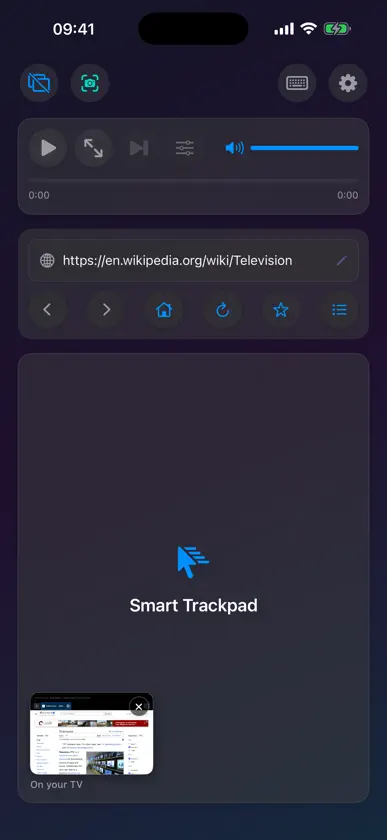
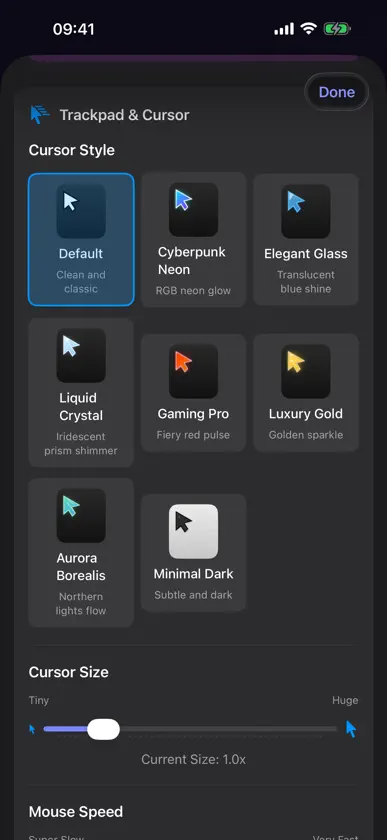
必须连接外接显示器或电视。ScreenCommand 在电视上显示自己的网页浏览器,你的 iPad 或 iPhone 则成为触控板和键盘。它不会复制你的屏幕,其他 App 也无法在电视上运行。没有接显示器时,App 只会打开“连接外接显示器”设置页面,无法在设备上单独浏览。 有线连接:USB-C 接口的 iPad,或 iPhone 15 及更新机型(iPhone 16e、iPhone 17e 和 iPhone Air 除外),配合 USB-C 转 HDMI 或 DisplayPort 转接头。Netflix、Prime Video、Apple TV+、Paramount+、Peacock 以及其他流媒体服务都能这样播放。 AirPlay:任何 iPad 或 iPhone,需要你的 Wi-Fi 网络中有一台 Apple TV。在 ScreenCommand 打开的状态下启动“屏幕镜像”,电视上只显示浏览器。网站、YouTube 和其他网页视频都能播放,光标略有延迟。流媒体服务需要有线连接。 iPad 或 iPhone 加一台外接显示器或电视,就是一套桌面级的浏览工作台,哪怕是没有 M 系列芯片、用不了 iPadOS 扩展显示器的 iPad,也照样能用。 大屏上跑的是完整的桌面级浏览器,iPad 或 iPhone 则变成触控板和键盘:8 种光标样式、最多 12 个常驻标签页、YouTube 画质最高 4K,有线连接还能看 Netflix 等流媒体。也支持实体键盘,在 iPad 上还能用鼠标。一次买断,无需订阅。 外接大屏,无缝衔接 • 在外接显示器上完整浏览网页 • 自动识别显示器,即插即用 • 针对 1080p、4K 与带鱼屏优化 进阶光标与操控 • 八种精致光标样式:默认、赛博霓虹、优雅玻璃、液态水晶、电竞专业、奢华金、绚丽极光、极简暗色 • 顺滑的触控板操作,支持手势 • iPad 支持蓝牙或 USB 鼠标与触控板 • 双指自然滚动 • 精准的单击、双击与右键操作 智能键盘输入 • 完整键盘支持,填网页表单、搜东西都顺手 • 支持实体键盘输入,以及 ⌘L、⌘T、⌘R 等快捷键 • 智能地址栏:网址、搜索词都能直接输入 • 自动识别并聚焦输入框 媒体控制 • 轻点一下播放/暂停视频 • 随时切换 YouTube 画质:最高 4K(2160p),全屏下也能调 • 用屏幕滑块调节媒体音量 • 拖动进度条,想看哪儿点哪儿 • 一键切换全屏 • 影院模式(Cinema Mode),观影不受打扰 强大的浏览功能 • 最多 4 个浏览器窗口,每个 12 个标签页,关掉 App 也会保留 • 在电视上并排显示两个窗口 • 密码自动填充,在电视上轻松登录 • 桌面模式,网站显示更完整 • 「支持情况」告诉你设备如何连接 • 阻止网页强行跳转到其他 App • 弹出式窗口拦截,可按网站单独关闭 个性化 • 光标大小可调(0.2x - 5.0x) • 鼠标速度可调,要精准还是要快随你(0.5x - 5.0x) • 自定义主页网址 • 接上显示器自动打开浏览器 隐私优先 • 不收集任何数据,不做追踪 • 没有第三方分析 • 所有处理都在你的设备本地完成 • 无需联网(浏览网页时除外) 适合这些人: • 需要更大工作区的职场人士 • 想在大屏上查资料的学生 • 打理社交媒体的内容创作者 • 任何想用 iPad 或 iPhone 获得桌面级浏览体验的人 怎么用: 1. 把 iPad 或 iPhone 接到外接显示器(USB-C 直连或 HDMI 转接头),也可以通过 AirPlay 投到 Apple TV 2. 打开 ScreenCommand 3. 浏览器会自动出现在外接显示器上 4. 把 iPad 或 iPhone 当作触控板与操控中心 5. 尽情享受桌面级浏览! 系统要求: • 带 USB-C 接口、运行 iPadOS 17.0 或更高版本的 iPad(无需 M 系列芯片) • 或运行 iOS 17.0 或更高版本的 iPhone。有线连接需支持 USB-C 视频输出(iPhone 15 及更新机型,iPhone 16e、iPhone 17e 和 iPhone Air 除外);任何 iPhone 都可使用 AirPlay • 外接显示器或电视 • USB-C 转 HDMI/DisplayPort 转接头(或 USB-C 直连),或一台 Apple TV 用于 AirPlay 无线连接(有线连接光标延迟最低,更推荐) ScreenCommand 把真正的桌面级浏览带到 iPad 或 iPhone 的外接屏幕上。
What's new
Version 2.5 · Nov 8, 2026
ScreenCommand 2.5 brings your languages to the compact keyboard. • The compact keyboard now follows the keyboards you've added in Settings, with the same keys as your iPad's or iPhone's own keyboard for each language: German, French, Spanish, Turkish, Russian, Greek, Arabic, Hebrew, Korean and more. The globe key switches between them, and the space bar shows the one in use. • Hold a letter to see its accents, then slide to the one you want and lift your finger: á, é, ñ, ö, ő, ç, ß, ł and more. With Shift on, you get capitals. • Tap 123, then hold the quote, hyphen, ? or ! key for „ « » – — ¿ ¡. • On iPad, swipe down on a letter key to type the gray symbol shown on it: numbers, -, /, @ and more, without switching to 123. • For Japanese, Chinese and dictation, the globe key still brings up your iPad's or iPhone's own keyboard, after your other languages. Hold the globe key to pick any keyboard from a list. • The trackpad now always stops just above the keyboard, and the compact keyboard takes up less room. • Not Working? is new on the connect screen and in Settings: tap what's wrong and see the fix, with nothing to type. • Clearer about AirPlay: it needs an Apple TV, and the TV shows ScreenCommand's browser, not a copy of your screen. • Drag on the trackpad: double-tap, keep your finger down and move it to select text or move a slider, on iPad and iPhone. • Downloads work: click a file on the TV, say yes on your iPad or iPhone, and save it wherever you like. • Games and music sites now have sound, and the volume slider controls it. • Your iPad or iPhone stays awake while a TV is connected, and a video carries on when you come back from a call or another app. • Larger text and stronger contrast throughout the app, and clearer help for iPad in Windowed Apps or Stage Manager. Questions or feedback? support@screencommand.app
More from Simple Products Studio

You might also like
All apps like ScreenCommand → exBrowserRyosuke Kawachi
 Second Monitor: ScreenDeckIgor Cuiumju
 One Tap HabitsKODY MICHAEL GENTRY
 DeskStateAbraham Rubio
 Reader Ink:PDF编辑签名ILKER YILDIRIM
 Slate: 보조 모니터Junho Lee
 LilDisplaySaeed Garmeh
 XeOS: 外接显示器桌面 手机变电脑 多任务Marian-Daniel Filipovici
 Spokt: Read AloudMusab Alhariri
 InfiniteX2P Pro — Desktop ModeJoonwoo Kim