
SSHTerminalS: SSH终端
jinkyun kim
No ratings yetProductivityAges 4+
Screenshots


About this app
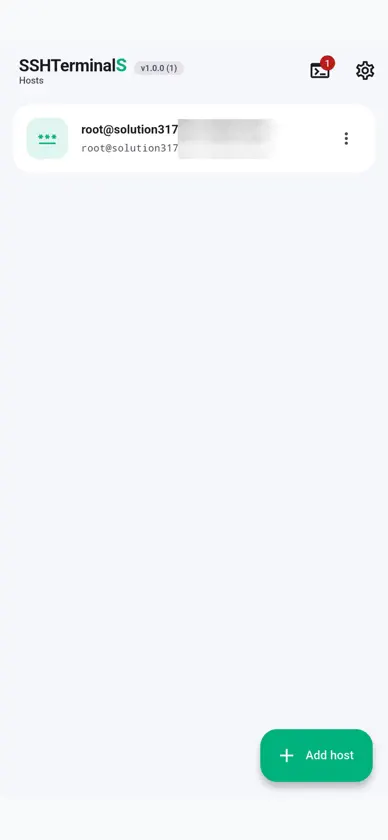
SSHTerminalS 是一款为「无法坐到电脑前」的时刻而生的 SSH 终端。当你在外收到告警,或发现批处理任务卡住而必须立刻处理时,这款应用让你仅凭手中的手机就能打开 shell、读取日志并采取行动。 添加主机、连接、操作、在多台之间切换、安全保存 — 整个流程都在一个应用中完成。 ■ 以安全为起点的设计 • 凭据加密保存 — 服务器密码与私钥绝不以明文存储,而是以 AES-256-GCM 加密,密钥由 iOS 钥匙串保护。iCloud 同步已关闭,不会复制到其他设备。 • 应用锁 — 使用口令或 Face ID 锁定整个应用。启用后,加密密钥将由你的口令派生,因此即使他人拿到你的设备,没有口令也无法打开已保存的凭据。 • 主机密钥验证 — 首次连接时展示 SHA256 指纹供你确认。若日后指纹变更,应用会与已保存的指纹并排展示并拒绝连接,不让潜在的中间人攻击溜过去。 • 截图拦截 — 由于终端中可能显示凭据,截图与应用切换预览默认被拦截。 ■ 在手机上真正好用的终端 • 多会话标签 — 最多同时开启六个会话并即时切换。切换标签、甚至返回主机列表,连接与输出都不会中断,因此一边刷日志一边检查另一台服务器十分自然。 • 辅助键栏 — Ctrl、Esc、Tab、方向键、Home、End、PgUp、PgDn 以及常用符号常驻终端下方。Ctrl 采用切换式,Ctrl+C 这类组合单手即可发送。 • 稳定的连接 — 除 SSH keep-alive 外,还提供防止服务器端空闲超时断线的选项。工作期间屏幕不会熄灭,断线后也可用重连按钮立即恢复。 • 灵活的认证方式 — 支持密码与 PEM 私钥连接,包括带口令的私钥,也能处理要求 OTP 的两步验证服务器。 • 复制与粘贴 — 选取终端输出进行复制,把在电脑上准备好的长命令直接粘贴执行。 ■ 换手机也不会丢失的主机列表 主机列表会自动备份到 Google 云端硬盘的应用专属文件夹。备份中的密码与私钥在上传前会用你选定的口令重新加密,因此我们、Google 乃至任何取得该文件的人都无法打开。同时也提供 JSON 文件的手动导出与导入。 ■ 可按需调整的界面 12 种强调色主题可与浅色、深色、跟随系统三种外观模式自由组合。终端正文始终保持低眩光的深色背景。界面原生支持简体中文、繁体中文、韩语、英语与日语。 把服务器装进口袋 — 在需要的那一刻,用 SSHTerminalS 连上它。 ■ Solution317 的其他应用 • 말씀모아 — 聆听话语的习惯,讲道流媒体 • BibleS — 更轻松地阅读与查找圣经 • WeatherKoreaS — 一眼掌握韩国天气 • CopyNPasteS — 常用语句,一键复制与分享 • MyNoteS — 安全的本地专用记事本 • PdfToImageS — 将 PDF 转为图片,离线更安心 • ResizeToS — 整个文件夹一次性调整尺寸 • PhotoRenamerS — 按拍摄时间整理照片文件名 • VolumeControlS — 以 10% 为单位调节媒体音量 made by Solution317
What's new
Version 1.0.3 · Sep 10, 2026
SSHTerminalS is an SSH terminal built for the moments you cannot reach a computer. When an alert arrives while you are out, or a batch job stalls and someone needs an answer now, this app lets you open a shell, read the logs, and take action from the phone already in your hand. Add a host, connect, work, move between servers, and keep everything safe — the whole flow lives in one app. ■ Designed Around Security • Encrypted credentials — Server passwords and private keys are never stored in plain text. They are encrypted with AES-256-GCM under a key protected by the iOS Keychain, with iCloud sync disabled so nothing is copied to other devices. • App Lock — Lock the entire app with a passphrase or Face ID. When enabled, the encryption key is derived from your passphrase, which means even someone holding your unlocked device cannot open your stored credentials without it. • Host key verification — New servers present their SHA256 fingerprint for your approval. If a fingerprint later changes, the app shows it beside the stored one and refuses to connect, so a possible man-in-the-middle never slips past unnoticed. • Screenshot blocking — Because credentials can appear in the terminal, screenshots and the app switcher preview are blocked by default. ■ A Terminal That Actually Works on a Phone • Multiple session tabs — Keep up to six sessions open and switch between them instantly. Connections and output survive tab changes and even leaving for the host list, so tailing a log on one server while inspecting another feels natural. • Auxiliary key bar — Ctrl, Esc, Tab, arrow keys, Home, End, PgUp, PgDn, and the punctuation you constantly need sit permanently below the terminal. Ctrl is a toggle, so combinations like Ctrl+C take one hand. • Connections that hold — On top of SSH keep-alive, an optional setting prevents disconnects caused by server-side idle timeouts. The screen stays awake while you work, and a reconnect button restores a dropped session immediately. • Flexible authentication — Connect with a password or a PEM private key, including passphrase-protected keys, and handle servers that require an OTP through two-factor prompts. • Copy and paste — Select terminal output to copy it, and paste that long command you prepared on your computer instead of retyping it. ■ A Host List That Survives a New Phone Your host list backs up automatically to the app-specific folder on your Google Drive. Passwords and private keys inside the backup are re-encrypted with a passphrase you choose before upload, so neither we nor Google nor anyone who obtains the file can open it. Manual JSON export and import are available as well. ■ Made to Fit Your Eyes Combine twelve accent color themes with Light, Dark, and System appearance modes. The terminal body always keeps its dark, low-glare background. The interface is natively available in English, Korean, Japanese, and Chinese in both Simplified and Traditional forms. Your servers, in your pocket — reach them the moment you need to, with SSHTerminalS. ■ More from Solution317 • Malsseummoa — A habit of listening to the Word, sermon streaming • BibleS — Read and search the Bible with ease • WeatherKoreaS — Korea's weather at a glance • CopyNPasteS — Copy & share your go-to phrases in one tap • MyNoteS — A safe, local-only notepad • PdfToImageS — PDF to images, safely offline • ResizeToS — Resize a whole folder at once • PhotoRenamerS — Rename photos by capture time • VolumeControlS — Set media volume in 10% steps made by Solution317
More from jinkyun kim


You might also like
All apps like SSHTerminalS: SSH终端 → DeckPilot - Workflow ControlKeshav Kewlani
 DocumentHub: 文件管理器Penghui Zhao
 PenToPrint Handwriting to PDFSerendi LTD
 Device Monitor - DiagnosticsJohn Evans
 TaskForge: Obsidian任务Azhar Dewji
 Möbius SyncPickup Infinity Limited
 BlankPage - stay focusedKiyoshi Nakamura
 习惯追踪器 - HabitGridEdvard Adam Eros
 Nexter - Habit TrackerMarcel Bihl
 Under My Roof Home Inventory +Binary Formations, LLC