
Screenshots





About this app
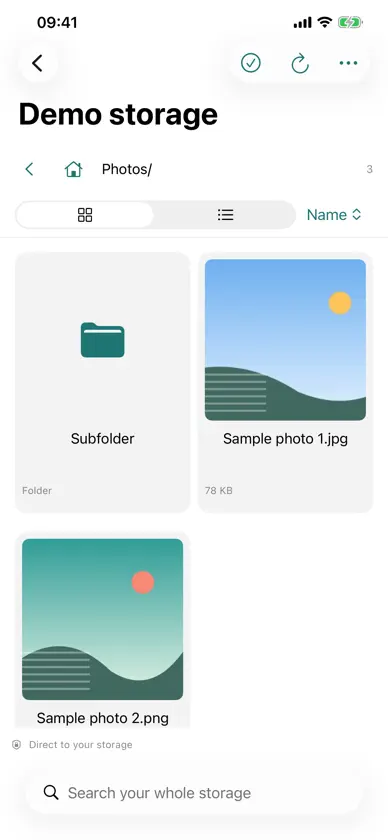
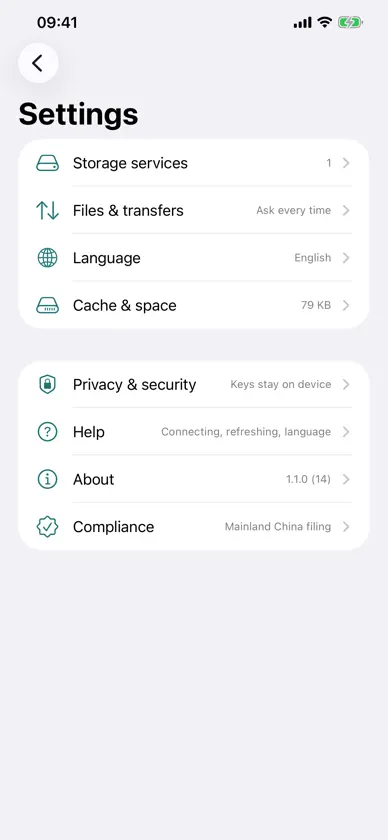
Guyun keeps your files in object storage you already own: Alibaba Cloud OSS, Tencent COS, Qiniu, Upyun, Backblaze B2, Cloudflare R2, MinIO, or any S3-compatible service. No account with us, no server of ours, no telemetry — files go from this device straight into your own bucket. The app provides no storage of its own and takes no cut of yours. ■ Why your own storage Most cloud drives keep files on the vendor's servers, where the vendor sets speed, capacity and price. Guyun turns that around: bucket, keys and bill are yours. ■ What it does · Browse and manage: grid or list, sort by name, date or size, search the whole bucket, create folders, rename, copy and move. · Upload and download: from Files or Photos, folders included; pause and resume; save to a folder or to Photos. · Live Photos come back as Live Photos: the bucket keeps Apple's bundle layout, so the pair and its metadata survive. One entry, a LIVE badge, the still as its thumbnail, press and hold to play. · File details: images and video at the top (tap to preview), audio plays in place, documents get a single "Open preview" row. · Background transfers on iOS: up to 200 MB finishes while you switch apps or lock the screen. · Usage and size: a ledger of what Guyun itself moved (today, month, last month, by storage and device; cellular stays here), and an on-request bucket measurement. Neither is your provider's bill. · Archive storage: archived files are marked and the app asks before a restore (how long, billed, not cancellable). · Previews, trash, devices: images zoom, video plays while downloading; deletes are restorable; one bucket works on iPhone, iPad and Mac. ■ AI access (optional, off by default) Point your own AI client at a local endpoint and let it tidy the drive: list, search, read, download, upload, rename, copy, move, move to trash, or draft a "file by month" plan and run it. · Off by default: no port is opened. When on it listens on 127.0.0.1 only — never your network or the internet — and requires a token the app generates. · Permissions are switches, not promises: seven groups (view, read content, download, upload and changes, delete into trash, irreversible and billed, settings) all start off; a storage can narrow them, never widen them; a new storage asks you first. · Where files are processed has three tiers, defaulting to "Metadata only": names, sizes and dates, while content reads, downloads and checksums are refused. "On this device only" adds downloads — but a download is not a safer reading: the file lands here and your AI client can open it. Only "Send to the AI service" allows content, after a confirmation; the app cannot verify where the AI runs inference, nor recall what was sent. · Irreversible steps (permanent deletion, archive restore, removing a storage) ask inside the app every time; no answer means no action. Keys never reach the AI, and every call goes into a local audit log. ■ Privacy, plainly · No account, no server of ours: the app talks only to the storage address you enter. · Access keys live in this device's Keychain: not uploaded to us, not synced through iCloud. · Data leaves the device only when you hand a storage to another device (the hand-off code is the key in plain text — treat it as a password) or when you turn on AI access and allow reads or downloads. · No usage collection, no third-party SDKs, no analytics, no ads. Face ID and Touch ID stay on your device. Both locks are a screen gate, not encryption. ■ Try it without a bucket A local demo storage is built in — sample photos, a video and a PDF generated on your device, no account, no key, no network. ■ What you need A bucket and a pair of keys scoped to it; pick a service and location and the app fills in the endpoint and region. Guides are on our website. ■ Languages Simplified Chinese, Traditional Chinese, English (switch in Settings; takes effect next launch). Support: contact@airdiode.com Website and guides: https://airdiode.github.io/Guyun/
What's new
Version 1.5.0 · Nov 15, 2026
1.5.0 adds AI access: point your own AI client at Guyun and let it tidy the drive — list, search, read, download, upload, rename, copy, move, move to trash, or draft a "file by month" plan and then run it. Guyun has no AI model of its own and does not use Apple Intelligence: it just connects the client you already use (Claude Desktop, Claude Code, Cursor, …). It is off by default; when on it listens on loopback only and requires a token. All seven permission groups start off, each storage can narrow them further, and a new storage asks you first. Where files are processed has three tiers and defaults to metadata only: content reads, downloads and checksums are refused; "on this device only" adds downloads, and a download is content too; only "send to the AI service" allows reads. Permanent deletion, archive restore and removing a storage ask you inside the app every time. Your keys never reach the AI, and every call is recorded in a local audit log. This release also includes Live Photos that come back as Live Photos (the bucket keeps Apple's bundle layout), a picture block at the top of the detail page with in-place audio, a single "Open preview" row for documents, and the author and website on the About page. This version also makes AI access visible: a status light at the top of the page (grey off, orange waiting, green connected, blue working), a full activity log you can filter, download as CSV and clear, and the MCP guide itself, readable in the app — exactly what your client is told.
More from 晖 江

You might also like
All apps like Guyun → Aimo PointerMoath Asfour
 Aside - Save AnythingArcBlock, Inc.
 TimeWeave+ Tasks & Reminders俊宏 刘
 ADHD Notes: AI Brain DumpUseful Tools LLC
 FlipScape强胜 贾
 Shift Planner - Work RotaXiamen City Fanyou Network Technology Co., Ltd.
 ImageZip: Photo & Video Tools宇航 吴
 People Counter: Party, EventsRamkumar Vellaisamy
 Pond - Drop Your IdeasEUIHYUNG JUNG
 TidyDay - AI每日计划清单·周计划表·时间管理武汉轻效科技有限公司