
Screenshots





About this app
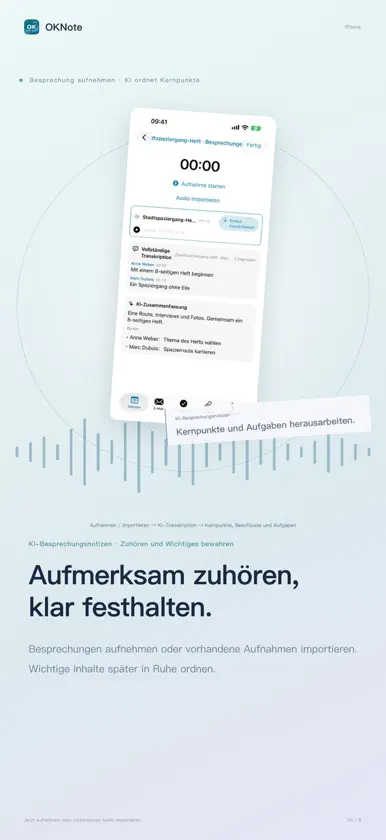
OKnote ist ein leistungsstarker Arbeitsbereich für persönliche Privatsphäre und Effizienz, der exklusiv für NAS entwickelt wurde. Dies ist die mobile gekoppelte Version. Hauptfunktionen der NAS-Software: Notizen als Kern, Erkennung von Meeting-Aufnahmen, E-Mail-Integration und Aufgabenplanung kombiniert mit KI. Mit Fokus auf Datenschutz und langfristiger Datenspeicherung ist es ein äußerst praktisches NAS-Werkzeug für alle Benutzer. Integrierte Domain-Mapping – binden Sie Ihre eigene Domain, um Intranet-Adressen ins Internet zu leiten, damit Sie von überall auf Ihre Daten zugreifen können. Tief abgestimmte Datenübertragung und Synchronisation sorgen für konsistente Daten auf allen Endgeräten. Notizfunktionen · Ein-Klick-Kopie von Bildern und Text: Kopieren Sie gemischten Bild-Text-Inhalt aus WPS, Word und anderen Notizprogrammen direkt in Notizen (Hinweis: WPS hat Einschränkungen in der Webversion aufgrund abweichender Kopierformate); · Sitzungsprotokoll: Unterstützt ab Version 3.1.0. Sitzungsaufnahmen aufzeichnen, Audiospuren per Sprachmodell trennen und KI-Zusammenfassung sowie Sitzungsrückblick aktivieren; · Markdown-Unterstützung: Nach Import von MD-Dateien wird automatisch eine spezielle Markdown-Ansicht erstellt; · Tutorial-Erstellung und Teilen: Effizientes privates Hilfswerkzeug. Bilder, Texte und Anhänge frei kombinieren, um Gedanken und Schritt-für-Schritt-Anleitungen zu erstellen; · Textauswahl zur Diagrammerstellung: KI erstellt Diagramme aus markiertem Text; · KI-Notizzusammenfassung: Notizinhalte per KI mit einem Klick zusammenfassen. E-Mail-Funktionen · KI automatische Antwortentwürfe: KI erstellt Antwortentwürfe basierend auf dem E-Mail-Text; · KI E-Mail-Klassifizierung: KI sortiert E-Mails nach Priorität gemäß Ihren Regeln, um wichtige Nachrichten schnell zu erkennen und zu bearbeiten; · Mehrkonten-Antwort: Wechseln Sie zu anderen Postfächern für Antworten / Allen antworten, wenn das ursprüngliche Postfach nicht verfügbar ist. Aufgabenfunktionen · Automatische Generierung von Wochen-/Monatsberichten: KI erstellt Wochen- und Monatsberichte nach Ihrem Aufgabenplan. Weitere Funktionen werden nach und nach veröffentlicht. Altersfreigabe: Ab 3 Jahren — enthält keine Gewalt, Horror, sexuelle Anspielungen, Schimpfwörter, Simulationsglücksspiel oder andere altersbeschränkte Inhalte, geeignet für alle Altersklassen.
What's new
Version 4.0.0 · Oct 30, 2026
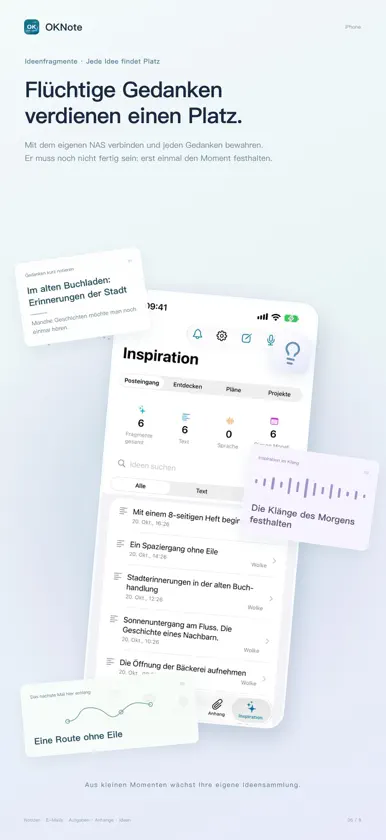
OKnote 4.0 has been fully updated, and the mobile version will now become your handy privacy office tool! iPhone Duo is now supported; You can now make in-app purchases for OKnote on iOS; You can now smoothly use the offline mode on mobile devices; Added the new module [Idea Fragments] (only partial functions are available in offline mode): Idea Fragments is a tool for recording and solidifying fleeting thoughts. It lets you log ideas, analyze connections between multiple thoughts, and turn ideas into tangible innovations. It works great for commercial analysis, project planning, idea correlation and recommendation. It records and manages the full workflow: capture ideas → refine thoughts → get commercial ideas from AI → compare multiple AI-generated plans → project implementation (asset and document management). Note: The classification and analysis feature of Idea Fragments requires a vector model. See AI Settings for details. Unified the notebook LOGO icon on mobile and desktop. Added a view-only mode for mobile notes to prevent accidental text changes from touch operations. Redesigned the email list layout for richer content. Added one-click translation for email body text. Added one-click translation of reply content into the target language. Added an optional feature to include historical emails in replies. Added voice input for tasks, with AI automatic recognition and auto-filling. Added 2 static backgrounds and 4 animated backgrounds. The AI module icon in notes can now be dragged to avoid content occlusion. Fixed incomplete translation issues across multiple languages. Fixed severe page flickering when zooming notes with two fingers on mobile. Fixed the 404 error when tapping to generate charts on mobile. Added mobile collaborative note-taking, you can now co-create notes with AI. Fixed repeated vertical page jumping when the on-screen keyboard pops up. Fixed the bug where images failed to display in email bodies. Fixed several logical bugs.
In-app purchases
The most popular purchases on the App Store.
- OKNote ProConsumable199,99 €
- OKNote FamilieConsumable49,99 €


