
Screenshots




About this app
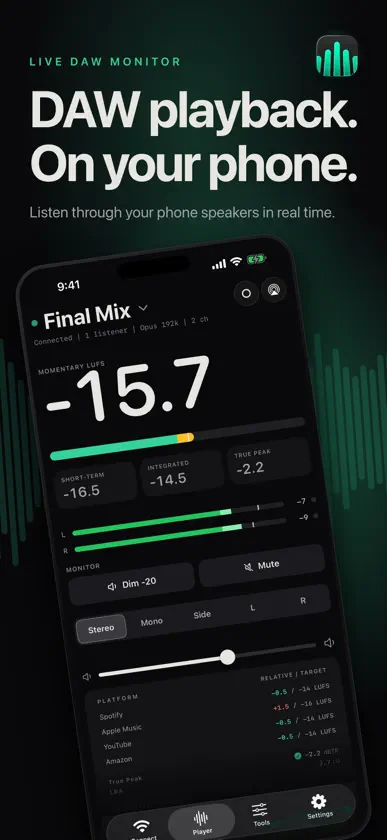
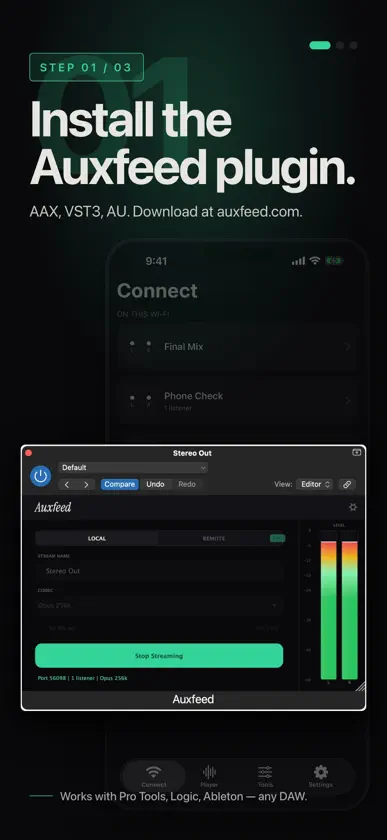
Listen like your listeners. Auxfeed turns your iPhone or iPad into a real-time studio monitor. Works with any DAW. Open the Auxfeed plugin, press play, and hear your mix through your phone speakers, AirPods, Bluetooth headphones or any AirPlay speaker. If your phone can play through it, you can mix through it. Other tools simulate what your mix will sound like on a phone. Auxfeed just plays it there. In your studio it takes your phone and your DAW on the same Wi-Fi, and no account. Auxfeed Pro adds streaming to clients anywhere and the monitoring tools on the phone. FEATURES - Real-time playback of your DAW mix on your iPhone or iPad - Lossless PCM at your session's sample rate, up to 192 kHz. Opus from 64 to 320 kbps. AAC. - 1 to 12 channels in, folded to stereo on your phone - Streams appear by themselves on your Wi-Fi. No IP addresses to type. - Per-channel level meters with peak hold - Momentary and short-term LUFS (EBU R128) - Landscape view plays stereo through both iPhone speakers - AirPlay to HomePod, Apple TV or any AirPlay speaker - Several phones can listen to one stream at the same time - Scan a QR code to connect in a second - Dim and mute Works for any audio work: music, podcasts, post, live events, broadcast. AUXFEED PRO Remote streaming, pro monitoring tools, and more. - Stream to clients anywhere. The plugin gives you a share link; they open it and hear the mix live, no account. One remote stream at a time. - Mono, Side, Mid, Left and Right: hear the mono fold and what each side carries - Integrated LUFS and true peak (dBTP) with over warnings - Loudness targets for Spotify, Apple Music, YouTube and Amazon: see how far your mix sits from each - EQ on the phone: high-pass, low-pass and a sweepable band to find problem frequencies fast. Your DAW output is untouched. - Record what you hear as a WAV file, when the plugin allows it Auto-renews until canceled. Manage in Settings > Subscriptions. HOW IT WORKS 1. Download the Auxfeed plugin at auxfeed.com (macOS and Windows). 2. Put Auxfeed on your monitor bus or any track and start streaming. 3. Open Auxfeed on your phone. Your stream appears on its own over Wi-Fi. 4. Tap it. Live audio and live meters, right away. WORKS WITH EVERY MAJOR DAW ON MAC AND WINDOWS - Pro Tools (AAX): Mac and Windows - Logic Pro (AU): Mac - Ableton Live (VST3): Mac and Windows - REAPER (VST3): Mac and Windows - Cubase / Nuendo (VST3): Mac and Windows - Studio One (VST3 / AU): Mac and Windows - FL Studio (VST3): Mac and Windows - Bitwig Studio (VST3): Mac and Windows - Any DAW that loads AU, VST3 or AAX plugins Download the plugin for Mac and Windows at auxfeed.com Questions: contact@auxfeed.com Privacy Policy: https://auxfeed.com/privacy Terms of Use (EULA): https://www.apple.com/legal/internet-services/itunes/dev/stdeula/
What's new
Version 1.0.19 · Nov 3, 2026
• Fixed: the Loudness peak readings follow the same window as the rest of the card, not the highest peak since the stream started. • Fixed: when a stream can't be reached, one clear card at the top of Connect says so. No more popup covering the menu; dismiss it with the x. • VoiceOver reads the level meters and every tool: channel names, peaks and clips, Loudness, Spectrum, Heat Map, Phase and Replay. • Connect shows each stream's codec, channels and sample rate under its name. • Each tool's gear opens only that tool's settings. Heat Map keeps its picture when you switch tabs. • Unplug the USB cable mid-stream and the app keeps playing over Wi-Fi. Clearer wording in every language.
In-app purchases
The most popular purchases on the App Store.
- Auxfeed Pro AnnualSubscription · 7 days free trial699,00 kr / year
- Auxfeed Pro MonthlySubscription89,00 kr / month


