
Clicklet
Nicholas Ritschel
No ratings yetUtilitiesAges 4+
Screenshots


About this app
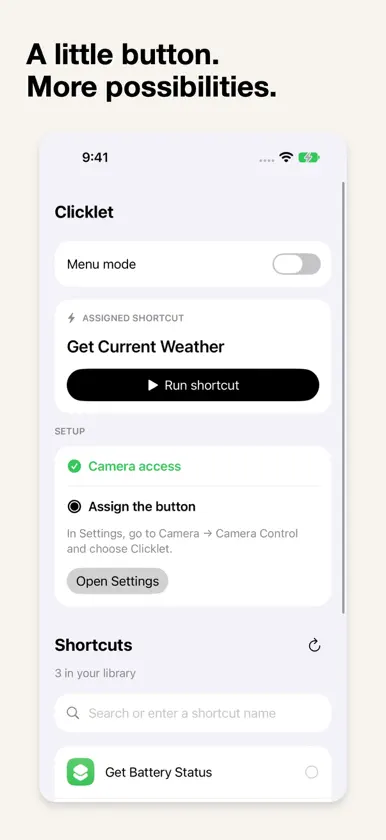
Clicklet lets the Camera Control button on your iPhone start your Apple Shortcuts. Pick one shortcut to launch with a press, or turn on Menu mode and choose from a few favorites each time. Clicklet opens Apple Shortcuts to run your workflow, so you'll see the usual Shortcuts screens, along with any permission prompts or app handoffs your shortcut needs. To set up your library, install the included Connect Clicklet helper. It brings in your shortcut names and small icon images, which appear in your library, in the menu, and while a shortcut opens. You can also search for a shortcut or type its name. If you used an earlier version, replace the old helper with the new one and refresh to get icons. From the menu, tap Configure to go back to setup. You can scroll the menu by dragging along its side margins. Your shortcut names, icons and selections stay on your device. There's no account, advertising, analytics, subscription or in-app purchase. Camera access supports the Camera Control and lock-screen handoff and shows a live preview; Clicklet doesn't save photos or videos. Launching while your iPhone is locked requires authentication. Requires iOS 18 or later and Apple's Shortcuts app. Launching from the button requires an iPhone with Camera Control; set Clicklet in Settings > Camera > Camera Control. Opening Clicklet on its own shows your setup without running a shortcut.
What's new
Version 1.1 · Nov 9, 2026
Shortcut icons are here. Connect or refresh your library to see them in your list and menu. Scroll the launcher menu from either side margin, and tap Configure to return to setup. Support and Privacy links now scroll with the setup sidebar. Already using Connect Clicklet? Replace it with the helper included in this update, then refresh your library.

