
qForging
USHIO FUJIMURA
No ratings yetGraphics & DesignAges 4+
Screenshots



About this app
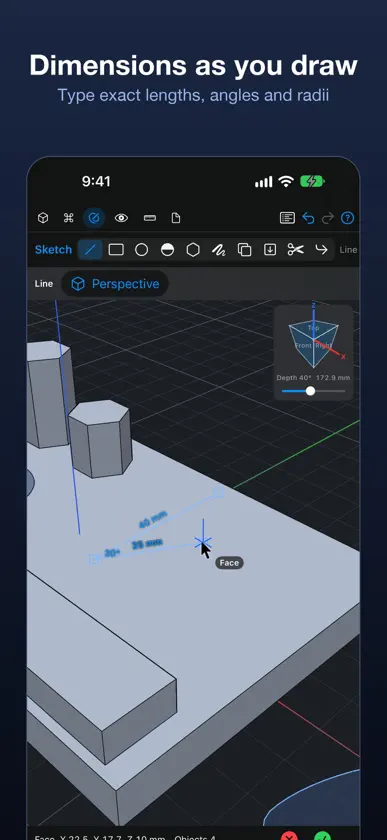
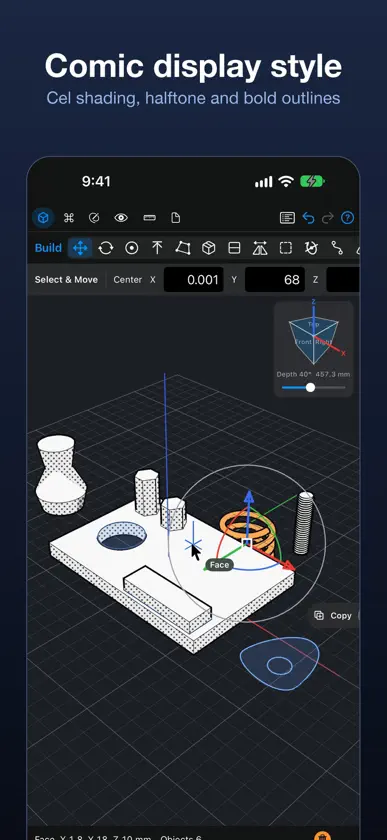
qForging is precise 3D CAD for iPhone, iPad and Mac. Sketch in 2D, pull it into 3D, and keep every value editable: springs, threads, fillets, holes and more. NEW IN 0.4 - Importing Parasolid X_T files now turns many more parts into editable defined shapes instead of meshes: screws and bolts, parts with internal or external threads (threaded rings and caps), extrusions with rounded or chamfered edges and drafted sides, and round wires and coiled cords as sweeps. Files from older Parasolid versions open, and import is faster and lighter. - Fitted solids: keep a body and the parts cut from it editable as one shape. Antimatter can be limited to cut only chosen objects or groups. - Rounded and chamfered edges and drafted sides of extrusions stay editable. Change the radius of a single edge, or switch it between round and chamfer. - New display style: Comic. - Set a construction plane from three points. One-tap actions are gathered in a new Commands category. - Tracing a picture follows the middle of pen lines, and pictures can come from the photo library. - Much lower memory use, smoother editing of large documents, continuous outlines, and fixes for freezes and crashes. A CURSOR YOUR FINGER NEVER HIDES Move the cursor with one finger like a trackpad. It snaps to vertices, midpoints, centers, edges and faces, so you can work precisely even on a phone. Two fingers orbit around the point under the cursor, pinch zooms, three fingers pan. Apple Pencil draws right where it touches. SKETCH, THEN BUILD Lines, rectangles, circles, arcs, polygons, the Bezier pen and text. Enclosed areas become regions automatically. Pull a region into a solid, sketch on a face and pull out to add or push in to cut. Revolve, sweep, loft, patterns, metric threaded holes and threaded rods. SERIOUS MODELING Fillet and chamfer edges and corners, shell, split, mirror, scale, offset and tilt faces, construction planes. Antimatter cuts whatever it overlaps without destroying the original, so you can move or remove it later. Move, rotate and scale handles show the amounts right on them. CHECK YOUR WORK One, two or four views, a view cube, perspective or orthographic projection, a live section plane, and 2D drawings on A4 exported as PDF, SVG or DXF. FILES THAT STAY EDITABLE Import and export STEP, Parasolid X_T, STL, OBJ, 3MF, SVG and DXF. Imported solids are rebuilt as boxes, extrusions, revolves and springs where possible, so they stay light and editable. PRIVATE BY DESIGN No account and no tracking. Everything stays on your device. Available in 10 languages.
What's new
Version 0.4.0 · Nov 9, 2026
qForging 0.4 - Importing Parasolid X_T files now turns many more parts into editable defined shapes instead of meshes: screws and bolts, parts with internal or external threads (threaded rings and caps), extrusions with rounded or chamfered edges and drafted sides, and round wires and coiled cords as sweeps. Files from older Parasolid versions open, and import is faster and lighter. - Fitted solids: keep a body and the parts cut from it editable as one shape. Antimatter can be limited to cut only chosen objects or groups. - Rounded and chamfered edges and drafted sides of extrusions stay editable. Change the radius of a single edge, or switch it between round and chamfer. - New display style: Comic. - Set a construction plane from three points. One-tap actions are gathered in a new Commands category. - Tracing a picture follows the middle of pen lines, and pictures can come from the photo library. - Much lower memory use, smoother editing of large documents, continuous outlines, and fixes for freezes and crashes.


