
StarfloaTik
Inna Rudenko
No ratings yetUtilitiesAges 4+
Screenshots



About this app
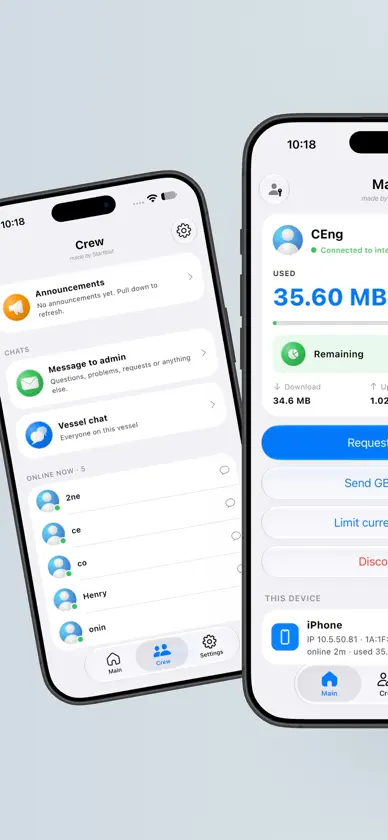
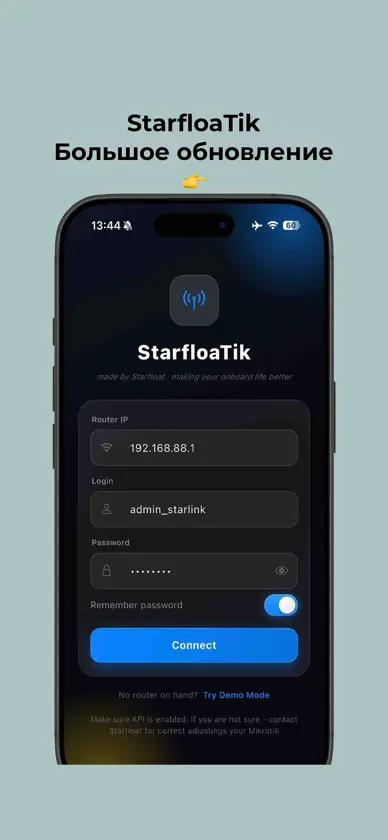
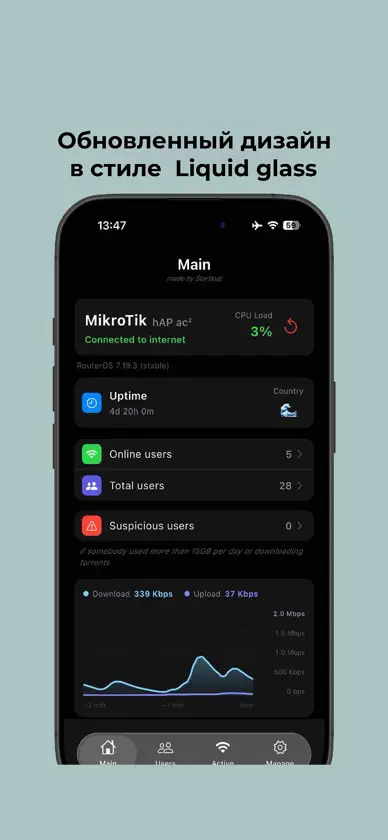
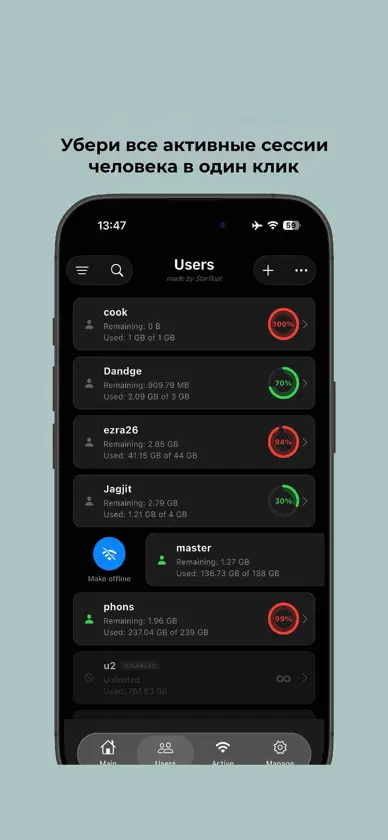
StarfloaTik is a clean, fast and secure manager for MikroTik Hotspot — built for vessels, crews, fleet managers and network administrators who run onboard or onshore Wi-Fi from their phone. One app, two modes: Admin for the person who manages the router, and Crew for everyone who uses the Wi-Fi. CREW MODE Turn it on in one tap. Each crew member logs in with their hotspot login and gets their own screens: - Traffic and GB left, time online and their devices — live. - Notices and announcements from the admin, and personal notices just for them. - Vessel chat and direct chats phone to phone over the vessel Wi-Fi — no internet and no traffic needed. Photos, reactions and replies. - Messages and top-up requests to the admin. - GB transfers to other crew members and a one-time limit for their own session. For the admin, Crew Manager keeps it all in one place: who is online, chat, GB transfers, session limits, announcements, personal notices and crew requests such as password changes — approve in one tap. ADMIN MODE Connect directly to your RouterOS device over its native API and get full control in seconds: - Live dashboard — model, RouterOS version, uptime, CPU and memory load, real-time WAN traffic chart. - Hotspot users — create users and vouchers, edit, enable, disable or remove them. Assign profiles, set traffic limits, reset counters one by one or in bulk. - Active sessions — who is online right now: username, IP, MAC, uptime, live speed and traffic used. Disconnect anyone in one tap, or everyone before maintenance. - Profiles — shared users, rate limits, session and idle timeouts. - Router tools — bridges and interfaces, firewall rules, hotspot servers, DNS, Wi-Fi settings, scripts and scheduler, router time. - Notice to crew — a pop-up and banner on the hot.spot login page, with ready templates. - Your hot.spot pages — new design with your own background and app download buttons, updated straight from the app. - Telegram — top-up requests from the crew, daily traffic reports and a torrent detector that blocks torrent users automatically. - History and reports — every change is logged; History and Data reports with PDF export; back up the History to the router and restore it on a new phone. - Maritime zone map — territorial waters and your position on the map, with a distance tool. DESIGN Built in the iOS 26 Liquid Glass style: native glass buttons, menus and tab bar, smooth animations, two-column layouts on iPad, Face ID login. Available in English, Ukrainian, Filipino and Hindi. PRIVACY FIRST StarfloaTik connects directly from your phone to your router. No StarfloaTik servers, no analytics, no tracking. The crew chat stays on the vessel Wi-Fi, phone to phone. Your router password is stored only on your device and protected by Face ID. Try everything first in Demo mode — no router needed, for both admin and crew. Perfect for vessels, fleets, hotels, campsites and any place where MikroTik powers the guest Wi-Fi. Requires a MikroTik router with the API service enabled (port 8728) on the same network. Crew mode works on the router's hotspot Wi-Fi.
What's new
Version 2.2.1 · Nov 11, 2026
What's new in 2.2.1 • Support for iPhone Duo. • TP-Link settings — the StarfloaTik finds TP-Link routers behind your MikroTik and opens their settings page in one tap. See which devices and users are on each router, and note the deck where it stands. • Check your cables — a new screen in Manage. See every MikroTik port and the state of its cable: green is OK, orange is slower than 1 Gbps, red needs attention. • Device name on the Active tab — see which phone, tablet or computer each crew using now. • Fixes and small improvements.
You might also like
 OctoTikArtem Soroka
 OctoClientArtem Soroka
 Mikrolink HotspotYevgenii Kryzhanivskyi
 OceanLinkXSeny Maritime EOOD
 YoSC - Your Secure ConnectionWEEDAR
 MikroTik Hotspot Manager ProLUTFULLAH SAFDARI
 Infinity Fleet ConnectArtem Soroka
 MikroTicket: WiFi VouchersMikroTicket LLC
 Orio MonitorAli Falah
 MikroTik Beacon ManagerMikroTik