
warmread
Roger Sengthavychith
No ratings yetProductivityAges 4+
Screenshots


About this app
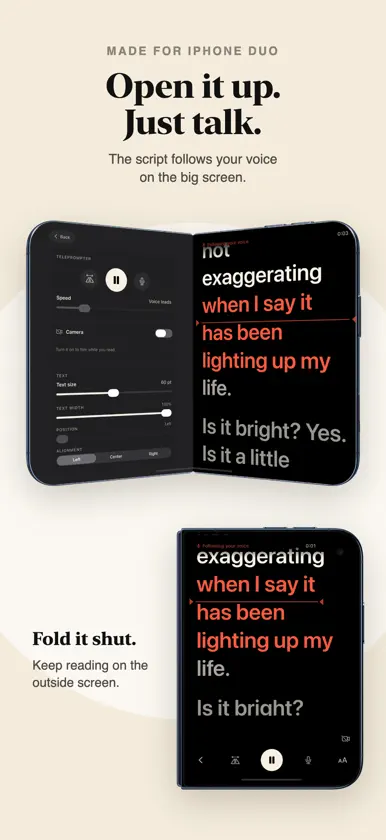
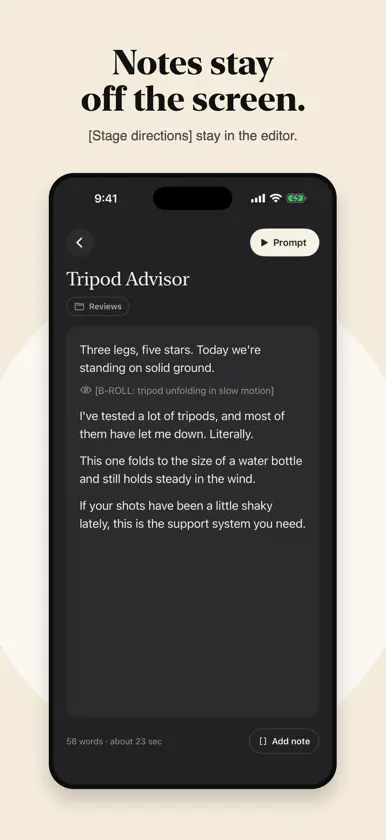
warmread is a teleprompter that follows your voice. Just start reading. The script moves as you talk, waits when you pause and keeps your place when you ad lib. The next lines glow so your eyes land ahead of your mouth. No remote, no foot pedal, no one scrolling for you. RUN THE TAKE WITH YOUR VOICE Say "go back" to jump back a few lines, "start over" to go to the top, "pause" to hold and "end take" to stop and save your recording. If your script uses the same words, warmread reads them instead of obeying them. MADE FOR IPHONE DUO warmread knows how you're holding it and puts the script right beside the camera you're looking into. - Laptop: the script stands on the top half under the camera, with the controls on the half resting on the table. - Book: your scripts and the editor split right at the fold. - Main cameras: open it flat, turn it around and read on the outside screen while the best cameras film you. - Closed: a teleprompter in your pocket on the outside screen. Each way you hold it remembers its own text size, width and position. FILM WHILE YOU READ Record in 720p, 1080p or 4K at the frame rate you choose, with stabilization. Your video plays faintly behind the words so you can check your framing, and takes save to Photos, even if a call comes in. READY FOR GLASS True black, mirror and flip for teleprompter rigs, a red eyeline you can drag to where your eyes rest, and text you can size, narrow and slide toward the lens. WRITE AND PASTE Paste from notes, docs or anywhere. Smart paste cleans it up, and [stage directions] stay in the editor and never show on the screen. Every script shows how long it reads, and learns your real pace after a few full reads. BLUETOOTH REMOTES TOO Prefer a clicker? Start, pause, change speed and step lines from any Bluetooth remote or keyboard, mapped the way you like. PRIVATE BY DESIGN No account, no ads, no tracking. Speech is recognized on your device and never saved. Scripts and settings sync through your own iCloud.
What's new
Version 1.0.3 · Nov 8, 2026
The first big update since launch. Less fiddling, more filming, and a lot of little things that make every take easier. Roll with one tap. Tap record for a three second countdown, then your take and your script start together. Every clip starts clean. Use the volume buttons. While the camera is on, press a volume button or Camera Control to roll and cut. Bluetooth remotes can record too. The rear camera and every lens. Film with the rear cameras on iPhone and switch between ultra wide, wide and telephoto right from the prompter. Cinematic blur. A soft background that keeps the focus on you. Turn it on in video settings. A steadier voice scroll. It sticks close to where you are, only jumps ahead once it's sure you've moved there, and listens in your script's language. Just ask Siri. Say "Prompt my latest script in warmread", or put it on the Action button. Your scripts show up in Spotlight too. Try me first. A new script in your library walks you through everything. Just read it out loud. Paste in one tap with no permission prompt, and undo a delete if you change your mind. More room in landscape, Japanese, Chinese and Thai scripts, smoother scrolling for long scripts, gentle haptics, and better VoiceOver, larger text and Reduce Motion throughout.


