
Lua IDE - Learn Lua Coding
盼军 崔
No ratings yetDeveloper ToolsAges 4+
Screenshots




About this app
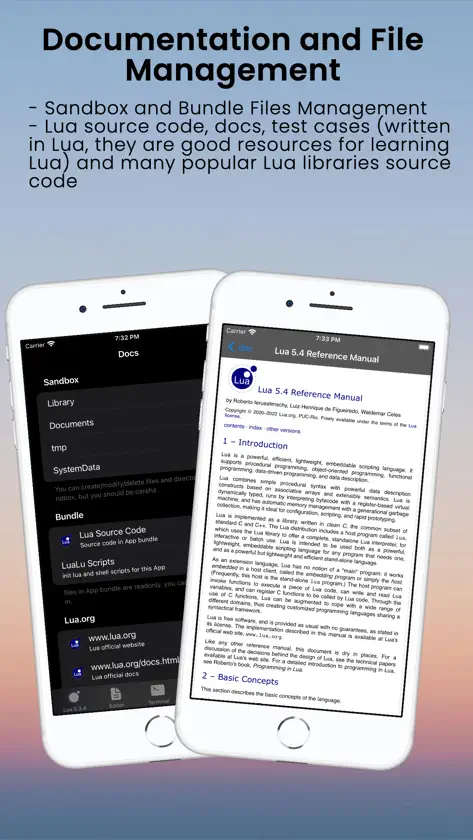
Bienvenido a Lua IDE REPL: libera tu potencial en Lua. Incluye intérprete integrado, editor de código, gestor de archivos y terminal. Compatible con resaltado de sintaxis, gestión de proyectos y depuración. Ahora con autocompletado de código y formateo automático. Funciona sin conexión, soporta varios idiomas. What's on the Horizon? Package Management Magic: Stay tuned for Lua IDE's Package Manager, a game-changer for library integration. It's like having LuaRocks at your fingertips, making library management a breeze. Debugging Join the Lua IDE Community: Your Voice Matters: Have a suggestion or a brilliant idea? Reach out to us at amadman380743909@gmail.com or visit https://www.iamadman.com, or twitter: andy38074, Reddit: iamadmancom. Your input is what propels Lua IDE forward. Learn on Your Terms: Lua IDE is not just an app; it's a journey. Learn programming wherever, whenever, and whatever you desire. Unleash your coding potential with Lua IDE today! This is Lua IDE with a standalone interpreter, a Code Editor and File Manager and many useful resources for learning Lua. Lua REPL: Lua official standalone interpreter integrated. You can input Lua code interactively with it. And you can also use it to run a Lua file in Terminal. Terminal: ##Cursor Operations: - supports various cursor operations, including cursor positioning, hiding, showing, and blinking. ##Colors: - ANSI escape codes for text styling and colors are fully supported. You can set foreground and background colors, as well as apply other text styles. ##Escape Sequences: ##256-Color Mode: ##True Color (24-Bit Color): ##Text Selection and Copy-Paste: - Users can select text within the terminal, and xterm.js provides built-in functionality for copying and pasting text to and from the clipboard. ##Input Handling: - handles keyboard input, allowing users to type commands and interact with the terminal interface using the keyboard. ##UTF-8 and Multilingual Support: #Shell Commands ##Support many useful shell commands "ifconfig","ping","export","readlink","chmod","scp","telnet","host","du","link","dig","cksum","bc","date","egrep","gzip","nslookup","fgrep","mv","open","md5","say","ssh-keygen","xargs","diff","cd","tee","lua","sh","touch","dc","tar","chflags","rm","sort","uniq","awk","printenv","find","mkdir","tail","unalias","pwd","ed","gunzip","compress","nc","uptime","sed","openurl","setenv","stat","alias","sum","head","uname","wc","cat","echo","unsetenv","unlink","pbpaste","rmdir","uncompress","curl","ln","cp","whoami","rlogin","sftp","tr","env","ssh","whois","pbcopy","wol","grep","ls" ##Custom commands "code", "help", "clear", "files" Code Editor: ## Syntax Highlight Syntax highlighting for Lua and many other languages like: C, C++, Swift, JavaScript, TypeScript, CSS, HTML, Markdown, JSON, Python, YAML, Bash (you can view Makefile as bash file). ## Line Number Show/Hide line number gutter. ## Wrap Line ## Invisible Characters ## Themes Currently support four themes that cover both Light and Dark Mode Docs ##Bundled Source Code and Documentations ###Lua source code Lua 5.3.4, 5.3.6, 5.4.6 source code, docs, and tests (written in Lua, they are very good resources for learning Lua) ##Online Documentations ###Lua.org ###Lua-users.org ###LuaRocks.org ###Awesome-lua File Manager You can create/delete/view/copy/paste files and folders. Source code files are syntax highlighted.
What's new
Version 4.8.1 · Dec 28, 2025
algunas optimizaciones
In-app purchases
The most popular purchases on the App Store.
- Pro MonthlySubscriptionUSD 0.99 / month
- Pro YearlySubscriptionUSD 9.99 / year
- Buy me a coffeeConsumableUSD 2.99
More from 盼军 崔


You might also like
 Lua IDEWenhuan Li
 Lua IDE Fresh Edition小文 黄
 luai5.2.1-autocomplete,runcode小文 黄
 Love2D Studio淑敏 孙
 LispPad GoMatthias Zenger
 CraftOS-PCJack Bruienne
 CodeMaster - Mobile Coding IDEShanghai Dazhuo Information Technology Co., Ltd.
 Pythonica: Code and DebugFiras Moussa
 WebDebug - Web debugging toolShanghai Dazhuo Information Technology Co., Ltd.
 pythoni-run code,autocomplete小文 黄