
Screenshots




About this app
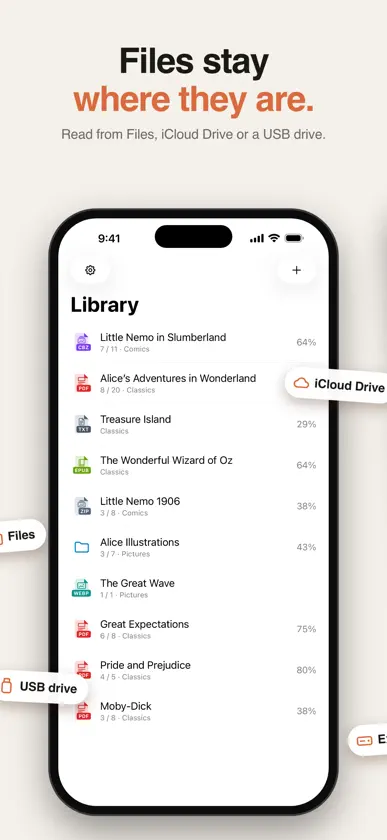
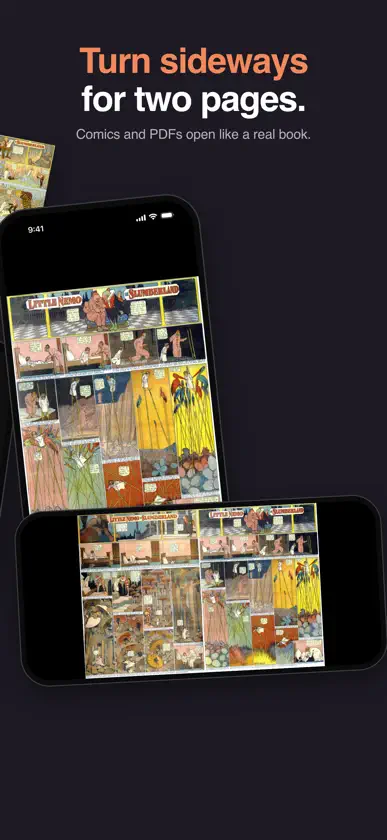
Plain Reader opens your books, PDFs, comics and image folders right where they are — in Files, iCloud Drive, or on a USB drive or external SSD. No account, no import, no copies. READ, NOTHING ELSE • Menus stay hidden while you read. Tap the center to bring them back. • Pages fill the screen. Swipe, tap the sides, or drag the slider to jump anywhere. • Turn your iPhone or iPad sideways for two-page spreads, with the cover on its own. • Turn pages with a Bluetooth page turner or a keyboard. TXT AND EPUB • Choose the font, size, line spacing, margins and theme — pages reflow to fit. • Listen: books in 31 languages are read aloud by natural voices made on your device. • Table of contents, search and bookmarks. TXT text encoding is detected automatically. COMICS AND MANGA • Opens ZIP and CBZ archives without unpacking them — even ones with thousands of pages. • Right-to-left reading for manga. • A folder of images opens as one book. PDF • Sharp pages, search, table of contents, thumbnails and text selection. • Two-page spreads on wide screens. YOUR FILES STAY YOURS • Files are read in place and never uploaded anywhere. • Bookmarks and your reading position are kept for every book. • Works with iCloud Drive and external storage through the Files app. PLAIN READER PRO Plain Reader is free with a small banner ad. Watch one short video ad to read without banner ads for 2 hours, or to use Listen for 1 hour. Plain Reader Pro removes all ads and adds unlimited Listen, Auto Page Turn, and blocking the apps you pick while you read. Choose a Monthly or Yearly subscription — Yearly starts with a 7-day free trial for new subscribers — or a one-time Lifetime purchase. Restore it on your iPhone and iPad with the same Apple Account. Payment is charged to your Apple Account when you confirm the purchase. Subscriptions renew automatically unless canceled at least 24 hours before the end of the current period. You can manage or cancel them in your App Store account settings. Terms of Use: https://ourbeom.com/plainreader/terms Privacy Policy: https://ourbeom.com/plainreader/privacy
What's new
Version 1.5.0 · Oct 29, 2026
• Auto Page Turn (Pro). In a book, open Settings and tap Start Auto Page Turn. TXT and EPUB turn every 30 seconds, comics and PDFs every 10. You can change both. • Block apps while you read (Pro). Pick them in Settings > Focus. They won't open while you're reading and come back as soon as you close the book. • Bluetooth page turners and keyboards turn pages now: PageDown, the arrow keys or Space. Settings > Page Turner Test shows whether yours is connected and which keys it sends. • Choose how pages turn in Settings > Touch > Turn Pages With: Tap, Swipe or Both. TXT, EPUB and comics now turn with up and down swipes too. • Bookmarks and your place stay on the same text when a new font size changes the page count. • When you start a free trial, you see the date you'll be charged and get a notification the day before.
In-app purchases
The most popular purchases on the App Store.
- Plain Reader Pro (Lifetime)Consumable14,99 €
- Plain Reader Pro (Monthly)Subscription0,99 € / month
- Plain Reader Pro (Yearly)Subscription · 7 days free trial7,99 € / year
- Plain Reader ProConsumable2,99 €
More from OurBeom

You might also like
 Manamo: EPUB & Ebook ReaderKrisan Murugendran
 L&N ReaderVibetuned
 NextPhase ReaderNextPhase LLC
 LoreMark: EPUB & PDF ReaderManh Tien Tran
 Anyview - Comic & Book ReaderJaehyun Shin
 MiracleNovel: Read RomanceIBT PTE. LTD.
 AureadMehdi Maaref
 HoneyBooks RomanceHoneyBooks OU
 OnlyText: TXT & EPUB ReaderSTUDIOJIN
 Timebound EPUB ReaderCow Cow Technologies LLC