
Visual Routine Timer: NextStep
Mubarak Almahmeed
No ratings yetProductivityAges 4+
Screenshots




About this app
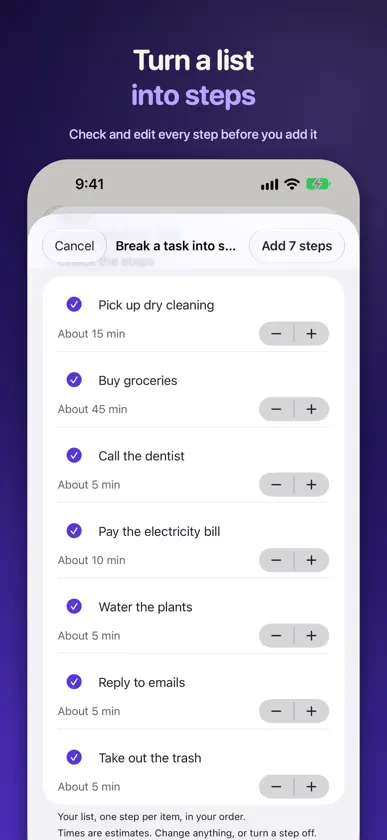
Get through a busy morning one step at a time. NextStep shows the step you are on, how long it should take and when you want to be finished, on iPhone and on Apple Watch. Each step counts down its own estimate. At zero nothing moves on by itself: the step waits there until you tap Done. BUILD THE ROUTINE • Up to 30 steps per routine, each with a time estimate, a short note and an optional flag • Choose a finish-by time and watch the estimated finish as you work through the list • Start from a ready-made routine for leaving the house, an evening reset or a focus block, or write your own • Break a task into steps: NextStep offers steps and times from its own templates for everyday tasks and, on iPhones with Apple Intelligence, from the on-device model for anything else. Every step is yours to check before it goes in • Reorder, duplicate or archive routines whenever you like • Repeating reminders arrive at the time you choose; a reminder never starts a routine on its own WORKING THROUGH THE STEPS • Done, Skip, Pause, Add 1 minute and End are always up to you • Running late? Adjust plan lists the optional steps still to come and the minutes each would save. Drop a few, or shift the finish time for this run only • Pausing or adding a minute leaves your deadline where you put it, so the effect on the plan is plain to see WRIST, WIDGETS AND LOCK SCREEN • The Apple Watch app can run saved routines without your iPhone nearby, and the two catch up once they reconnect • An optional Live Activity follows routines you start on iPhone, with a Done button for the step you're on • The Home Screen widget shows the step you're on with a Done button, or your next routine • A Start routine control in Control Centre or on the Action button opens your next routine, ready for you to confirm • Watch complications show your progress at a glance TIMES BASED ON YOUR OWN PACE • History lists the routines you finished or ended • After enough real runs, NextStep suggests new step times from your own pace, and you decide which to keep BEFORE YOU GO PRO • Two saved routines, run as often as you like • Routine editing, reminders, widgets, the Live Activity, the Start routine control, the last seven days of history, time suggestions and file import and export • Three goes at Break a task into steps • Watch complications, if you were using NextStep before version 1.1 • A 45-second demo run that never reaches your history NEXTSTEP PRO • No limit of two routines • Full history with planned-against-actual times • Extra ready-made programmes, such as Ready to go and A calmer evening, which you can preview before buying • Break a task into steps with no limit • Watch complications, if NextStep was first installed at version 1.1 or later • If Pro stops, your routines remain available to view, edit and run • A paywall never appears while a routine is running STAYS ON YOUR DEVICES There is no account to create, not a single advert, and no outside AI service involved; Apple Intelligence suggestions are put together on the iPhone itself. Routines and history stay on the devices that run them, and you can export a file for your own copy at any time. ABOUT PRO PAYMENTS Three ways to get Pro: monthly, annually, or once for good with the lifetime unlock. Look at the purchase sheet before confirming; it states your regional price and how often a plan bills. Apple collects payment from your Apple Account. Plans carry on from one period to the next without any action from you. Auto-renewal can be switched off up to a day before a period closes, otherwise the next period is billed on that final day. Subscription settings sit under your name in Settings. Lifetime is separate from any plan you already hold, so end that one yourself if you no longer want it. Privacy: https://mubaraklabs.com/privacy/nextstep/ Terms: https://mubaraklabs.com/terms/nextstep/ License: https://www.apple.com/legal/internet-services/itunes/dev/stdeula/
What's new
Version 1.1 · Oct 17, 2026
Version 1.1 helps you set up a routine sooner and follow it from more places. • On a new install, a five-step setup lets you choose what NextStep should help with first, set a finish-by time, then review your first routine and start it • Break a task into steps from the routine editor. NextStep suggests steps and times for common tasks; on iPhones with Apple Intelligence, the on-device model helps with other tasks. You check every step before it is added (three free tries, then Pro) • Tap Done on the current step from the Home Screen widget or the Live Activity • A Start routine control for Control Centre, the Lock Screen or the Action button opens your next routine, ready to confirm • Siri and Shortcuts can mark a step done, skip a step or tell you what's next. Spotlight finds saved routines when step names aren't set to private • Clearer VoiceOver labels, and layouts that hold up at the largest text sizes • Watch complications are part of Pro for people who first installed NextStep at version 1.1 or later. Anyone who used NextStep before keeps them free
In-app purchases
The most popular purchases on the App Store.
- Pro LifetimeConsumable59,99 €
- Pro AnnualSubscription · 7 days free trial34,99 € / year
- Pro MonthlySubscription5,99 € / month
More from Mubarak Almahmeed
 Keto Meal Planner: Diet PlanMubarak Almahmeed
 Stencilsmith: Image to SVGMubarak Almahmeed
 Kerfwise: Cut List GeneratorMubarak Almahmeed
 RoomFit: Room Layout PlannerMubarak Almahmeed
 Memory Magazine: ScrapbookMubarak Almahmeed
 ProofBook: Contractor ReportsMubarak Almahmeed
 Replay Notebook: Tennis VideoMubarak Almahmeed
 Study Desk: Source FlashcardsMubarak Almahmeed
You might also like
 ADHD TimePiotr Poliwoda
 Calibrate: Time Block PlannerWarren Peters
 Hey OnTime: Meeting ReminderWherk
 Rutin: Start on TimeEmilia Elgfors
 Routine Tracker - Daily FlowBULPARA TEKNOLOJI LIMITED SIRKETI
 DayTimer - Time BlockingRajai Baboun
 Ready Freddy RoutinesGriffin Davis
 Commute Prep - MorningRushStreet567
 Focura: ADHD Time BlockingNoah Carpenter
 HeavyLogVeedroot