
VelNotes : Notes manuscrites
YUNUS ISLEGEL
No ratings yetProductivityAges 4+
Screenshots




About this app
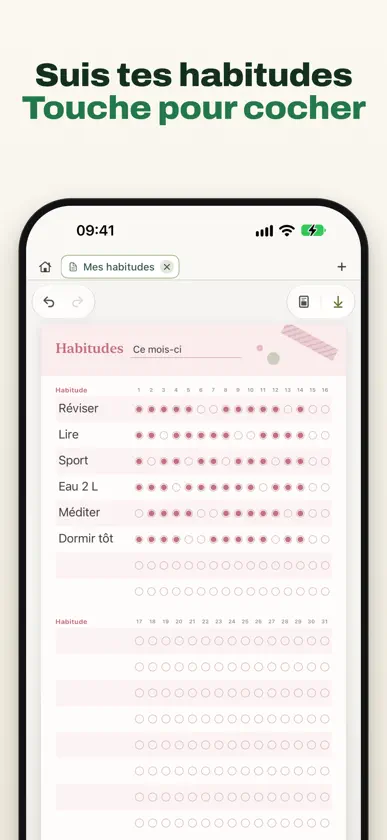
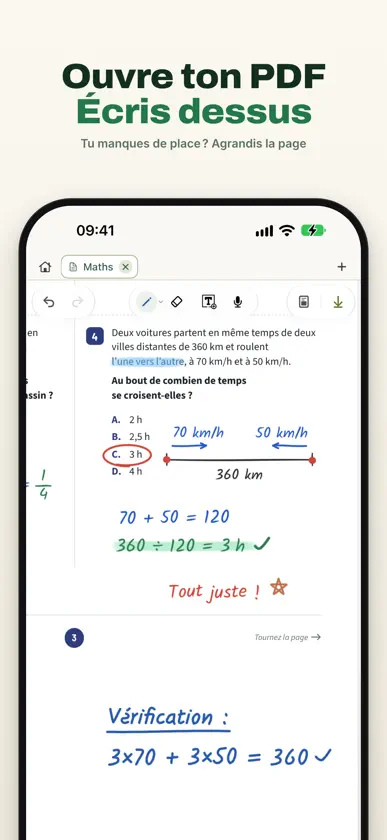
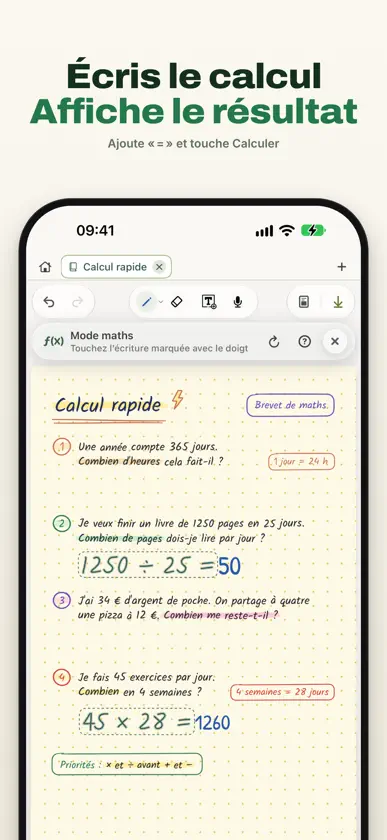
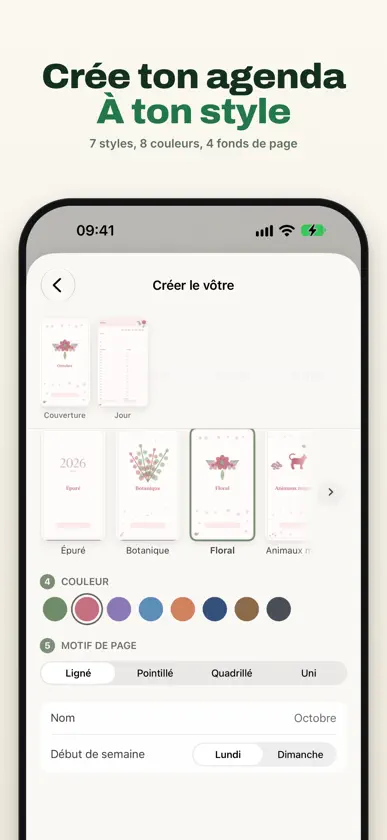
Prenez des notes à la main, annotez vos PDF et transformez vos enregistrements de cours en texte. Tout est réuni dans une seule app, sur iPhone comme sur iPad, sans compte à créer. • Mode maths : écrivez un calcul comme 2(3+4)=, on s’occupe du reste. Touchez la ligne marquée, puis « Calculer » : 14 s’affiche à côté du =. Un chiffre mal lu ? Corrigez-le. • Embellir en écrivant : vos notes griffonnées en cours deviennent nettes et lisibles pendant que vous écrivez, dans l’un des 19 styles ou en version soignée de votre propre écriture. • PDF trop serré ? Agrandissez la page ou ajoutez de l’espace à côté pour vos notes, solutions et schémas. PARTOUT AVEC VOUS • Sur iPhone, écrivez au doigt sur des pages au format de l’écran, et retrouvez vos carnets de l’iPad grâce à iCloud • Planificateurs sur iPhone : 12 modèles prêts à remplir ou le vôtre, dates déjà en place ; touchez une ligne pour saisir du texte, une case pour la cocher • Sur iPad : deux carnets côte à côte, et une fenêtre vidéo flottante pour suivre un cours tout en prenant des notes ÉCRIVEZ À VOTRE FAÇON • Au doigt sur iPhone ; sur iPad, avec l’Apple Pencil ou, en option, au doigt • Zones de texte, Texte rapide, formes, règle, pinceaux, étiquettes et notes adhésives, plus le pointeur laser sur iPad • Redressez vos traits, déplacez votre écriture, convertissez-la en texte ou griffonnez pour effacer • Papier Seyès, ligné, quadrillé, Cornell ou agenda, 360 stickers et dossiers en couleur PDF ET CONTENU VISUEL • Importez vos PDF, même protégés par mot de passe ; au-delà de 300 pages, ils s’importent par parties • Écrivez sur les pages et ajoutez texte, photos, scans, stickers, formes et GIF • Onglets, formats A4, Lettre US ou personnalisé, export en PDF ou en images ENREGISTREZ ET TRANSCRIVEZ • Enregistrez cours, réunions et idées ; si l’app se ferme brusquement, l’enregistrement est récupéré • Transcrivez sur l’appareil, en choisissant la langue parlée • Avec Pro, importez un fichier audio ou vidéo et transformez la parole en texte REJOUEZ ET CRÉEZ • Voyage dans le temps : revoyez l’écriture d’une page et exportez-la en vidéo 9:16 ou 16:9 • Sticker Studio : détourez vos photos sur l’appareil pour en faire des stickers PENSÉ POUR LA CONFIDENTIALITÉ • Aucun compte requis ; vos carnets sont d’abord stockés sur l’appareil • Synchronisation entre vos appareils et sauvegarde privée via votre iCloud Drive, activées par défaut s’il est disponible ; désactivez-les ou exportez vos données à tout moment • VelNotes n’envoie ni vos carnets ni vos enregistrements bruts sur ses serveurs GRATUIT ET PRO Formule gratuite : jusqu’à 3 carnets à la fois, plus 3 planificateurs sur iPhone (éléments synchronisés, restaurés ou dans la corbeille compris ; une suppression définitive libère une place), des enregistrements de 15 minutes par session et une utilisation de la transcription en direct. Mode maths, Embellir, agrandissement des pages, vidéos Voyage dans le temps, ainsi que l’écran partagé et la fenêtre vidéo sur iPad : gratuits pour tous. Pro, en abonnement hebdomadaire, mensuel ou annuel, ou en achat unique à vie (mêmes fonctions) : carnets illimités, planificateurs illimités sur iPhone, transcription sur l’appareil de vos fichiers audio et vidéo, enregistrements plus longs et transcription en direct illimitée sur les appareils compatibles. Pro est valable sur iPhone et iPad avec le même compte Apple. Les prix varient selon la région de l’App Store. La transcription et la reconnaissance de l’écriture peuvent contenir des erreurs et dépendent de l’appareil, du système et de la langue. Le mode maths ne traite que des calculs numériques. Interface en français, anglais, allemand, espagnol et turc ; les autres langues utilisent l’anglais. Confidentialité : https://velnotes.com/privacy/en Conditions d’utilisation : https://www.apple.com/legal/internet-services/itunes/dev/stdeula/
What's new
Version 2.2.0 · Nov 8, 2026
VelNotes is now on iPhone too: your notebooks in your pocket, in sync with your iPad. • VelNotes on iPhone: write with your finger or type, mark up PDFs, record lectures, and turn them into text, right on your phone. New notebooks get Phone screen pages that fit without zooming, and the sidebar tucks away with one tap. Notebooks sync with your iPad through your own iCloud Drive, and one Pro covers both with the same Apple Account. • Planners on iPhone: tap the calendar button on Home and pick one of 12 ready-made planners, such as Daily Focus, Weekly Plan, Habit Tracker, Budget, and Exam Study Plan, or create your own. The dates are already on the pages: tap a line to type, tap a checkbox to check it off. Your planners live in the new Planners tab, with an optional reminder on the days you choose. • Two notebooks side by side on iPad: keep a PDF on one side and your notes on the other, and write in both, each with its own toolbar. Your split is still there the next time you open VelNotes. • Video window on iPad: watch a lesson video in a floating window while you take notes. Paste a video link or search for a lesson. Put it away and the video keeps playing; it pauses when you start a recording or leave VelNotes. Also new • The whole app is now available in French. • Straight lines: turn on Snap to Straight Line for the highlighter and every highlight comes out straight. With pens, use Hold for a straight line: pause at the end of a stroke and it straightens. • 360 stickers in 12 categories, from Study and Cute to Botanical and Vintage. • Folders that look like real folders, with 12 colors, 30 icons, and sorting by newest, name, or number of notebooks. • Quicker tabs: tap + in the tab bar to open a notebook you already have, or start a new one. • Longer and locked PDFs: PDFs over 300 pages import in parts, and password-protected PDFs import once you enter the password. • Pick the spoken language before you transcribe. • Recordings are safe if VelNotes closes unexpectedly: everything up to that moment is kept, ready to open next time. The voice panel now lists your recordings. • iCloud Backup keeps earlier copies: go back to an earlier day, or restore another device's latest backup. • Free plan: delete a notebook for good and you can start a new one. Keep up to 3 notebooks at a time, plus 3 planners on iPhone. Improved Pages and PDFs stay crisp while you turn them, and tapping the page counter takes you to any page. Text boxes wrap at the page edge, and the page rises above the keyboard while you type. Sticky notes stay above your ink. Math mode marks a line it couldn't read and keeps the answer clear of the =. Long notebooks turn pages much faster. A notebook now opens even if a page can't be read, and anything unreadable is kept safe in Notebook Health. Deleted pages show a preview in the Trash. Fixed a crash the first time you used live transcription.
In-app purchases
The most popular purchases on the App Store.
- VelNotes Pro LifetimeConsumable44,99 €
- VelNotes Pro YearlySubscription · 7 days free trial17,99 € / year
- VelNotes Pro MonthlySubscription5,99 € / month
- VelNotes Pro WeeklySubscription1,99 € / 7 days
You might also like
 Lemon Notes: Pdf, Docs, StudyNEFISE ZELIHA BAYAR
 Noteora : Notes & ManuscritPerfectAiStudio
 AINotes : Prise de notes & PDFPRODSOFT PTE LTD
 CanvasNoteNicolai Kummer
 DefterPad : notes manuscritesAHMET OGUZHAN TEKIN
 SoftPaper: Agenda DigitalMUHAMMED MELIH GUNDOGAN
 NoteSam : Notes ManuscritesCryptosam LLC
 LuNote: Not, Görev, PlanlayıcıLu Apps LLC
 Daypen : Notes IA & AgendaAli Can
 Nib - 손글씨 다이어리YONGGYU KIM