
ScreenStack Screenshot Manager
江 吴
No ratings yetProductivityAges 4+
Screenshots



About this app
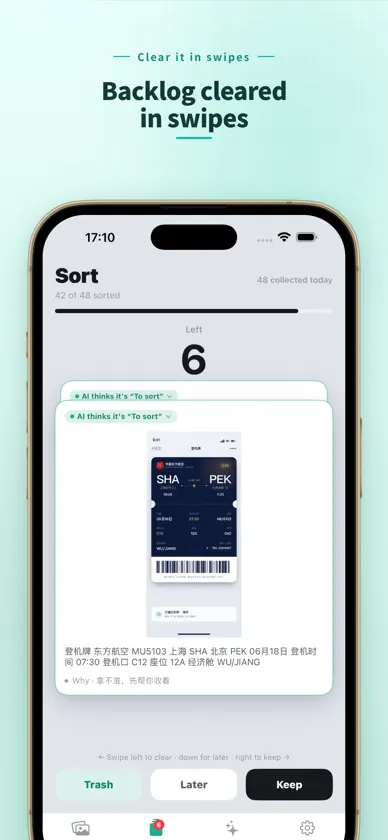
ScreenStack is an AI-powered screenshot manager that helps you get screenshots in, find what matters, use the information inside them, and clean up with confidence. Local-first by design, with optional AI enhancement. SHARE FROM ANYWHERE Use the system share sheet in any app to send a screenshot or photo straight into ScreenStack—verified working from Photos, WeChat, and similar sources. AI SORTING Open the app to a visual screenshot wall. New imports are routed into Important, Saved, Quick, or To Review. Your rules come first; uncertain items stay honest instead of being forced into the wrong category. Correct a suggestion once and ScreenStack remembers. INSTANT OCR SEARCH On-device OCR turns screenshot text into searchable information. Find verification codes, order numbers, Wi-Fi passwords, amounts, and tracking numbers in about half a second—and copy the field you need, not just the image. OPTIONAL AI, YOUR KEY Connect your own API key from 17+ model providers for more detailed classification and extraction. Your provider, model, and rules stay under your control. Core features work without a key. SAFE CLEANUP Review extracted fields before deleting. Soft-deleted screenshots go to a trash folder, while saved credentials and favorites can keep an original backup. SAFE BACKUP & RESTORE Export a free, offline backup that preserves original image copies, OCR text, extracted fields, notes, tags, and organization status. Restoring verifies the file, then merges it non-destructively—nothing is lost when you switch devices or reinstall. SCREENSTACK PRO Smart Cleanup groups visually similar screenshots and identifies expired credentials. Credential Wallet adds expiry reminders and batch CSV export. One-time purchase, no subscription. PRIVACY FIRST OCR, search, and organization run on your device. Original screenshots never leave it. Only when you enable AI and provide your own key are extracted words sent to the provider you choose. Import, organize, search, and basic cleanup are free forever.
What's new
Version 1.9.0 · Nov 11, 2026
New: Slim Screenshots. Convert large screenshots to HEIC in one tap: nothing deleted, text stays sharp, about 70% less space each. • The Cleanup tab now shows how many large screenshots you have and how much you can save; originals go to “Recently Deleted” and free up space after 30 days. (Pro) • The 50%-off first week for new users is now permanent. • We only ask for a rating after a cleanup or slim-down actually frees 50 MB or more. • Small fixes.
In-app purchases
The most popular purchases on the App Store.
- ScreenStack Pro (Launch Half)ConsumableUSD 1.99
- ScreenStack ProConsumableUSD 4.99
More from 江 吴


You might also like
All apps like ScreenStack Screenshot Manager → ShotTidy军 沈
 FindShot: Screenshot LibraryWuhan Jiange Technology Co., Ltd.
 Screenshot Organizer: ShotBoxMEHMET CANKER (TR)
 Screenshot Cleaner: SnapMopabdullah zubeyir ceylan
 AI截图助手 - 看懂截图与智能总结朝俸 贾
 Paper2FormFlorian Fischer
 人迹世健 毛
 回味-图片收藏·视频收藏·链接整理·书签管理·稍后看·收藏夹Feng Chen
 Image Library: Capture LookupHaruki Sugaya
 Dot Timer | Focus TimerHirasawa Masayuki