
FlickMouse
Tetsuya Sato
No ratings yetUtilitiesAges 4+
Screenshots


About this app
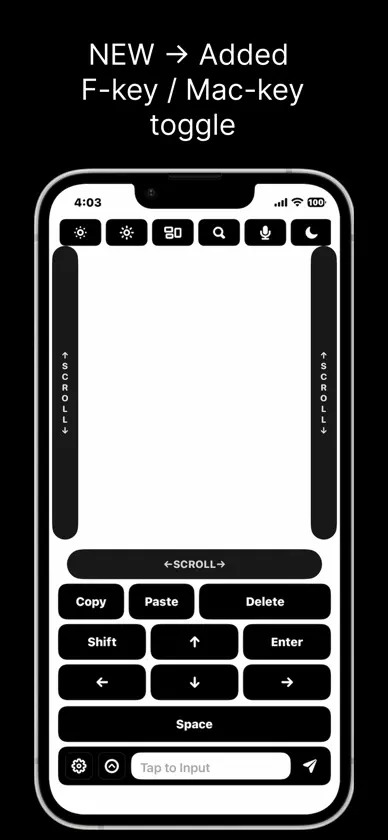
FlickMouse is a remote input app that lets you use your iPhone as a trackpad and keyboard for your Mac (M1 or later). The “FlickMouse Server” app is required on your Mac (macOS). Within the same Wi-Fi network, you can control the cursor, type text, and use shortcuts — all from your iPhone. 【What you can do】 ■ Trackpad controls (Free) ・One finger: move the cursor / tap: left-click ・Two fingers: right-click / scroll ・Three-finger swipes, and more ■ Scroll rails (Pro) ・One-finger vertical / horizontal scroll rails ■ Keyboard input (Pro) ・Send text from the input field at the bottom of the screen ・One-tap keys you use often, such as Enter / Delete / Arrow keys / Space ■ Shortcuts / function keys (Pro) ・Copy / Paste / Undo / Mission Control / Dock, and more ・F1–F12 keys grouped at the top 【Free vs Pro】 ■ Free ・Move the cursor / left & right click / scroll / swipe gestures ※Pointer controls alone are enough for video playback and simple operations. ■ Pro (Paid: subscription or one-time purchase) ・Text input ・Various key / shortcut buttons (including F1–F12) ・Vertical / horizontal scroll rails, and more 【7-day free trial】 On first launch, tap “Start free for 7 days” to try Pro features for 7 days. After the trial ends, the app automatically switches to Free mode and you can continue using it for free. 【About subscriptions】 ・Pro offers auto-renewing subscriptions (monthly / yearly). ・Your subscription will renew automatically unless you cancel at least 24 hours before the end of the current period. ・After purchase, you can manage or cancel in iPhone Settings > your name > Subscriptions. 【About the one-time purchase】 ・The one-time purchase lets you use Pro features with a single payment. 【How to use (3-minute setup)】 Install “FlickMouse Server” on your Mac. Launch Server and keep it in standby mode. Connect your iPhone and Mac to the same Wi-Fi network. On your iPhone, enter the IP address and port to connect. ※Once set up, you can start quickly next time with auto-reconnect. 【Communication & privacy】 ・No account registration required ・Communication between iPhone and Mac is encrypted ・No ad SDKs or tracking libraries are used Official / guide / download ・Official page: https://tech-peace-lab.jp/flickmouse/ ・Setup guide: https://tech-peace-lab.jp/flickmouse/setup.html ・Direct Server download: https://tech-peace-lab.jp/flickmouse/index.html#download Terms (EULA): https://www.apple.com/legal/internet-services/itunes/dev/stdeula/ Privacy policy: https://tech-peace-lab.jp/flickmouse/privacy
What's new
Version 1.1.8 · Apr 3, 2026
Added Fkey/MacKey toggle.
In-app purchases
The most popular purchases on the App Store.
- FlickMouse Pro YearlySubscription7,99 € / year
- FlickMouse Pro LifetimeConsumable9,99 €
- FlickMouse ProSubscription0,99 € / month
You might also like
 QuickPad - Touch & ControlKAZUHIRO KAKIMOTO
 Desk Remote: Mouse controlDaniil Nuzhdin
 TouchLink: Trackpad & KeyboardFRE:X DESIGN INC.
 GridBar: Tile Shelf & MacrosJonas Hoettler
 RTL Couch Surfer TrackpadRecep Yusuf Tetik
 Laser MouseDesign 4 IT
 Air file Drop - Remote SupportFENGHUI (HK) HOLDINGS LIMITED
 PC Controller: Remote MouseMalkane
 RemotePad: Wireless Trackpad荷芬 赵
 Spacie - View Photos By SizeThinkTime Creations LLC