
FlightPlan Pro
Ahmed Mamdouh
No ratings yetNavigationAges 4+
Screenshots







About this app
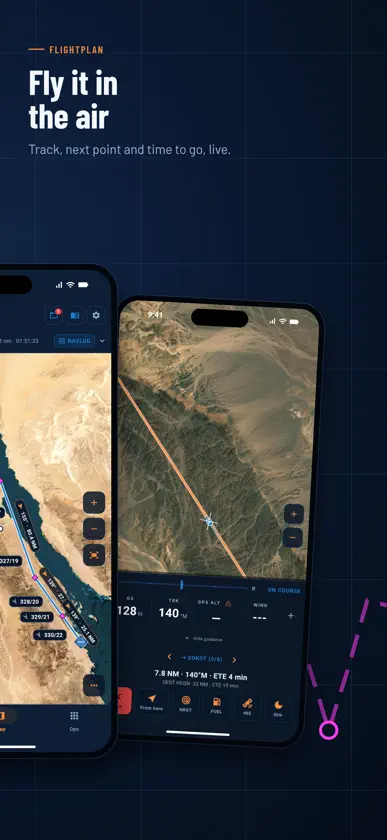
Plan the flight on the ground. Fly it without a signal. FlightPlan Pro is a pre-flight and in-flight companion for helicopter pilots. It turns your route, your weather and your aircraft into the one number that decides the day: fuel balance. Everything works offline — you plan on the ground and fly with no coverage. PLAN A ROUTE Type your waypoints and the legs build themselves: course, distance, time, fuel and backtrack. Drag a leg on the map to reroute it. Every point comes from a reference database, so every leg has geometry you can trust. FUEL THAT ANSWERS THE QUESTION Trip, taxi and reserve against fuel on board, ending in a single balance figure — green or red. Nothing is buried. If you are short, the app says so plainly. WEATHER WHERE IT COUNTS METAR and TAF for your airports, plus winds aloft folded straight into your leg times and burns. The wind you fetch is the wind your fuel figure is calculated from. APPROACH MINIMA, CHECKED Your destination's charted ILS and RNP minima measured against its live METAR. An unreadable METAR gives you "unknown" — never a false pass. A MOVING MAP Satellite, street and hybrid basemaps with your route, your position and NOTAM alerts timed to when you will pass them. Import your operator's reference pack for waypoints, airways, runways and ground layouts. FLIGHT MODE Track-up moving map, configurable HUD, and a dead-reckoning coast that keeps the aircraft moving on screen when GPS drops. Screen dimmer for night work. YOUR CHARTS, YOUR DEVICE Add your own approach plates and airport diagrams as PDFs. Your flight plans stay on your device. TAKE IT WITH YOU Export the whole plan as a PDF — legs, fuel, alternates, weather and your selected charts — or share the summary as an image. ALSO IN THE APP Timing and stopwatch, ruler and bearing tool, nearest-airfield search, multiple saved plans, multiple aircraft profiles, and an encrypted local store with an optional Face ID or passcode lock. IMPORTANT FlightPlan Pro is a planning aid. It is not certified for primary navigation and does not replace approved charts, official briefing material, or the pilot-in-command's judgement. Always cross-check against current official sources.
What's new
Version 1.4.52 · Nov 11, 2026
New in this version: - Sharper Egypt terrain: Highest terrain, safe altitudes and the terrain alert use 30 m heights, so peaks read up to about 200 ft higher than before - AIP en-route charts for Egypt, Saudi Arabia, the UAE and Oman under AIP chart low and AIP chart high, with a switch for each country - Area names sit along the area's own edge, at most 4 on screen, and a chip shows the areas over the middle of the map - Every point card ends in Direct to, Add to route and Actions; edit or delete any point, built-in and downloaded ones too - Settings > Units: show MGRS always, on a tap or never, and choose what a tap on the centre dot does - Direct to card: distance, course, radial and time to go; it folds to one line and ends when you pass the point - Documents: keep your manuals and notes in Ops, with a PDF reader and tools - 225 more abbreviations in Help, with an AW109E list - One switch for IFR waypoints and reporting points - Faster downloads - New map colours: your route and its points in magenta, grey airways, one outline per TMA, white hatched SIGMETs, and labels that never sit on each other - New cards for airports, helipads and points; the airport tabs stay under the header - Tap an IFR point for its card: compulsory or on request, magnetic variation, distance and bearing, add it to the route - SIGMETs with a tap card, shown within 200 NM of you or your plan - MGRS coordinates, and Search the map for points, airways, areas and towns - Airport charts grouped by type, with search - Map icons light up when you press them - Ops shows live lines for Checks, Timing, Fuel and Log - Downloads: delete one package or all, and an update shows its own size - Sharper relief shading - A109E lesson pictures redrawn as flow maps
In-app purchases
The most popular purchases on the App Store.
- Monthly passSubscription0,99 €
- Annual passSubscription14,99 €
More from Ahmed Mamdouh


You might also like
 Passport TrailsMohamed Hammad
 PilotFlight: Flight PlannerYigit Can Akinci
 PilotDeckFlight Service SIA
 GeoChartsSkyler Cuthbertson
 Air Taxi EgyptONE LYMO FOR SMART APPS AND COMMERCIAL AGENCIES
 Air Radar: Live Flight TrackerAsad Mahmood
 Altitude PlusMehmet Sucu
 Rafeeq Supervisor رفيق الإشرافMinistry of Tourism and Antiquities
 E6B+ E6B Flight CalculatorTung Huynh
 Scenic Map Grand CanyonGrangerFX