
Piraeus app
Piraeus Bank S.A.
4.7(214.6K)FinanceAges 4+
Screenshots




About this app
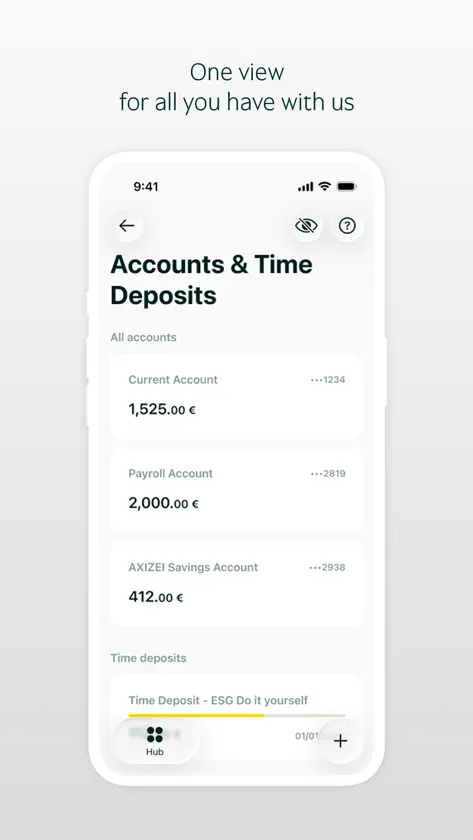
Piraeus app offers a modern everyday banking experience, with simplified navigation and quick access to the features you use most. Designed to help you manage your finances easily and securely, it allows you to initiate and complete your daily transactions in fewer steps. For users with devices running iOS 26 or later versions, the app supports the new liquid glass design, delivering an even more modern and engaging user experience. From the app's home screen you have instant access to key functions through smart shortcuts (Quick Actions), while the new central Hub/Menu lets you browse all sections of the app with ease and find exactly what you need through the built-in search. At the same time, the search button on the home screen helps you quickly find transactions, accounts, cards, products, saved payment accounts, as well as ATMs and branches, while the «+» button gives you fast access to the most frequent actions, such as transfers, payments and bill payments. Your transaction history is available in one place from «Recent activity – View all transactions», or from «Transaction history» under the «More» shortcut on the home screen. In addition, a «Scheduled» option is now available in the transfers and payments sections. The «For you» section presents offers that enhance your banking relationship, while the «Our stories» section features short articles of general interest. You get a single view of all your products by category and choose which ones are included in «My balance», with an allocation chart across accounts, savings and investments. At the same time, you can personalize the app by picking a theme, switching between light and dark mode, and rearranging the sections of your home screen to suit you. Accounts & Time Deposits Through the Menu and the “Accounts & Time Deposits” section, you can view your account balances and detailed transaction activity for each account. You can also open a new account or create a new time deposit directly through the app or add a beneficiary. Cards Through the Menu and the “Cards” section, you can manage your debit, credit and prepaid cards. You can view balances and transactions, make card payments, temporarily block cards, issue new cards, manage spending limits and access additional card management features. Loans Through the Menu and the "Loans" section, you can view information about your loan products and apply for an e-loan. Insurance Through the Menu and the “Insurance” section you can view information about your insurance products and purchase new ones. Investments Through the Menu and the “Investments” section, you can view information about your investment products and purchase new ones. Security Management -Set up security features for Quick login (4-digit PIN or biometric authentication for compatible devices). -By activating the app’s notifications, the extraPIN code is automatically received and submitted by your device when authentication is required for your mobile app transactions. You simply confirm the transaction using your quick login, saving time with increased security. For any further information, or assistance in your banking experience, you can contact us through: supportebanking@piraeusbank.gr. Alternatively, you can use the contact form available in your Profile. The service is provided under the current restrictions on capital transfers.
What's new
Version 3.2.5 · Nov 4, 2026
• Redesigned login: A simpler, faster, and more personalized sign-in experience. • Upgraded Home screen: Instant access to your cards, balance breakdown, and available accounts at a glance. • Refreshed product sections: A sleek, modern look across all app features. • Smart search functionality: Find what you need instantly from either the Menu or the Home screen. • Quick help buttons: Added to key screens to give you instant access to useful tips and support actions. • Themes: Personalize your app's appearance by heading to Profile > Settings > Mode. • IRIS Request to Pay: Create payment requests to other users, and accept, reject or cancel requests. • Brainy (robo-advisor): New service in the Investments section, where you can sign up, transfer money and manage your portfolio. • International Stock Markets: You can now activate Joint Investment Accounts digitally, and sign and manage the W-8BEN form electronically for trading in US securities. • Agri eLoan application now also available in English. • Improvements and fixes


