
Clockffiti: Draw Your Clock
亮亮 尹
No ratings yetUtilitiesAges 4+
Screenshots


About this app
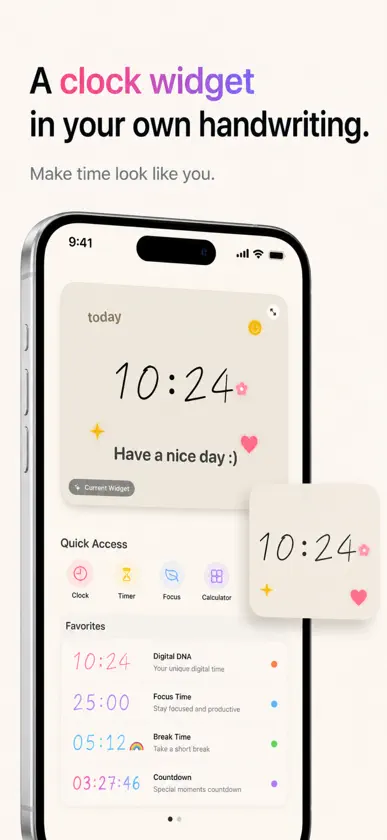
Make time feel personal. Clockffiti turns your handwriting into custom clock widgets, focus timers, countdowns and full-screen desk clocks. Draw the digits 0-9 once, choose a style you like, then let your own numbers follow you across iPhone, iPad and Mac. Create a clock that feels like yours Use hand-drawn numbers, analog clock faces, digital time layouts, soft doodle themes, scrapbook styles, cyber looks, retro pixels and more. Your clock can be playful, calm, minimal or bright. Custom widgets for everyday time Put your handwritten clock on the Home Screen, Lock Screen and Dynamic Island. Check the time, your next focus session or a countdown without opening the app. Focus timers and countdowns Use 15, 25 or 45 minute focus sessions, Pomodoro-style timers, reminders, tasks and countdowns with the same digits you drew yourself. Full-screen desk clock Turn your iPhone, iPad or Mac into a personal desk clock for studying, working, relaxing, bedside time or a cozy workspace. Made for iPad and Mac Enjoy a larger canvas for drawing digits, browsing themes, previewing widgets and keeping a beautiful full-screen clock nearby while you work. Why Clockffiti is different Most clock apps give you another default style. Clockffiti lets you make the numbers yourself, then reuse them everywhere time appears. One-time Pro unlock. No subscription. No ads.
What's new
Version 1.4.4 · Aug 7, 2026
A smoother, more personal Clockffiti. This update improves stability and refines handwritten clocks, widgets, focus timers, and countdowns across iPhone, iPad, and Mac.
In-app purchases
The most popular purchases on the App Store.
- Clockffiti Pro YearlySubscription · 3 days free trial5,99 € / year
- Clockffiti Pro MonthlySubscription · 3 days free trial0,99 € / month
- Clockffiti Pro LifetimeConsumable17,99 €
More from 亮亮 尹


You might also like
 TickCanvas祖刚 宋
 Glance : Your Photo Memoir世杰 戴
 Focus Flow:Green FocusHong Kong Trillion Industrial Technology Group Limited
 Mini Chroma ClockDavid Mickey
 Doable: Reach Big GoalsRethinking.Studio
 Just Nice ClockPeragy LLC
 Rose Diary: Aesthetic Journal堃萍 周
 专注花伴-番茄钟学习计时器厦门晓仓科技有限公司
 PeakStampzaiduan
 Timezone Grid: World Clockpilyeong heo