
Screenshots





About this app
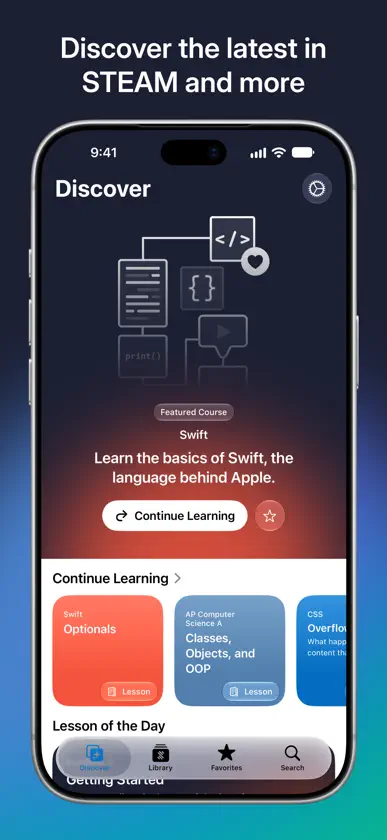
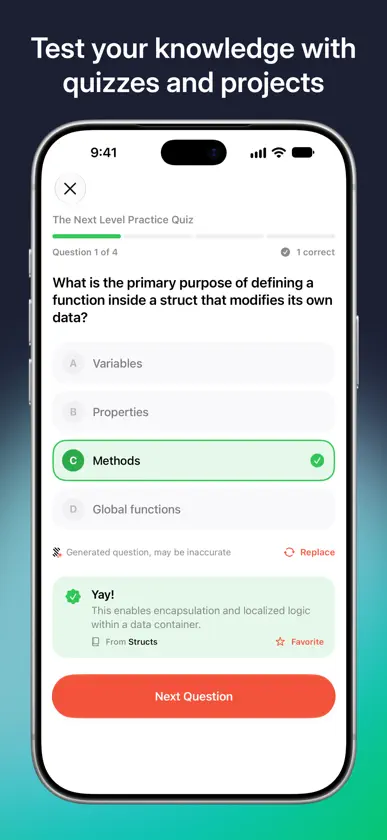
Why should learning be hard? It doesn't need to be. With STEMpump, learn whatever you want, however you want. Just like that. How you learn is just as important as what you learn. Whether you're studying for a test in the morning or building an app in an hour, we can help. STEMpump is 100% student-led, student-built, and student-run. We're taking the ways we learned and giving everyone access. We designed this app to share our passion for STEAM, because good STEAM resources are hard to come by. Since STEMpump was founded in September 2019, we've taught over 150,000 students worldwide. We believe every student should have access to the same resources and opportunities. LEARN THE WAY YOU WANT TO Read a lesson, watch a camp, take a quiz, or build a project. Quizzes test what you've learned with multiple-choice, text, and number questions, and projects let you apply it to real-world problems. STUDY SMARTER WITH INTELLIGENCE Intelligence helps with every lesson, and it runs entirely on your device. • Summary: a lesson's overview, key points, and key terms in seconds. • Ask: ask questions about a lesson and follow up. Select any passage, even code, and tap Ask About This. • Flashcards: turn key terms into a deck for a lesson or a whole chapter. Swipe right if you've got it, left to see it again. • Practice Quiz: generate a quiz from any chapter. CAMPS, REIMAGINED Watch camps full screen with sections, a searchable transcript that follows along, and Resume right where you left off. Missed something? Catch Up recaps what you've watched, Ask answers your questions and jumps to the moment it came up, and Quiz tests you on what you've seen so far. UNPLUG AND LEARN Download a course and read its lessons, projects, and quizzes without a connection. TRACK YOUR LEARNING STEMpump keeps track of your progress, so you always know where you left off. Missed a quiz question? It comes back for review over the next few days until you've got it down. Finish every lesson in a course and get a certificate with your name on it to share. Find something to check out later? Add it to your Favorites. Widgets, Control Center, Siri, and Spotlight help you jump back in, and you can share any course, camp, or lesson. MADE FOR iPHONE AND iPAD On iPad, lessons open beside an outline of the whole course. Start on one device and pick up on another with Handoff. The app has features you won't find on our website, making it the best way to learn on the go. STEMpump also supports all orientations of iPhone Duo, from folded to unfolded to tabletop. PRIVATE BY DESIGN No accounts and no tracking. Your favorites and progress stay on your device. EXPLORE OUR EXPANSIVE LIBRARY We have over 40 courses and recorded camps covering all sorts of STEAM topics, across six subjects: • Science • Technology • Engineering • Art • Math • Other (everything else!) --- Intelligence features require a device that supports Apple Intelligence. STEMpump is a 501(c)(3) nonprofit organization. Our mission is to provide the world with free education and give students a platform to create and share. For more information, visit our website: https://www.stempump.org
What's new
Version 5.0.1 · Nov 3, 2026
After 5 years, we're back with a ground-up update: an iOS 27 redesign, new Intelligence features, and support for iPad and iPhone Duo. Redesigned • A new look for iOS 27, with Discover, Library, Favorites and Search tabs • Swipe between lessons, with a course outline sidebar on iPad • Search filters by courses, chapters, lessons and camps • Progress rings on every course and camp • A new camp player with sections, a live transcript and Resume New • Intelligence, entirely on device: lesson summaries, Ask (including Ask About This on selected text), flashcards and practice quizzes • Camp Intelligence: Catch Up, Ask and Quiz on what you've watched • Missed quiz questions come back for review • Number questions in quizzes • Download courses to read offline • Certificates when you finish a course • Widgets, Control Center controls, Siri, Spotlight and Handoff • iPhone Duo support, including a tabletop layout for camps • Improved accessibility throughout
More from Ritesh Kanchi

You might also like
 SwiftHub: Learn, Build & HireSaif Ullah Sajid
 Code! Learn Swift VersionHappy Moose Apps
 Learn to Code – TinkerstellarRational Matter
 Talk Python TrainingMichael Kennedy
 Encode: Learn to CodeUpskew Pty. Ltd.
 Python Programming GuideALG Software Lab
 Learn Linux ProALG Software Lab
 Learn AI AgentsMEHMET CANKER (TR)
 Electrician Practice Test 2026Thanh Hung
 Enki: Learn Coding/ProgrammingENKI LABS Inc.