
UC ClassFinder
Wonmo Seong
No ratings yetEducationAges 4+
Screenshots


About this app
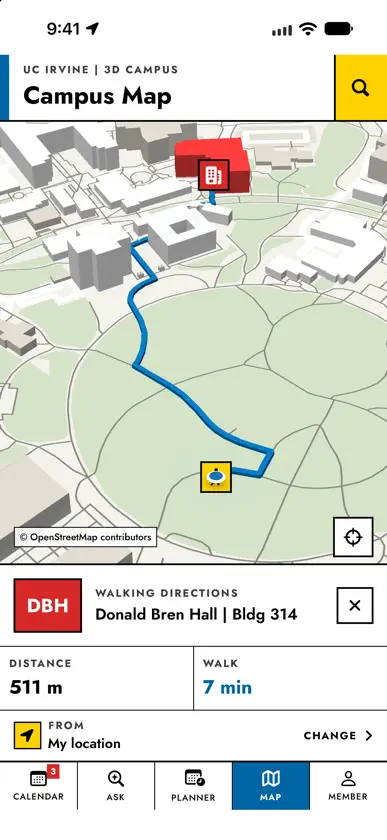
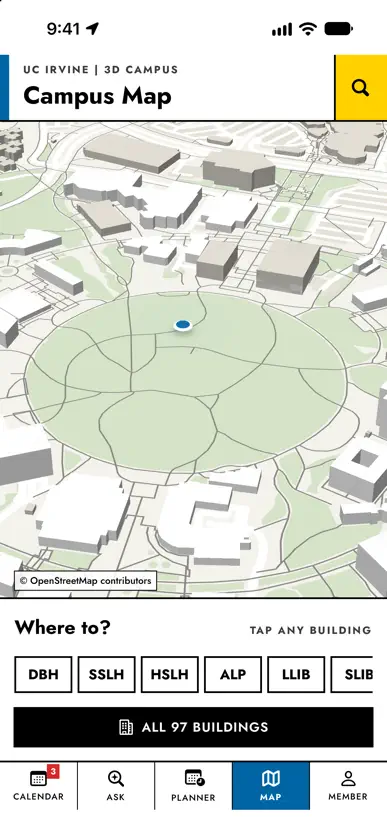
University of California class search & maps. UC ClassFinder is an independent, unofficial app. It is not affiliated with, endorsed by, or sponsored by the University of California or Stanford University. UC ClassFinder is a course planner for UC and Stanford students. Pick your campus, search the catalog, check live seats, build a schedule without time conflicts and find your way to class on a 3D campus map. CAMPUSES – Course catalog: UC Irvine, UCLA, UC Riverside, UC Merced, UC Santa Cruz, UC San Diego, UC Davis and Stanford – Live sections and seat counts: UC Irvine, UCLA, UC Riverside, UC Merced, UC Santa Cruz and Stanford – 3D campus maps with walking directions: all ten campuses, including UC Berkeley and UC Santa Barbara The app asks for your campus each time you open it, with your last campus on top so one tap continues. Switch any time from the Calendar header. FREE – Course catalog: search by title, department or course code, filtered by term. Courses load instantly, even offline – Live schedule of classes: section codes, meeting times, rooms, instructors, enrollment counts, waitlists and open or closed status – Calendar sync: add a section to your calendar in one tap, with the right days, times and locations – 3D campus map: buildings in 3D with on-device walking directions, distance and walking time, plus residence halls, apartments and dining commons in their own colours – Academic calendar and live weather on campus – Ask ClassFinder: search in plain English, like "easy GE with no Friday classes" (3 searches a day) – Planner: build a plan and see time conflicts at a glance – Home Screen widgets for your next class and your enrollment window, plus Siri and Shortcuts actions – Made for iPad: a sidebar, courses and sections side by side, a full-week planner grid with an inspector, the campus map with building panels, keyboard shortcuts, pointer support, Split View, Slide Over and Stage Manager COMMENTS – Course comments: an anonymous thread under every course. Say what the class was like, reply and vote the useful posts up – Checked before posting: no profanity, harassment, sexual content, links or personal information. Report or block anyone, delete your own posts any time CLASSFINDER PRO – Unlimited Ask ClassFinder searches – Unlimited plans, plain-English conflict explanations and one-tap Fix Conflicts – Seat alerts when a full section opens or a waitlist appears, at campuses with live seat counts – Grade insights for UC Irvine: full A–F grade distributions for every UCI course since 2014 – Enrollment window reminders and a Lock Screen Live Activity with your section codes – Sign in once and Pro follows you to your other devices ClassFinder Pro is available as a monthly or yearly auto-renewing subscription, or as a one-time Lifetime purchase. No account is needed to subscribe. Payment is charged to your Apple Account at confirmation of purchase. Subscriptions renew automatically at the price shown unless cancelled at least 24 hours before the end of the current period. Manage or cancel them in your Apple Account settings. Terms of Use (EULA): https://www.apple.com/legal/internet-services/itunes/dev/stdeula/ Privacy Policy: https://wonmor.github.io/UC-Irvine-ClassFinder/privacy.html UC ClassFinder is an independent app built on public course schedule data. It is not an official app of the University of California, any UC campus or Stanford University. University names are used only to identify the campus whose public data is shown. Campus map data © OpenStreetMap contributors.
What's new
Version 3.5 · Nov 14, 2026
UC ClassFinder now runs on iPad, designed for the larger screen rather than stretched from the phone. Sidebar: Calendar, Ask, Planner, Map, Member and Courses are one tap or one keyboard shortcut away (Cmd-1 to Cmd-6, Cmd-K to browse courses, Cmd-F to ask). Courses: the term and course list, the course and its live sections sit side by side. Planner: a full-week grid fills the screen; tap a block to see the section, directions and remove it in the inspector. Map: the 3D campus map takes the whole page, with a buildings panel on the left and the route card on the right. Calendar and Member use two columns. Everything adapts to Split View, Slide Over and Stage Manager, in every orientation, with pointer hover states.
In-app purchases
The most popular purchases on the App Store.
- ClassFinder Pro LifetimeConsumableUSD 49.99
- ClassFinder Pro (Yearly)SubscriptionUSD 22.99 / year
- TenureSubscriptionUSD 3.99 / month


