
Shapely 3D
Fabrizio Brancati
5.0(1)Graphics & DesignAges 4+
Screenshots





About this app
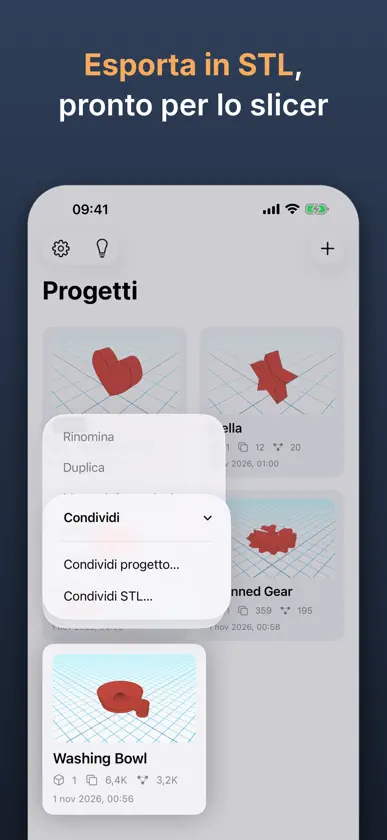
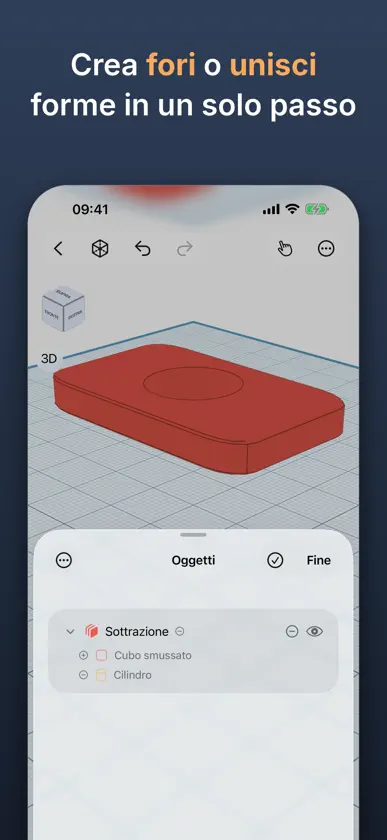
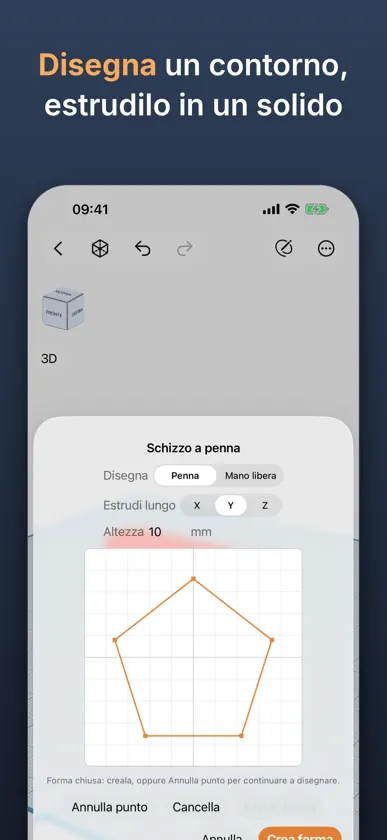
Shapely 3D è un'app di modellazione 3D nativa e veloce per iPad, iPhone e Mac: disegna, modella ed esporta veri modelli 3D con il dito o con Apple Pencil. Costruisci le tue scene partendo da forme primitive, poi spostale, ruotale e ridimensionale con un gizmo a schermo. Aggancia alla griglia configurabile, misura le distanze mentre lavori e usa il cubo di orientamento per passare subito a qualsiasi vista. Shapely 3D salva il tuo lavoro come documento nativo, così puoi riaprirlo esattamente da dove l'avevi lasciato. Prima di stampare, tocca Vedi nella stanza per vedere il modello sulla scrivania a grandezza reale, attraverso la fotocamera, o esporta un USDZ per Quick Look e qualsiasi strumento USD. La pressione di Apple Pencil Pro cambia modalità di schizzo mentre disegni e il passaggio della Pencil mostra dove cadrà la prossima forma. Ogni progetto è in Spotlight, Siri e Comandi Rapidi. I widget tengono i progetti recenti nella schermata Home e nella schermata di blocco, a un tocco di distanza. Shapely 3D Pro sblocca: • Combina le forme — unisci, sottrai e interseca per creare geometrie più complesse • Esportazione STL — invia i tuoi modelli direttamente a una stampante 3D o a un altro software CAD • Schizzo ed Estrusione — disegna un profilo 2D e trasformalo in un solido • Levigatura — arrotonda qualsiasi oggetto con una suddivisione regolabile e non distruttiva • Strumento taglio — seziona gli oggetti lungo una faccia o una linea disegnata • Modifica facce — sposta, estrudi e rimodella le singole facce di qualsiasi oggetto, e dai a ogni faccia un colore tutto suo • Ripara — trova i buchi, le facce isolate e le facce rovesciate su cui uno slicer inciamperebbe, vedile in rosso e correggile prima di esportare • I miei oggetti — salva nel catalogo qualsiasi oggetto che hai creato e inseriscilo in ogni progetto successivo come una forma integrata; tre sono gratis, Pro rimuove il limite Pro è anche senza pubblicità: nessun annuncio nella schermata Progetti. Che tu stia prototipando un pezzo, insegnando geometria o semplicemente ti piaccia costruire in 3D, Shapely 3D mantiene tutto semplice e non ti intralcia.
What's new
Version 1.4.0 · Nov 4, 2026
Shapely 3D 1.4 lets you keep what you make. Build it once, place it in every project after. The bracket you spent an afternoon on is now one tap away. MY OBJECTS - Add to My Objects - from the Object menu or the object's context menu - saves anything you made to the catalog. Place it in any later project with a tap, exactly like a built-in shape. A merged group is saved as one object, because it is one. - Every saved object gets its own preview, from the same angle and drawn like the shape icons, in black or white to match light or dark mode. It sits on the shelf next to the cube and the sphere, and nobody can tell who was there first. - Share a saved object as a .shapely3dobject file from its tile. One you receive lands in your My Objects when you open it. Shapes are better with friends. - Three objects are free. Shapely 3D Pro removes the limit, for those of us with strong opinions about brackets. WIDGETS - Recent Projects on the Home Screen, small, medium and large, with each project's preview and how long ago you last edited it. "2 weeks ago" is information, not judgment. - Continue Editing and Last Edited on the Lock Screen, plus an Open Shapely 3D control for the Lock Screen buttons, Control Center and the Action button. A tap opens that project. The Action button has found its purpose. TELL US WHAT TO BUILD - The lightbulb on the projects home opens Feature Requests: vote on what we build next, comment, or suggest your own idea. No account needed. We read every suggestion before it appears, including the ones that just say "more cubes". ALSO NEW - Project previews show your objects up close on the workplane, always from the same angle, whatever the camera was doing when you left - and they match light or dark mode. An existing project gets its new preview the next time you close it. - When Subtract or Intersect leaves nothing, the message now says why: the shape being cut sits entirely inside the shapes cut from it, or the shapes don't overlap. Still nothing. Now with an explanation. - A new project format loads previews and details without reading the whole model, so the projects home stays instant however big your projects get. The first launch converts your projects once, with a progress screen. Projects saved by 1.4 can't be opened by earlier versions, and a project from a newer version now asks you to update, instead of pretending to be damaged. - Big projects no longer freeze the editor: saving happens in the background, and a large imported model appears a moment after its project opens instead of holding the whole app hostage. - The Pro screen and Settings > Pro now say that Pro is ad-free, and in the last 24 hours of a sale they count down the hours and minutes. Dramatic, but accurate. FIXED - Fixed a crash on iPhone Duo with a project open in landscape. Also on iPhone Duo, the scene stays centered in the part of the screen you can see when the inspector is open, instead of half hiding behind it. - Fixed a crash when opening View in Room while a tip was on screen. The tip has learned to wait its turn. - Changing the workplane size in Settings with a project open keeps the workplane framed, instead of overflowing the view until Center Scene. - Text STL files (the kind that start with "solid") now import with a zero-size triangle, an accented letter in the name, Windows line endings or a comma as the decimal point. Older builds refused them outright. They were valid files. We apologized. Everything from 1.3 - iPhone Duo, the printability check, Repair - is right where it was. Now with somewhere to keep what you make.
In-app purchases
The most popular purchases on the App Store.
- Shapely 3D ProConsumable8,99 €
You might also like
 Forma3D - Modellare e StampareDenis Vazyulya
 3D Print Designer CADSebastian Kemper
 3D Model Print Simple EditHuragan Kodu s.p z o.o.
 指尖3D运保 罗
 Moldora: Generatore 3D IA东峰 杨
 STL Viewer - 3D MeshY Mobile Solution Co. , Ltd.
 MaterializrRavenhold LLC
 Meld - 3D ModelingMeld Systems LLC
 AI Stampa 3D: ModelliMuhammad Taha
 MeshStudio: 3D Model GeneratorONNEX YAZILIM ANONIM SIRKETI