
PilotDeck
Flight Service SIA
No ratings yetNavigationAges 4+
Screenshots



About this app
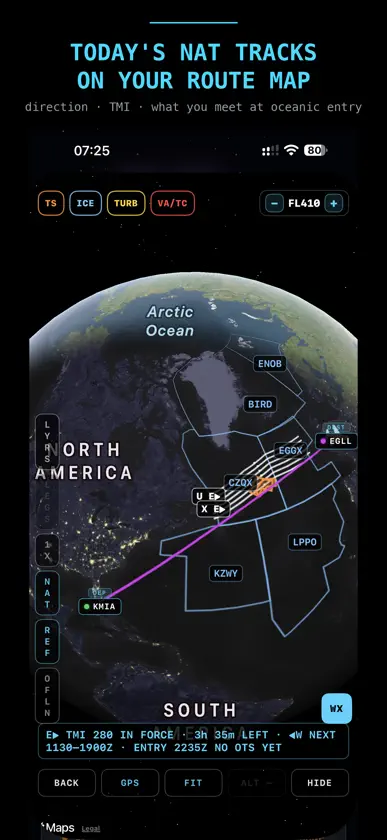
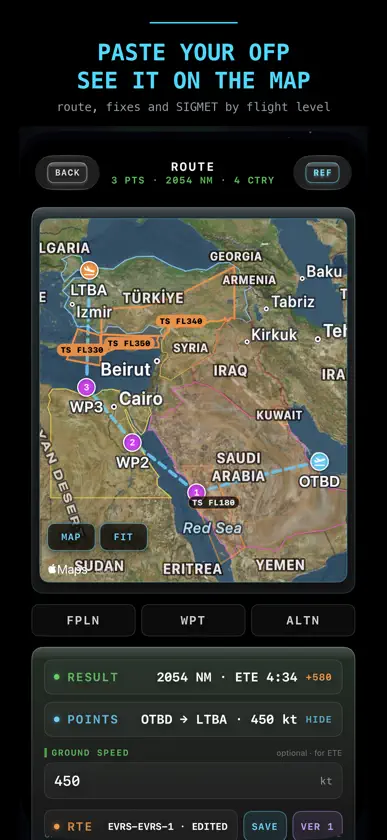
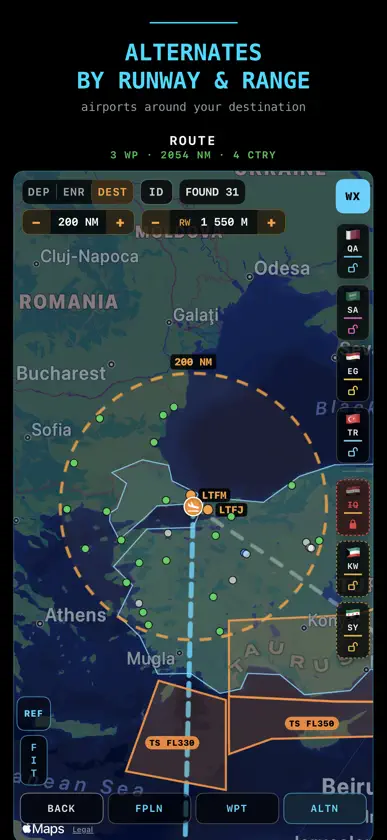
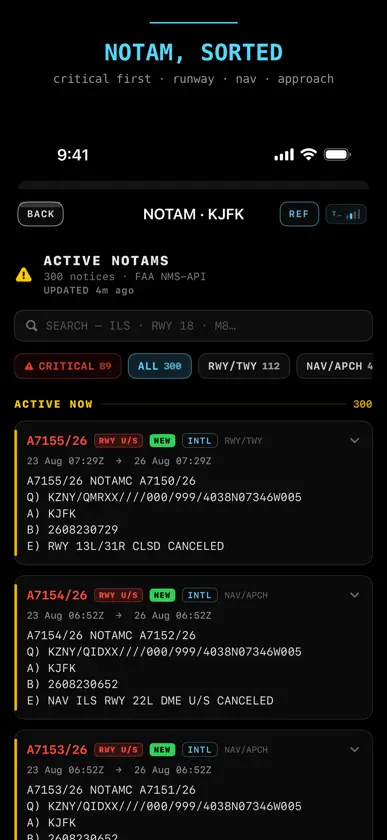
PilotDeck puts real aeronautical weather in your pocket — decoded METAR and TAF, live NOTAMs, SIGMET on the map, aviation news and a full route briefing for any ICAO airport in the world. Built by a pilot, for pilots, in a clean flight-deck (FMS) style. WEATHER — FREE, FOREVER • Live METAR and TAF, decoded into plain language • Hour-by-hour forecast: temperature, wind, gusts, precipitation, pressure; 7-day outlook • Weather at your exact position: a minute-by-minute rain nowcast and a 12-hour trend • Unlimited airports on your watchlist, everything cached for offline reading SMART PUSH ALERTS — THE FEATURE PILOTDECK WAS BUILT ON Follow an airport and PilotDeck watches it for you. The moment a new METAR or TAF is issued — a wind shift, a drop to IFR — a push reaches you, even with the app closed. ROUTE BRIEFING — YOUR WHOLE FLIGHT ON ONE SCREEN One tap builds a departure–destination–alternate brief, judged at your ETD and ETA: • A plain-English verdict: GOOD TO GO / CAUTION / NOT RECOMMENDED • NOTAMs sorted honestly: red only for what can stop you — runway or approach closed, minima raised, RVR out • SIGMET along your track, drawn on the map and sorted against your cruising level • Wind on the real runway layout: best threshold, crosswind and tailwind for every runway end, Vapp from your VREF • TAF timeline with LVTO, LVP and below-minima tags; take-off alternate when you may depart but could not land back • Countries overflown with entry times; re-route around any airspace in a few taps • The whole briefing as a three-page PDF to share or keep with the flight's documents Flight tracks are recorded in the background and can be merged and shared. AVIATION NEWS Twelve trusted sources in one feed, categorised, with alerts for incidents and regulation changes. Bookmark to read offline. HOME SCREEN WIDGETS Live airport weather with a colour-coded wind compass, your Daily Check streak and the latest news. DAILY CHECK — A PRE-FLIGHT FOR YOUR BRAIN A two-minute cognitive pre-flight measures reaction, memory and decision-making and gives you a FIT index for today, with an IMSAFE self-check and a 30-day trend. REFERENCE IN SIX ICAO LANGUAGES Every screen has a REF key: an illustrated explanation in English, Arabic, Chinese, French, Russian and Spanish. TRAINING AND TOOLS • Holding Entry, Scan & Catch, Crosswind Crunch, Needle Chase — games that train real skills, with a scientific debrief • Aviation quizzes with detailed explanations • Flight-planning tools: wind and drift, top of descent, crosswind, fuel, density altitude and more PRICING — HOW IT WORKS PilotDeck is built for pilots, by pilots. Everything a pilot needs for a flight — weather, NOTAM, SIGMET, briefing and PDF, routes, alternates, tracks, news — is free and stays free. No operational feature is locked behind a paywall. What is paid is the training side: PilotDeck PRO unlocks unlimited games, the full quiz banks and the Daily Check history. That is what keeps the team going — the servers, and the data that is only sold, not given away. A number of professional feeds would make the app noticeably better: full ADS-B traffic for the flight-radar layer (today it runs on free feeds, so aircraft and flight details are incomplete), richer NOTAM and airport data, wider weather coverage and faster updates. Each is a paid subscription on our side, and every PRO plan brings them closer. PilotDeck PRO: Monthly €4.99 · Annual €39.99 (best value). Both start with a 7-day free trial. Payment is charged to your Apple ID at confirmation of purchase. The subscription renews automatically unless turned off at least 24 hours before the current period ends; your account is charged within 24 hours prior to the end of that period. Manage or cancel in your App Store account settings. Any unused portion of a free trial is forfeited on purchase. Terms of Use (EULA): https://www.apple.com/legal/internet-services/itunes/dev/stdeula/ In partnership with DataFly Systems LLC.
What's new
Version 4.7 · Nov 8, 2026
PilotDeck 4.7 - your OFP becomes the flight. Scan it or open the PDF: route, fuel, weights, step climbs and alternates land where they belong. Every pilot feature stays free, always. OFP INTO THE FLIGHT - OFP key in INIT and FPLN: camera scan, PDF or photo, read on the phone - NEW FROM OFP fills an empty flight: DEP, DEST, alternates, date, ETD, flight time, level, callsign, registration, and the navlog with its airways as the plan - OFP UPDATE FLIGHT on a flight you already have: every OFP field next to yours. Empty ones are taken at once, different ones wait in amber for your choice - Several OFPs in one briefing package: each leg is read from its own pages, pick the leg with a tap - A new OFP against your plan: CURRENT PLAN or ROUTE CHANGED, with the points gone, the points added and the extra miles - Crew names are never read PERF - EVERYTHING THE OFP KNOWS - A PERF key on the flight card and a PERF section in the briefing - FUEL: taxi, trip, contingency, alternates, final reserve, extra and block, with times - WGT: passengers, ZFW, TOW and LW against their limits - green, amber under 500, red over - CRZ: Mach, average wind and ISA, air distance against great circle, SID and STAR - WHAT-IF: fuel and time at each level, what 10 kt of wind and a ton of weight cost STEP CLIMB - Steps from the ATC route, metric levels like S1190 and the change back to feet - The initial level comes from the navlog, not the highest level of the flight - A green mark at each step on the map. In flight a STEP CLIMB plaque 50 NM before it, amber with a soft tone at 10 NM, once. Already on the new level or DONE pressed - the step is done FPLN - THE ROUTE AS CHIPS - Points as chips, airways in lilac between them. Tap a chip to insert, move, set LL or delete. UNDO and REDO - Names resolved across all databases. A navaid with the same name far away is not taken - Airways learned from pilots: once two devices report the same OFP segment, every PilotDeck shows its name FLIGHT MAP - A new point card: a black FMS plate, DCT in the header, EDIT gives INS BEFORE, INS AFTER, REPLACE and DELETE - In GPS: GPS and REC on one key, DCT and NRST on another, APT and FIX in the left column - The plan ribbon is on by default: tap centres the map, hold opens the card, tap an airway to frame it - GC in LYRS turns off the great circle arc - asked by a pilot from India - Aerodromes and fixes thinned to one label per area, more as you zoom in - Faster with WX and SIGMET on a long route, and GPS mode now opens smoothly
In-app purchases
The most popular purchases on the App Store.
- PilotDeck PRO (Annual)Subscription · 7 days free trial$34.99 / year
- PilotDeck PRO (Monthly)Subscription · 7 days free trial$3.99 / month


