
EpicDraft
EpicDraft, Co.
No ratings yetProductivityAges 4+
Screenshots


About this app
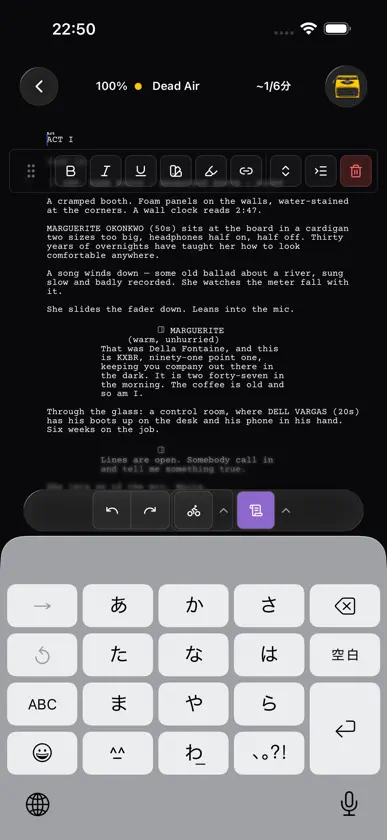
EpicDraftは、脚本を書き、整形し、整理するための脚本執筆アプリです。業界標準のFountain、Final Draft、PDF形式に対応し、シーン・登場人物・ロケーションを脚本と結び付けたまま管理でき、オフラインでも動作します。 どこでも書ける。 スマートフォンでも、タブレットでも、パソコンでも、任意のブラウザでも同じ脚本を開けます。バスの中でシーンを書き始め、机で仕上げる。そんな使い方ができます。 邪魔をしない書式設定。 業界標準の脚本フォーマットを、入力と同時に自動で適用。登場人物とロケーションのオートコンプリート、全要素のキーボードショートカット、ページだけに向き合いたいときの集中モードも備えています。 脚本のそばにライブラリを。 プロジェクトのwikiとして、ログライン、あらすじ、トリートメント、登場人物、ロケーション、絵コンテ、シーンを、別のアプリではなく脚本と同じ場所で管理できます。各項目は登場するページと結び付き、人物やロケーションのページは参考ルックブック付きの詳細シートへ育ち、絵コンテのコマは属するシーンに固定されます。 読み込みと書き出し。 Fountain、Final Draft、PDFのファイルを開けます。内蔵OCRでスキャンしたPDFにも対応。透かしなしのPDFとFinal Draftファイルを書き出し、印刷できます。 講評(カバレッジ)機能を内蔵。 草稿にフィードバックが欲しくなったら、EpicDraft Proで安全な閲覧専用リンクを共有し、脚本カバレッジを集められます。読み手からのページごとの構造化されたフィードバックが、ひとつのダッシュボードに集まります。読み手はブラウザで脚本を開き、何もインストールせず無料でレビューできます。リアルタイム共同編集、脚本ごとの権限設定、チームチャットで、ライターズルーム全体が同じページの上で作業できます。 AIツール一式を、あなたの条件で。 EpicDraft Proには、物語全体を把握した上でチャット、リサーチ、ログライン作成、本文の書き換えを行う執筆アシスタントと、絵コンテやコンセプトアートのための画像生成が加わります。プロジェクト全体を任せて、自動のカバレッジレポートや整合性チェックを実行することもできます。既定ではローカルモデルで動くため、ページがマシンの外に出ることはありません。ホスト型モデル提供元の自分のアカウントは、望んだときだけ接続できます。自分のMCPサーバーをつないで、アシスタントに道具を追加することも可能です。 あなたのファイルは、あなたのハードウェアに。 脚本は既定でローカルに保存され、収集されることも、AIモデルの学習に使われることも決してありません。クラウド同期は必要なときのためのもので、あなたが有効にするまでオフのまま。Proなら、クラウドを介さずに自分のデバイス同士をピアツーピアで同期させることもできます。 無料で使えます。 エディタ、無制限の脚本、読み込みと書き出し、29言語のインターフェース、すべてのプラットフォームが無料。透かしも制限枠もありません。EpicDraft Proでは、AI執筆アシスタントと画像生成、脚本カバレッジレポート、デバイス同期、リアルタイム共同編集、チームチャット、復元可能なチェックポイント付きのファイル履歴、ファイル暗号化が加わります。
What's new
Version 0.33.7 · Oct 20, 2026
- Page breaks by the rules. A speech or action block that runs over a page now breaks only at the end of a sentence, with at least two lines on each side, and a speech that breaks carries (MORE) at the foot of the page and NAME (CONT'D) at the top of the next, extensions like (V.O.) included. That holds when the break falls between a parenthetical and its line, too. The PDF and the Print Editor now paginate the same script onto the same pages, a character cue is never left alone at the foot of a page, and the Print Editor no longer overlaps text where an element splits. - Deleting stays calm. Holding Backspace with Autocomplete while typing on no longer sends a request between every repeat, and no longer ends in the app restarting after an error on iPad. The autocomplete and a sparkle suggestion wait until you stop deleting, then pick up from where the caret is. - One AI at a time. The autocomplete ghost steps aside while a sparkle suggestion or a command is working or has an answer on screen. A proposed change that comes back by undo, by reopening the file or from a collaborator shows its review bar again, so it can always be accepted or rejected.
In-app purchases
The most popular purchases on the App Store.
- Pro OneConsumable¥3,000
- Cloud ServiceSubscription¥2,500 / year
- Pro AnnualSubscription¥10,000 / year
- Pro QuarterlySubscription¥3,000 / 3 months
- Pro LifetimeConsumable¥15,000
You might also like
 Revision ScreenwriterMichael Sherman
 ScriptDraftIntelligence Limited
 Southwind ScreenplayAhmet Emirhan Korkmaz
 脚本・シナリオ・台本作成 Zen WriterAshish Rattan
 Script SidesDavin Nguyen
 The Script ToolGreg Howard
 Scripts Writer: ScreenwritingWesley Smith
 SoloBeat WriterArunkumar Charles
 Linewright: Script Writing9592 Solutions UG
 Script Pilot: ScreenwritingShort Bread Apps LLC