
Mindscope 2
John Goering
No ratings yetProductivityAges 4+
Screenshots


About this app
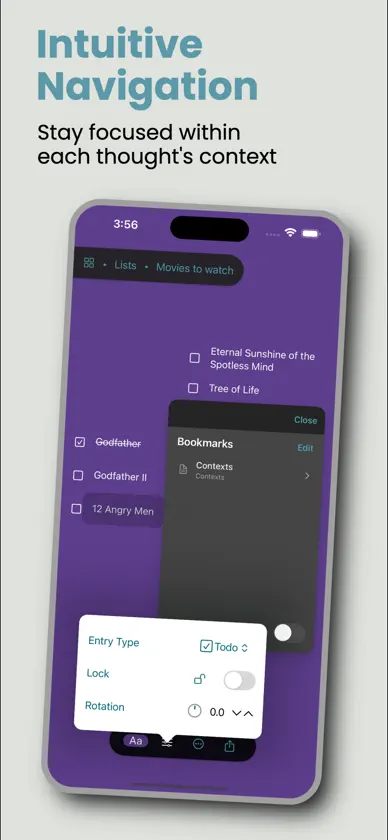
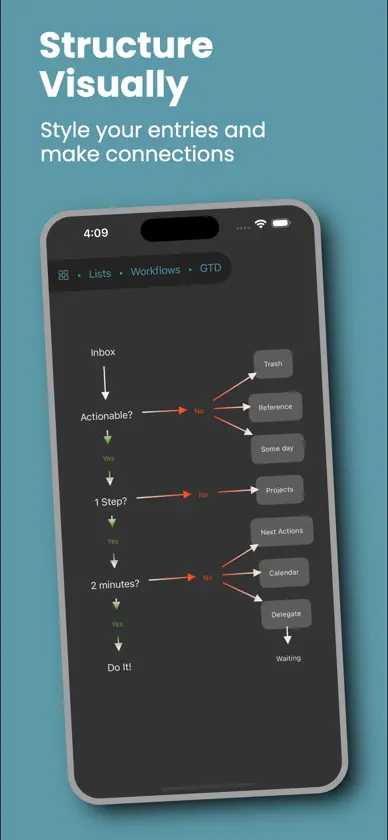
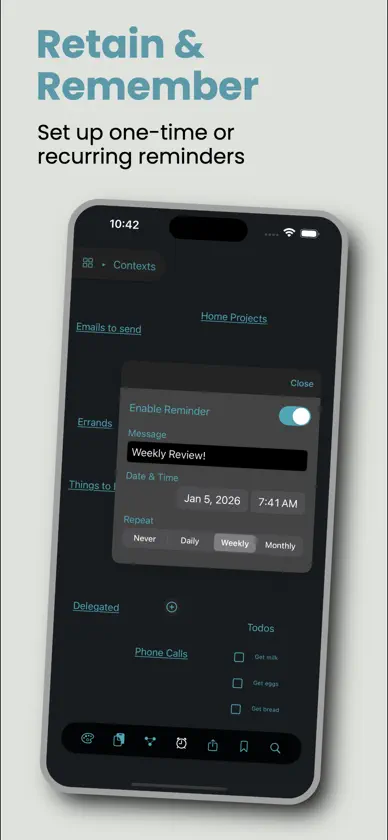
Mindscope 2는 생각을 가장 빠르게 기록하고 정리할 수 있는 방법입니다. 부드럽고 시각적인 마인드맵과 아웃라이너를 하나로 결합한 앱으로, SwiftUI로 완전히 구현되었으며 iPhone, iPad, Mac, 심지어 Apple Watch에서도 사용할 수 있습니다. 단순하고 우아한 자유 형식 텍스트 캔버스에서 어디서든 생각을 엔트리로 만들 수 있습니다. 드래그로 위치를 옮기고, 탭하여 확대하면 해당 엔트리만의 공간으로 들어가 원하는 만큼 여러 단계의 하위 엔트리를 추가할 수 있습니다. ‘브레드크럼 바’ 또는 빠른 핀치 제스처를 사용해 한 단계 위로 이동할 수 있습니다. 주요 특징: • 자유 형식의 시각적 보드와 부드럽고 매우 빠른 내비게이션 • 즉각적인 아웃라이닝. 엔트리를 드래그해 재정렬하고, 중첩하고, 아이디어를 구조화 • 다양한 프로젝트를 위한 여러 보드. 엔트리는 원하는 위치에 저장 • 엔트리 유형: 텍스트, 링크(다른 앱으로의 딥 링크 포함), 할 일, 장문 노트 • 선택 사각형을 드래그해 여러 엔트리를 한 번에 이동하고 스타일 지정. 길게 눌러 컨텍스트 메뉴 표시 • 엔트리 사이에 선과 화살표를 그림. 화살표 끝 모양 커스터마이즈 가능 • 변경 사항에 대한 스마트한 실행 취소 / 다시 실행 • 핵심 엔트리에 빠르게 접근할 수 있는 북마크 • 이동하거나 열고 싶지 않은 엔트리 잠금 • 글꼴, 색상, 배경, 회전 등 풍부한 스타일링. 내보내기 시 그대로 유지 • 모든 엔트리에 대한 알림 설정. 단일 또는 반복 가능. 알림을 누르면 바로 해당 항목으로 이동 • iPad와 Mac에서 멀티 윈도우 지원. 완전한 키보드 단축키와 네이티브 메뉴 제공 • iCloud(CloudKit) 동기화. 오프라인으로 작업하고 나중에 자동 동기화 • 로컬 Apple Intelligence를 활용한 지능형 붙여넣기. 붙여넣은 텍스트를 제목이 있는 깔끔한 글머리표 계층으로 자동 요약 • 모든 엔트리를 대상으로 한 즉각적인 전역 검색 • 아름다운 리퀴드 글래스 UI 내보내기를 통해 데이터에 대한 완전한 제어권을 유지할 수 있습니다: • Mindscope 아카이브(.mindscope2) • OPML(대부분의 마인드맵 앱에서 지원) • 글머리표 텍스트 • PDF(다중 페이지 선택 가능) • PNG(보드별) • 실제 앱을 그대로 반영한 단일 파일 인터랙티브 HTML 내보내기. 내비게이션, 스타일, 선, 할 일을 포함하며 어떤 브라우저에서도 오프라인으로 작동 가져오기 기능도 지원합니다. .mindscope2 파일을 새로운 최상위 보드로 열거나, 서식, 위치, 메타데이터, 선 연결을 유지한 채 OPML을 가져올 수 있습니다. Mindscope 2는 최대 200개의 엔트리와 2개의 보드까지 완전히 무료로 사용할 수 있습니다. 모든 기능, 모든 내보내기 옵션, 동기화가 포함됩니다. 제한에 가까워지면 Pro 버전으로 업그레이드하라는 부드러운 안내가 표시되며, 구독 또는 일회성 구매 중 선택할 수 있습니다. Mindscope Pro는 무제한 보드와 엔트리를 제공하며, 월간 또는 연간 요금제에는 14일 무료 체험도 포함됩니다. 얼리 어답터는 낮은 가격이 그대로 유지됩니다. Apple Watch용 앱이 포함되어 손목에서 확인할 수 있는 동기화된 간결한 리스트 뷰를 제공합니다. Mindscope 2는 속도와 집중에 초점을 맞춰 개인적인 사용을 위해 만들어졌습니다. 머릿속의 생각을 꺼내 정리하고, 나중에 쉽게 접근할 수 있도록 하기 위함입니다. 무료로 사용해 보고, 조금만 써 본 뒤에 머리가 조금 더 가벼워지는지 직접 확인해 보세요.
What's new
Version 1.0.3 · Oct 9, 2026
Images are full Mindscope entries! Adding images is easy - paste an image, or drag and drop one from anywhere. - Pick from Photos or Files using the board toolbar, or right-click on the Mac. - Drop several images at once to get one entry for each. - Resize with a drag, with the aspect ratio locked or unlocked. - Adjust Image: zoom in up to 400%, pan, and choose a rectangle, rounded or circle frame. - Open any image full screen to see the details. - They sync across iPhone, iPad and Mac with iCloud. - They’re included when you export to Mindscope files, PNG, PDF and interactive HTML. - Mindscope optimizes each image automatically, so your boards stay fast Also new: - Mac: connect your AI assistant. Turn on the MCP server in Settings (off by default), and local AI clients like ChatGPT or Claude can read and organize your boards for you. - iPhone Duo: unfold your iPhone when a single entry is selected to zoom right into the selected entry, and fold it again to step back out. Improvements and fixes - New devices no longer create a second Welcome board after syncing with iCloud. - Text stays readable when you switch between light and dark mode. - Changing colors with several entries selected no longer changes the wrong entries. - Bold italic text now keeps its bold when you change the font or export. - Exporting several selected entries now includes all of them. - Clearer messages about your Pro status, with fixes for subscription edge cases. - Lines line up more precisely with their entries. - Better translations across all 10 languages. - Many more stability fixes.
In-app purchases
The most popular purchases on the App Store.
- Mindscope Pro LifetimeConsumable₩55,000
- Mindscope Pro MonthlySubscription · 14 days free trial₩4,400 / month
- Mindscope Pro YearlySubscription · 14 days free trial₩33,000 / year
More from John Goering


You might also like
 QuikFlow Proconeno GmbH
 Index: Save AnythingSunset Capital, llc
 Grid Notes AppJimmy Nordstrom
 Just Note: fast mind organiserMarcin Jasinski
 Magic Table - Image ScannerDmitrii Prokushev
 Idea Vault - Notes & JournalKevin Struna
 MindBoardyInfamous Tuesday
 ClearMind: AI 음성 텍스트VietTS CO., LTD
 ThreeAIJeffrey Lawrence
 Jotable - Simple NotesGeorge Babichev