
Cursive Practice+
Melissa Chan
No ratings yetEducationAges 4+
Screenshots




About this app
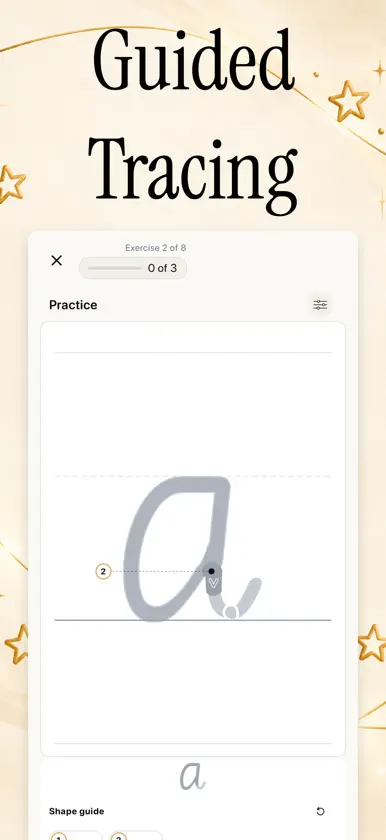
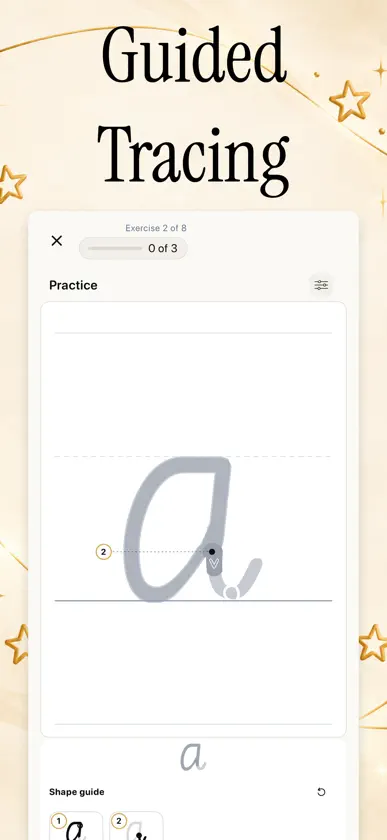
Cursive Practice! Use your Apple Pencil, stylus, or Mac trackpad to master cursive on the go. iPad, Mac, iPhone iCloud Sync Master elegant, fluid handwriting with interactive tracing, dedicated signature practice, evidence-based spaced repetition, personalized practice sets, and detailed progress insights. Whether you are learning cursive for the first time, perfecting your professional signature, or refining your everyday penmanship, Cursive Practice gives you a dedicated digital studio to build lifelong muscle memory. Features: • Interactive Tracing & Responsive Monoline Canvas • Dedicated Personal Signature Studio • Multiple Authentic Cursive Styles & CoreText Glyphs • Instant Text & Photo Card Generator • "Now & Next" Study Flow & Practice Modes • Smart Folders & Practice Sets • Deep Analytics, Heatmaps & Fluency Streaks • Seamless iCloud Sync Across iPad, iPhone & Mac • Face ID, Touch ID & Passcode Privacy Lock • CSV & JSON Import/Export with Full Backup Support • Interactive Tracing & Precision Guidance: Follow stroke-by-stroke guides powered by high-precision centerline tracking, real-time accuracy scoring, and dynamic feedback. Practice on ruled handwriting paper with warm charcoal ink tuned for Apple Pencil, styluses, touch, and Mac trackpads. • Dedicated Signature Studio: Craft, refine, and perfect your signature. Build customized signature guides from text or import a photo of your existing signature, fine-tuning opacity, scale, and placement for focused tracing practice. • Authentic Cursive & Script Styles: Train with true typographic fidelity using CoreText glyph outlines. Choose from educational school hands (NSW Cursive), formal script flourishes (Snell Roundhand), modern expressive scripts (Caveat, Dancing Script, Pacifico), and clean monoline vectors. • Instant Card Generator: Turn any text or document into custom handwriting practice cards in seconds. Paste phrases, quotes, or vocabulary lists—or snap a photo to instantly generate individualized tracing exercises. • Fluid Study Flow & Flexible Practice Modes: Stay in rhythm with the interactive "Now & Next" exercise strip and visual milestone counters. Jump into Speed Rounds to build fluency under pressure, or switch to Cram sessions for quick reviews without altering your spaced repetition intervals. • Smart Organization: Organize your handwriting journey into custom decks with distinctive icons and colors. Group sets into nested folders, and easily back up, import, or export your collections with CSV and JSON file support. • In-Depth Progress Dashboard: Monitor your penmanship journey with detailed stats. Track daily practice streaks, completed strokes, review counts, accuracy trends, and activity heatmaps that keep you inspired every day. • Universal, Desktop-Ready & Private by Design: Seamlessly transition between iPad, iPhone, and Mac with automatic iCloud sync via CloudKit. Enjoy a native desktop Mac experience with hotkeys, menu shortcuts, and mouse/trackpad tracing. Protect your handwriting with Face ID, Touch ID, or Passcode Lock—with zero tracking and no data collection. Cursive Practice combines the timeless art of handwriting with modern cognitive learning science. Move beyond basic penmanship drills and build a fluid, confident, and sophisticated hand designed for the digital age. Terms of Use (EULA): https://www.apple.com/legal/internet-services/itunes/dev/stdeula/
What's new
Version 4.0.0 · Nov 7, 2026
Version 4.0.0 Updates: A major milestone release introducing personal signature practice, desktop Mac support, smarter spaced repetition learning, and authentic cursive style models: **NEW: Personal Signature Studio** — Design and perfect your personal cursive signature. Create signatures from custom text or imported photo templates with precision controls for opacity, scale, and placement. **NEW: Full Mac Catalyst Experience** — Practice cursive anywhere with full macOS support, including trackpad and mouse tracing, native keyboard shortcuts, menu bar integration, and Touch ID app unlocking. **NEW: Re-Architected Spaced Repetition (SRS)** — An overhauled review and academy system with intelligent scheduling algorithms designed to optimize handwriting retention and track long-term fluency. **NEW: True Glyph Rendering & Australian / School Cursive** — High-fidelity CoreText glyph outlines provide authentic letter models, introduced alongside NSW School cursive as a newly supported default writing style. **IMPROVED: Interactive Practice Flow & "Now & Next" Guidance** — Streamlined study sessions featuring an upcoming exercise strip, visual milestone counters, clearer stroke sequence prompts, and ruled handwriting card previews. **IMPROVED: Expanded Global Localization** — Comprehensive multi-language translation and localization support across all lessons, settings, and navigation. **FIXED: Performance & Canvas Enhancements** — Smoother stroke processing, faster canvas transitions, and general stability fixes across iCloud sync and custom practice sets.
In-app purchases
The most popular purchases on the App Store.
- Cursive Practice PremiumSubscription$19.99 / year
- Cursive Practice MonthlySubscription$3.99 / month
- Cursive Practice LifetimeConsumable$39.99
More from Melissa Chan


You might also like
 Cursive Practice - Letter+Brite Technologies
 Montessori Cursive WritingChristian Montessori
 PenForm: Handwriting CoachLukas Nagy
 Handwriting Practice: InkflowMouawia Hammo
 Better Handwriting - HandwryteAhmed Abdullah
 Cursive Handwriting Practice ·The App Studio
 Learn Cursive Letters GameAndrzej Stec
 BrainSpark: Quiz & LearnSOMESH ARORA
 English Common VerbsBui Hoai Trang
 Flowsophy: Study Prereq MapperYasmeen Khalil