
Focus Easy
Matthew Strickland
No ratings yetProductivityAges 4+
Screenshots




About this app
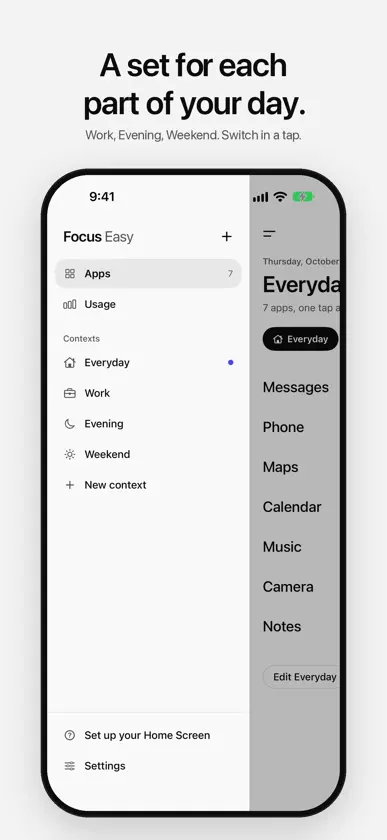
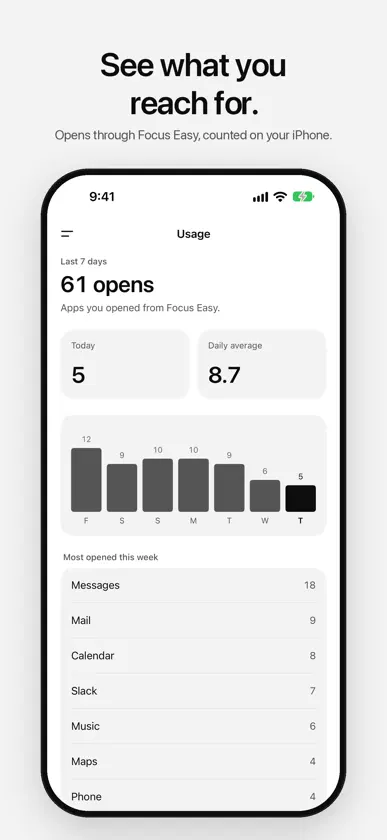
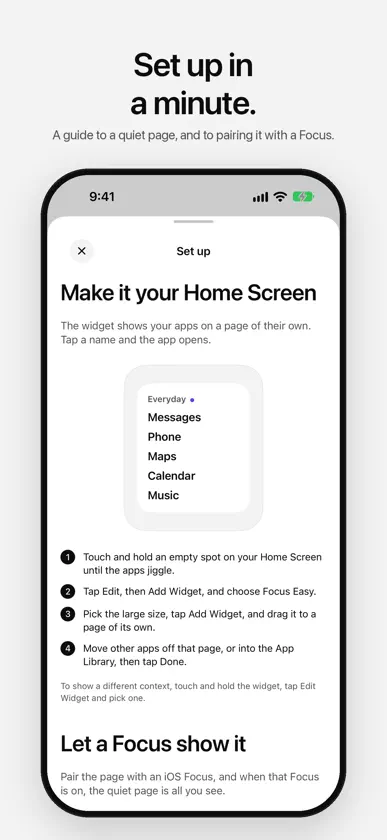
Focus Easy is a quiet launcher for iPhone. Pick the few apps you need, give them a page of their own, and open each with one tap. No badges, no icons calling for you, no account. Your apps in plain type The launcher shows your apps as big, plain names. Tap one and it opens. That's the whole idea. Contexts for your day Make a set of apps for each part of your day, such as Everyday, Work and Evening, and switch between them in a tap. Focus Easy can suggest the one that fits the time of day. A widget for a quieter Home Screen Put the Focus Easy widget on a Home Screen page of its own, in small, medium or large. Each widget follows your current context or shows one you pick. One app on the Lock Screen Add the One app widget beside the clock and reach the app you use most without hunting for it. Pick the app, or let it follow the first app of your current context. Works with Focus and Siri Pair the widget's page with an iOS Focus, and it's the only page you see while that Focus is on. Add the Focus Easy filter to a Focus, and Focus Easy switches to the right context, then back again after. Or say "Switch to Work in Focus Easy", and use the same action in Shortcuts automations. Any app Add the apps on your iPhone in a tap. Apps with no link, such as Phone or Camera, open through a shortcut you make once in the Shortcuts app, and Focus Easy shows you how. See what you reach for Usage counts the apps you open through Focus Easy over the last week. It doesn't read Screen Time, and the counts stay on your iPhone. Plain to look at Black type on a pale page, or pale type in Graphite or Black after dark. A single colored dot marks the context you're in, and the icon on your Home Screen takes the same color. A plain wallpaper in the widget's shade lets the list sit straight on the page. Private No account, no ads, no analytics and no network. Your apps, contexts and counts stay on your iPhone.
What's new
Version 1.3 · Nov 3, 2026
One app is a new Lock Screen widget: put the app you reach for most beside the clock and open it in a tap. Pick the app, or let it follow your current context. • Ask Siri to "Switch to Work in Focus Easy", or add Switch context to a Shortcuts automation. • The setup guide covers both.
More from Matthew Strickland
 Track Easy - Habit TrackerMatthew Strickland
 Creases: Paper FootballMatthew Strickland
 Pebbles: Arcade HoopsMatthew Strickland
 Ringers: Arcade Ball RollMatthew Strickland
 Empire: Party Game HostMatthew Strickland
 Dimples: Mini GolfMatthew Strickland
 Talk Easy - Voice DictationMatthew Strickland
 Dose Easy - Supplement TrackerMatthew Strickland
You might also like
 Focus Fence: App BlockerDean Wahle
 Hush: Quiet Your PhoneVarun Purushothaman
 Focuscapes: Deep Sleep & FocusBetter Sleep Rise Elite
 Stillscreen: Focus LauncherHosain Bouggourne
 Simple Zen: Dumb Phone立派 汪
 Bare Phone: Dumbphone LauncherStack Network Limited
 Minimalistic Launcher ProWritecream
 Mantle LauncherLinh Phan Nhat Khanh
 WaypointHubDylan Russell
 Pulse FocusSynheart AI Inc