
Hello Nexus
Integretti LLC
No ratings yetUtilitiesAges 4+
Screenshots



About this app
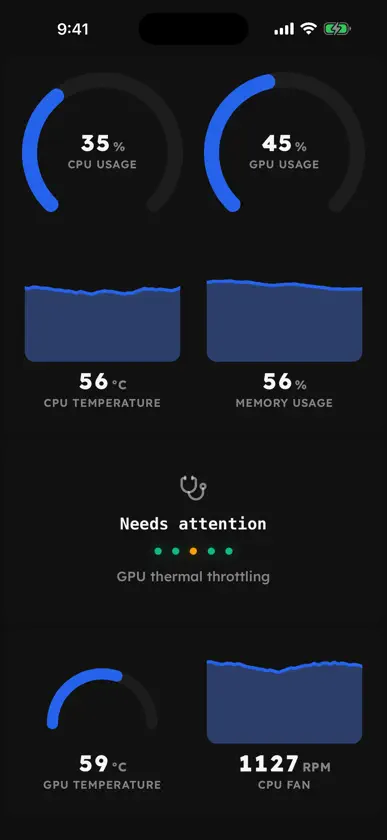
Nexus turns your phone into a live dashboard and control surface for the computer you game and work on. Pair once with the free Nexus app on your Windows PC, Apple Silicon Mac or Linux PC, then build a panel of widgets you can reach from the couch, the desk, or the other side of the house. WHAT YOU CAN DO - Watch CPU, GPU, memory, temperature and fan readings update live, as gauges, sparklines or full-screen charts. - Control your RGB lighting: pick an effect, set colors and brightness, and give each device its own look. - Tune cooling: switch presets, edit fan curves against any temperature sensor, and see every fan respond. - Run playback, system volume, the per-app audio mixer and your monitors' brightness. - Drive OBS: switch scenes, start and stop streaming or recording. - Build a deck of custom keys for shortcuts, hotkeys, launching apps and one-tap system actions. - Keep an eye on processes, storage, network and overall system health. - Fill the rest of the grid with clock, weather, stocks, calendar, photo gallery and more. A PANEL YOU DESIGN Drag widgets around the grid, resize them, spread them over several pages, and tap any of them to open a full-screen view with the detailed controls. Your layout stays in sync with your computer. SEND THINGS TO YOUR PC Share files, photos and links from any app straight to your computer, or push clipboard text across in a tap. CONNECTED TO YOUR OWN MACHINE Your phone talks to your computer, not to a middleman. Pairing is confirmed on both ends, the session is pinned to your computer's own certificate, and an encrypted relay carries the connection only when you are away from your network. WHAT YOU NEED Nexus for Windows, macOS or Linux, a free download from hellonexus.com. The app on your phone is free too, with no account required.
What's new
Version 3.0.1 · Oct 8, 2026
Nexus Sentry is now available! If you lock your PC and want to know if anyone is trying to access it without your permission, activate Sentry mode from swipe down menu after pairing your device. This will send a push notification to all of your paired iOS devices.
You might also like
 MetricViewerAgustin Lopez
 BroadboardJuan Carlos Robles
 Device Tuner Pro 26GEORGE OWEN IKECHUKWU AGHO
 BizCard Connect.NewSoft Technology Corporation
 Prox Agent: Proxmox ManagerMaximilian Hartung
 Ivory Pro: Piano Tuner ProLei Feng
 AudioConfigZYCOO CO LTD
 SHDW OperatorMichael Wildermuth
 ThermoHammerGogita Kupatadze
 AxTraxProSynerion Systems LTD.