
Micro Clock: Floating Timer
俊贤 黄
No ratings yetUtilitiesAges 4+
Screenshots



About this app
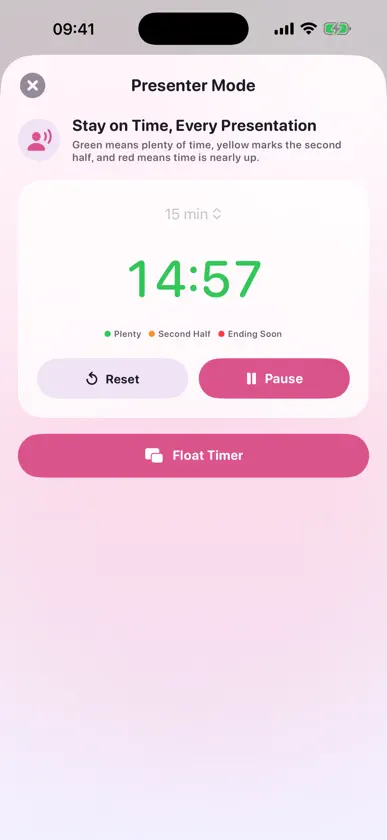
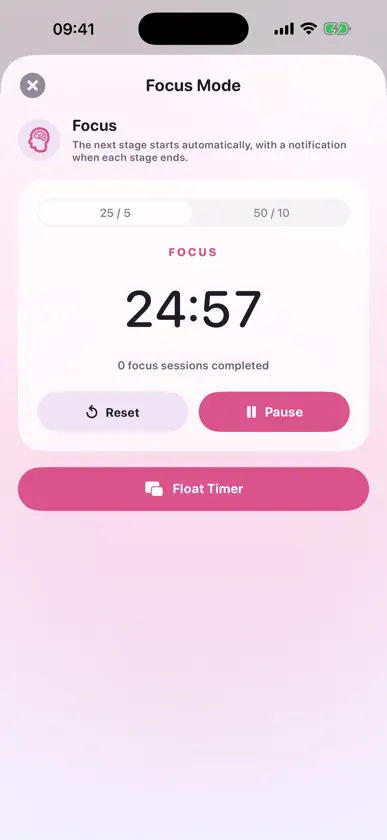
Micro Clock keeps time visible while you use other apps. Start a Picture in Picture clock, countdown or stopwatch, then return to the Home Screen, a presentation, a browser or your work app without losing sight of the timer. CORE FEATURES • Floating clock with seconds • System 12-hour or 24-hour format • Countdown with accurate background recovery • Stopwatch with tenths of a second • Quick launch with Siri and Shortcuts • Timer data stored locally by default ADVANCED TOOLS • Presenter Mode with green, yellow and red time stages • Focus Mode with automatic 25/5 and 50/10 cycles • Event Countdowns with saved time zones and links • Event reminders 5, 10 or 30 minutes in advance • Floating Picture in Picture display for every advanced mode PRIVACY BY DEFAULT No advertising or analytics SDKs. Core timer data and feature usage stay on your device. Core timer features require no account. Picture in Picture and notification behaviour may depend on iOS settings and system conditions. Micro Clock is not intended for safety-critical timing.
What's new
Version 2.3.0 · Sep 3, 2026
New in 2.3.0: • Set custom focus and break durations in Focus Mode • See an active focus timer on Dynamic Island and the Lock Screen • Fixed switching between Stopwatch and Countdown • Added a one-time update guide so the latest features are easy to discover
In-app purchases
The most popular purchases on the App Store.
- Micro Clock Pro LifetimeConsumable$9.99
More from 俊贤 黄


You might also like
 FloatimerYuya Takamoto
 PiPomo: Floating Timer ScriptVinh Vo
 Floating Clock Pro科茗 王
 悬浮时钟抢购秒表Lijie Hu
 FloatingTimer-Suspension ClockNumrise Limited
 Floating Clock - Deal Sniping潇逸 李
 FLOATCLOCK-悬浮时钟提醒BIFROST CLOUD PTE.LTD.
 Second Clock & Countdown旭东 刘
 Floating Clock &StopWatchPolymath Company Limited
 FloClock - Flash Sale Clock侠光 邢