
RemGood
Vasuraj V Arni
No ratings yetProductivityAges 4+
Screenshots


About this app
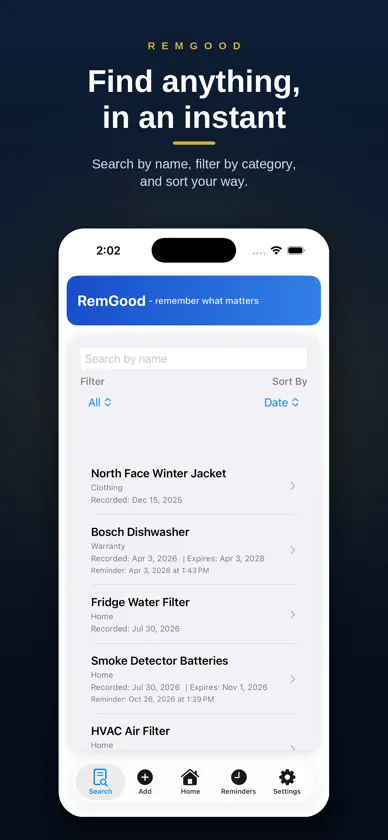
RemGood is your second memory for everyday life. We all keep a running list in our heads — when the car was last serviced, which air filter the HVAC takes, how long the dishwasher warranty lasts, that dish you loved at the restaurant downtown. RemGood holds all of it for you, and reminds you at the right moment. MADE FOR IPHONE DUO AND IPAD Unfold your iPhone Duo or turn your iPad sideways and RemGood uses the extra space: your list on one side, the item you’re working on the other. Pick something on the left and see or edit every detail on the right — across Home, Search and Reminders. Folded, the full app is right there on the cover screen. WHAT PEOPLE TRACK WITH REMGOOD Car service, oil changes, insurance renewals, tire rotations Home filters — HVAC, fridge water, air purifier Warranties and purchase dates, with a photo of the receipt Appliance model numbers and replacement parts Restaurants — what you loved, what to skip next time Clothing and gear, with the date you bought it Health check-ups, dentist visits, refills HOW IT WORKS Add an item, give it a date, and turn on a reminder. Choose a repeat — daily, weekly, fortnightly, monthly, quarterly, half-yearly, yearly, or every few days you choose — and RemGood keeps the cycle going for you. Attach photos or documents so the details are always at hand. Add an expiry date and RemGood flags the item the day it passes. ORGANIZED YOUR WAY Group everything into categories like Automobile, Home, Health, Warranty, and Kitchen. Drag to reorder. Switch between a visual grid and a detailed list. Search by name, filter by category, and sort however you like. Select several items at once to clear them out together. EVERYTHING DUE, AT A GLANCE The Reminders tab opens on All Pending, so you see everything ahead of you. Narrow it to Today, This Week, This Month, This Quarter, or This Year — or switch to the calendar view to see the month laid out. A bell marks every item with a reminder, turning orange when it’s due, and the app icon shows how many are waiting. RICH NOTES Write real notes with bold, italic, underline, bullet lists, and checkboxes. Tap an item and start editing immediately — your changes save when you leave. PRIVATE BY DESIGN No account. No sign-in. No internet connection. RemGood stores everything on your device and never transmits your data — to us or to anyone else. There is no tracking and no analytics. Optional App Lock with Face ID, Touch ID, or your passcode Backup and Restore for moving to a new phone A recycle bin, so deleted items can be recovered MAKE IT YOURS Follow your iPhone’s light or dark setting, or choose Light or Dark yourself. Add an accent color, or pick a premium theme — Navy & Gold, Charcoal, and Deep Burgundy. Free. No subscriptions. No in-app purchases. No ads. A note on sensitive information: RemGood is built for everyday, non-critical details. Please avoid storing passwords, financial account numbers, or government ID numbers in the app.
What's new
Version 1.5 · Nov 6, 2026
• Made for iPhone Duo and iPad: in landscape, lists and item details sit side by side across Home, Search and Reminders. • Add an item right inside a category on wide screens. • Refreshed Search and Reminders with compact filters and cleaner cards. • A consistent look across every tab, with System Default now reliably following your iPhone’s light or dark setting. • Cancel now discards edits on the first tap, including photos and documents you added or removed. • Unused attachment files are cleaned up automatically, plus stability fixes.
More from Vasuraj V Arni

You might also like
 TimaachuZuyyu
 CGCS CommunitiesCouncil of the Great City Schools
 Daily Journal - MemoiriMohammad Elzahaby
 To.Do - Simple To-Do listTairs Rzajevs
 Instant Translator LanguageInnovia IT Solutions
 Calendar Notes - Simple & EasyEdi Ermawan
 H2O AI Personal GPTH2O Inc.
 Language Translator ·Brain Craft Ltd
 Remember The Milk: To-Do ListRemember The Milk
 Chat with AI - ChatbotSozzled LLC